
Searching for the image width in the live filter yielded no results

Please check the FAQ (https://www.xyplorer.com/faq.php) before posting a question...
Post Reply
xuejianxianzun
Posts: 15
Joined: 22 Aug 2022 14:26

Searching for the image width in the live filter yielded no results

Post by xuejianxianzun »

I'm trying to filter images with specified width and height, so I tried searching using attributes, but there are no results. I'm not sure why. How can this be resolved? The version number is 28.10.
I have reviewed the Visual Filters documentation and tried these search criteria:
:Width >= 1900
:imagex: > 1500
Aspect Ratio: >= 3:2

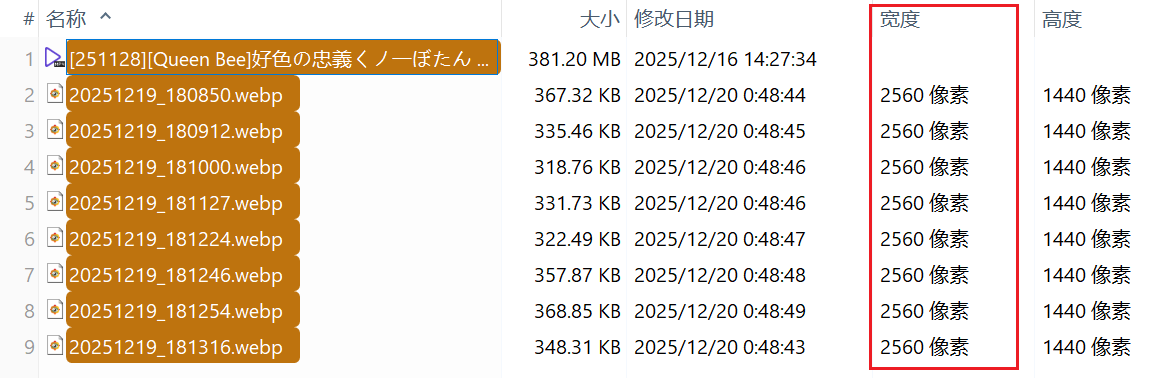
Below are the test images, all 2560x1440 pixels:
Image
Image

highend
Posts: 14923
Joined: 06 Feb 2011 00:33
Location: Win Server 2022 @100%

Re: Searching for the image width in the live filter yielded no results

Post by highend »

rtfm "idh_visualfilters.htm#idh_vf_particularproperties";

prop:imagex: > 1500
One of my scripts helped you out? Please donate via Paypal

xuejianxianzun
Posts: 15
Joined: 22 Aug 2022 14:26

Re: Searching for the image width in the live filter yielded no results

Post by xuejianxianzun »

highend wrote: 23 Dec 2025 10:21 rtfm "idh_visualfilters.htm#idh_vf_particularproperties";

prop:imagex: > 1500
Thanks, I tried it, and I can use `prop:imagex: > 1500` to search for the target file in the search panel that appears when you press F12.
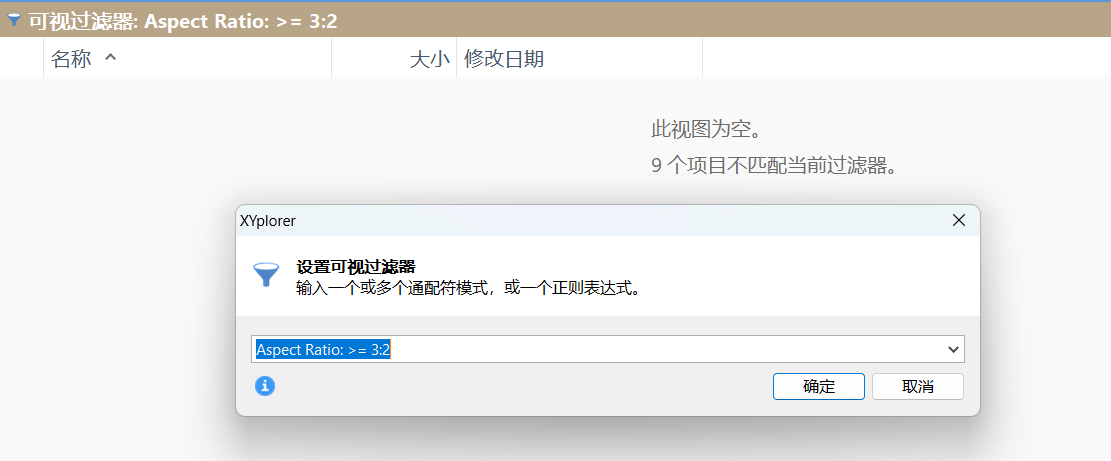
However, I still have some doubts:
1. Using `prop:imagex: > 1500` in the live filter still yields no search results.
2. I saw a search criterion like `Aspect Ratio: >= 3:2` on this page:
https://www.xyplorer.com/release_23.20.php
The screenshot shows the input in the live filter, but it doesn't work for me. I've tried the live filter, the F12 search panel, and the visual filters, but I haven't found any results.
These images are in a 16:9 aspect ratio, so they should meet the condition of `Aspect Ratio: >= 3:2`.
Image

renew:
Using `prop:#AspectRatio: >= 3:2` in the F12 search panel is effective.
In live filter and visual filters, you cannot use the comparison condition `>=`. You can only use precise ratios, such as `prop:#AspectRatio: 16:9`.
As for how to use `Aspect Ratio: >= 3:2` in a live filter, as shown in the URL above, I still don't understand.

highend
Posts: 14923
Joined: 06 Feb 2011 00:33
Location: Win Server 2022 @100%

Re: Searching for the image width in the live filter yielded no results

Post by highend »

First: aspect ratio is also a property

So if at all: prop:Aspect Ratio: >= 3:2
It seems even a prop:Aspect Ratio: 3:2 doesn't work with v28.10 so it's probably a bug

And live filtering for the x width:
Animation.gif
You do not have the required permissions to view the files attached to this post.
One of my scripts helped you out? Please donate via Paypal

xuejianxianzun
Posts: 15
Joined: 22 Aug 2022 14:26

Re: Searching for the image width in the live filter yielded no results

Post by xuejianxianzun »

highend wrote: 23 Dec 2025 12:18 First: aspect ratio is also a property

So if at all: prop:Aspect Ratio: >= 3:2
It seems even a prop:Aspect Ratio: 3:2 doesn't work with v28.10 so it's probably a bug

And live filtering for the x width:
Animation.gif
Thanks for the demonstration, but for me, `prop:imagex: > 1000` still only works in the F12 search panel; it doesn't work in the other two search boxes. I tried both webp and png format images and the same thing happened.
I'll use the F12 search box first, thank you!

admin
Site Admin
Posts: 66075
Joined: 22 May 2004 16:48
Location: Win8.1, Win10, Win11, all @100%
Contact:

Re: Searching for the image width in the live filter yielded no results

Post by admin »

Yes, something is not working right here. I'll look into it.

xuejianxianzun
Posts: 15
Joined: 22 Aug 2022 14:26

Re: Searching for the image width in the live filter yielded no results

Post by xuejianxianzun »

admin wrote: 23 Dec 2025 15:01 Yes, something is not working right here. I'll look into it.
Thank you, this software is great.😘

admin
Site Admin
Posts: 66075
Joined: 22 May 2004 16:48
Location: Win8.1, Win10, Win11, all @100%
Contact:

Re: Searching for the image width in the live filter yielded no results

Post by admin »

Thank you! :beer:

1) It's prop:#AspectRatio: 3:2 or Aspect Ratio: >= 1.5 or Aspect Ratio: == 1.5 or Aspect Ratio: 3:2

2) prop:imagex: > 1500 works in the next beta

3) prop:#image.width: > 1500 works in the next beta, and is much faster than prop:imagex

xuejianxianzun
Posts: 15
Joined: 22 Aug 2022 14:26

Re: Searching for the image width in the live filter yielded no results

Post by xuejianxianzun »

admin wrote: 23 Dec 2025 17:27 Thank you! :beer:

1) It's prop:#AspectRatio: 3:2 or Aspect Ratio: >= 1.5 or Aspect Ratio: == 1.5 or Aspect Ratio: 3:2

2) prop:imagex: > 1500 works in the next beta

3) prop:#image.width: > 1500 works in the next beta, and is much faster than prop:imagex
Good news, thank you for your hard work!

Post Reply

