Page 1 of 1

22.60.0200 Invisible Configuration’s checkbox in French

Posted: 27 Dec 2021 17:36
by cemekepirketou
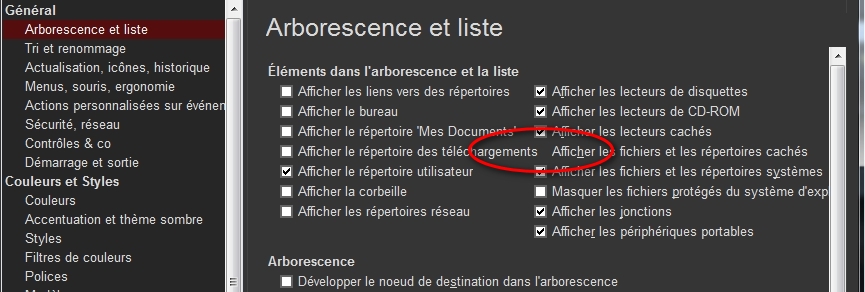
See the screenshot :

Image

Due to the fact that a row in the left-hand column is too long, a checkbox opposite in the right-hand column has disappeared.
Bug that does not occur in EN, because the lines are shorter.
But why put the [Tree and list] settings on two columns when it is NOT possible to adjust the size of the window, and moreover there is a vertical scroll bar to access the options at the bottom when the list is too long ?

Re: 22.60.0200 Invisible Configuration’s checkbox in French

Posted: 28 Dec 2021 10:32
by admin
I try to do without a scrollbar if at all possible.

What are your font settings (Configuration | Colors and Styles | Fonts | Buttons and Labels)?

Re: 22.60.0200 Invisible Configuration’s checkbox in French

Posted: 29 Dec 2021 19:01
by cemekepirketou
admin wrote: 28 Dec 2021 10:32 What are your font settings (Configuration | Colors and Styles | Fonts | Buttons and Labels)?
Was Arial Normal 10 (9,75), I change for Arial Normal 9, now the checkbox is half visible and accessible.
admin wrote: 28 Dec 2021 10:32 I try to do without a scrollbar if at all possible.
My screen resolution is 1280x768, and there is only 8 configuration windows whitout a scrollbar, Custum Event Action and Custum Columns have a big scrollbar.
So the solution would be to momentarily change the font size to access the configuration settings ?
And the reason is only because that you try to do without a scrollbar if at all possible ? :shock:
Tree and List is the only setting window with two columns, can't you make an exception and put it in one column ?
For the comfort of reading for the eyes, if I set Arial Normal 12, many parameter windows become invisible on the right because the window is not resizable, and there is no horizontal scroll bar either :oops: :cry:
And what is the use of being able to choose Arial Normal 72 ? :lol: :appl:
This area of XYplorer is currently unsuitable, even for frequent visits.
I am waiting to hear what solution you will choose to fix this problem.

Re: 22.60.0200 Invisible Configuration’s checkbox in French

Posted: 29 Dec 2021 19:47
by admin
1) The font selection dialog (offering 72 points) is by Windows, not by XYplorer. :)

2) For relaxing the eyes I recommend to set the Windows custom scaling to 125%. Everything will be bigger and all checkboxes will be accessible.

Re: 22.60.0200 Invisible Configuration’s checkbox in French

Posted: 03 Jan 2022 11:49
by cemekepirketou
admin wrote: 29 Dec 2021 19:47 2) For relaxing the eyes I recommend to set the Windows custom scaling to 125%. Everything will be bigger and all checkboxes will be accessible.
Very bad advice that does not solve the problem of invisble checkbox in Tree and List XYplorer Configuration : the Windows custom scaling to 125% it has the effect of a magnifying glass, not of resizing windows.


Moreover, after this change and the return to 100%, several software including XYplorer open automatically with the window enlarged, and I did not find how to return to the normal opening lower level.
So not only do you not provide a solution, you make the situation worse.
So I see at the moment that you are not listening to users' requests : setting the Tree and List options to a single column, and/or allowing resizing of the Configuration window.
I don't thank you.