22.60.0200 Invisible Configuration’s checkbox in French

Things you’d like to miss in the future...
Forum rules
:warnred20: :warnred20: :warnred20: :warnred20: :warnred20: READ THIS AND DO IT!!! :warnred20: :warnred20: :warnred20: :warnred20: :warnred20:

:info: Please include the following information:
1) Your XYplorer Version (e.g., v28.00.0801)
2) Your Windows Version (e.g., Win 11)
3) Your Screen Scaling Percentage (e.g., 125%).

:info: We strongly recommend adding your Windows Version and Screen Scaling Percentage to the Location field in your Profile or to your Signature. That way, you only have to type them once, and we won't have to search for that vital information.

:info: When attaching an Image, please use the Attachment tab at the bottom of your post and click "Add files".

:warnred20: :warnred20: :warnred20: :warnred20: :warnred20: READ THIS AND DO IT!!! :warnred20: :warnred20: :warnred20: :warnred20: :warnred20:
Post Reply
cemekepirketou
Posts: 12
Joined: 19 Dec 2015 15:56
Location: Paris - France

22.60.0200 Invisible Configuration’s checkbox in French

Post by cemekepirketou »

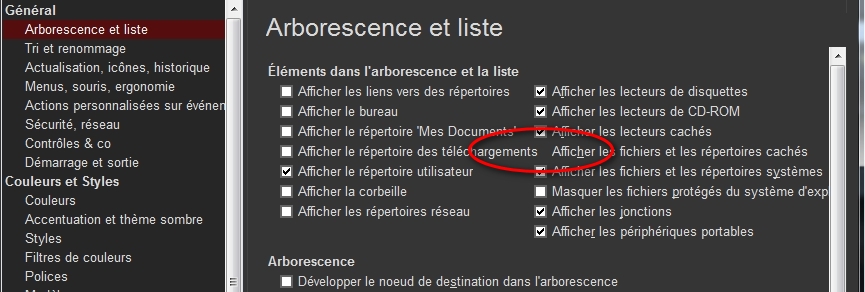
See the screenshot :

Image

Due to the fact that a row in the left-hand column is too long, a checkbox opposite in the right-hand column has disappeared.
Bug that does not occur in EN, because the lines are shorter.
But why put the [Tree and list] settings on two columns when it is NOT possible to adjust the size of the window, and moreover there is a vertical scroll bar to access the options at the bottom when the list is too long ?

admin
Site Admin
Posts: 65537
Joined: 22 May 2004 16:48
Location: Win8.1, Win10, Win11, all @100%
Contact:

Re: 22.60.0200 Invisible Configuration’s checkbox in French

Post by admin »

I try to do without a scrollbar if at all possible.

What are your font settings (Configuration | Colors and Styles | Fonts | Buttons and Labels)?

cemekepirketou
Posts: 12
Joined: 19 Dec 2015 15:56
Location: Paris - France

Re: 22.60.0200 Invisible Configuration’s checkbox in French

Post by cemekepirketou »

admin wrote: 28 Dec 2021 10:32 What are your font settings (Configuration | Colors and Styles | Fonts | Buttons and Labels)?
Was Arial Normal 10 (9,75), I change for Arial Normal 9, now the checkbox is half visible and accessible.
admin wrote: 28 Dec 2021 10:32 I try to do without a scrollbar if at all possible.
My screen resolution is 1280x768, and there is only 8 configuration windows whitout a scrollbar, Custum Event Action and Custum Columns have a big scrollbar.
So the solution would be to momentarily change the font size to access the configuration settings ?
And the reason is only because that you try to do without a scrollbar if at all possible ? :shock:
Tree and List is the only setting window with two columns, can't you make an exception and put it in one column ?
For the comfort of reading for the eyes, if I set Arial Normal 12, many parameter windows become invisible on the right because the window is not resizable, and there is no horizontal scroll bar either :oops: :cry:
And what is the use of being able to choose Arial Normal 72 ? :lol: :appl:
This area of XYplorer is currently unsuitable, even for frequent visits.
I am waiting to hear what solution you will choose to fix this problem.

admin
Site Admin
Posts: 65537
Joined: 22 May 2004 16:48
Location: Win8.1, Win10, Win11, all @100%
Contact:

Re: 22.60.0200 Invisible Configuration’s checkbox in French

Post by admin »

1) The font selection dialog (offering 72 points) is by Windows, not by XYplorer. :)

2) For relaxing the eyes I recommend to set the Windows custom scaling to 125%. Everything will be bigger and all checkboxes will be accessible.

cemekepirketou
Posts: 12
Joined: 19 Dec 2015 15:56
Location: Paris - France

Re: 22.60.0200 Invisible Configuration’s checkbox in French

Post by cemekepirketou »

admin wrote: 29 Dec 2021 19:47 2) For relaxing the eyes I recommend to set the Windows custom scaling to 125%. Everything will be bigger and all checkboxes will be accessible.
Very bad advice that does not solve the problem of invisble checkbox in Tree and List XYplorer Configuration : the Windows custom scaling to 125% it has the effect of a magnifying glass, not of resizing windows.


Moreover, after this change and the return to 100%, several software including XYplorer open automatically with the window enlarged, and I did not find how to return to the normal opening lower level.
So not only do you not provide a solution, you make the situation worse.
So I see at the moment that you are not listening to users' requests : setting the Tree and List options to a single column, and/or allowing resizing of the Configuration window.
I don't thank you.

Post Reply