 XYplorer Beta Club
Not bad either... but more work for me. A bit too much actually...serendipity wrote:Just to put out another idea (which i really like) is the way Opera browser does it. It silently creates a tab "Downloads" and logs information there. See screenshot:
XYcopy questions
-
admin
- Site Admin
- Posts: 66362
- Joined: 22 May 2004 16:48
- Location: Win8.1, Win10, Win11, all @100%
- Contact:
Re: XYcopy questions
FAQ | XY News RSS | XY X
-
serendipity
- Posts: 3360
- Joined: 07 May 2007 18:14
- Location: NJ/NY
Re: XYcopy questions
Yeah, i was putting out the idea for future XYcopy 2.0. I am quite happy if the current one works with no problems. But ofcourse, XYcopy 2.0 would be awesome in a file manager. I would give it a high prio for usability.admin wrote:Not bad either... but more work for me. A bit too much actually...serendipity wrote:Just to put out another idea (which i really like) is the way Opera browser does it. It silently creates a tab "Downloads" and logs information there. See screenshot:
-
Mesh
- Posts: 956
- Joined: 24 Mar 2008 21:22
Re: XYcopy questions
admin wrote:
The firefox thingy is self-destroying after 2 seconds or so. I could also play music from Mission Impossible while it's up.
Conc the job GUI. Yes, I'm having those ideas as well... but step by step...
I'm not sure whether it's better to have that as a tab, or as part of the seperate file ops window. Right now, I'm leaning towards the seperate window - but I like the idea of a detailed status log very much.
admin wrote:No idea what you are talking about.Mesh wrote:
Now, what *would* be helpful, in line with what you were thinking, is if the file ops dialog box had it's own taskbar item which took advantage of Win 7's UI feature of having a status bar within the taskbar item itself. In which case, it should probably match up with the Overall Status Bar, rather than the Current Job Status Bar.

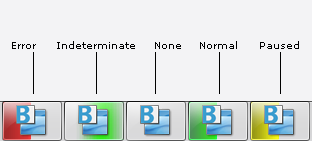
This isn't the best example, because the taskbar buttons are showing up in compressed form. It's much more impressive when they are expanded (as they are in XP by default).
And if it's not clear, the colored bars are dynamic, not static. They fill the taskbar button from left to right, as a true progress bar.
-
nas8e9
- Posts: 2232
- Joined: 21 Jun 2008 14:50
Re: XYcopy questions
It's Windows 7's taskbar feature where the background of a taskbar button turns green to indicate progress. I don't immediately have a screen shot handy, unfortunately.admin wrote:No idea what you are talking about.Mesh wrote:Now, what *would* be helpful, in line with what you were thinking, is if the file ops dialog box had it's own taskbar item which took advantage of Win 7's UI feature of having a status bar within the taskbar item itself. In which case, it should probably match up with the Overall Status Bar, rather than the Current Job Status Bar.
XYplorer's original copy/move/delete feature already has this: the Windows Shell dialog box is a separate window with thus its own toolbar button on the taskbar; its button turns green to indicate its operation's progress.
-
Mesh
- Posts: 956
- Joined: 24 Mar 2008 21:22
Re: XYcopy questions
nas8e9 wrote:
XYplorer's original copy/move/delete feature already has this: the Windows Shell dialog box is a separate window with thus its own toolbar button on the taskbar; its button turns green to indicate its operation's progress.
Yes, it has it, because XY is using the shell API.
However, since Don is talking about writing his own API, I'm not sure that would carry over the same UI feature unless it was intentionally designed to, which is why I mentioned it.
-
nas8e9
- Posts: 2232
- Joined: 21 Jun 2008 14:50
Re: XYcopy questions
You could quibble over whether this falls under the heading of XYcopy or Win7 stuff; regardless, I do agree it would be great once Don starts to use kernel functions for file operations, enabling/necessitating its own UI.Mesh wrote:nas8e9 wrote:
XYplorer's original copy/move/delete feature already has this: the Windows Shell dialog box is a separate window with thus its own toolbar button on the taskbar; its button turns green to indicate its operation's progress.
Yes, it has it, because XY is using the shell API.
However, since Don is talking about writing his own API, I'm not sure that would carry over the same UI feature unless it was intentionally designed to, which is why I mentioned it.
-
admin
- Site Admin
- Posts: 66362
- Joined: 22 May 2004 16:48
- Location: Win8.1, Win10, Win11, all @100%
- Contact:
Re: XYcopy questions
Ok, I'm thinking about giving it taskbar presence anyway, so it then would support this Windows 7's taskbar feature.nas8e9 wrote:It's Windows 7's taskbar feature where the background of a taskbar button turns green to indicate progress. I don't immediately have a screen shot handy, unfortunately.admin wrote:No idea what you are talking about.Mesh wrote:Now, what *would* be helpful, in line with what you were thinking, is if the file ops dialog box had it's own taskbar item which took advantage of Win 7's UI feature of having a status bar within the taskbar item itself. In which case, it should probably match up with the Overall Status Bar, rather than the Current Job Status Bar.
XYplorer's original copy/move/delete feature already has this: the Windows Shell dialog box is a separate window with thus its own toolbar button on the taskbar; its button turns green to indicate its operation's progress.
Currently XYcopy is an invisible window which might be the reason for the foregrounding problems I mentioned. The confirmation prompts popped from the invisible window sometimes (unpredictably!) stay in the background. Not nice. I assume (will test soon) that I won't have these issue with a visible window (not sure about minimized state... well, needs testing). This visible window then could display some basic information about the job in progress. (However no live progress with the shell API because it does not callback; the kernel API will have live progress).
FAQ | XY News RSS | XY X
-
Mesh
- Posts: 956
- Joined: 24 Mar 2008 21:22
Re: XYcopy questions
admin wrote:
Ok, I'm thinking about giving it taskbar presence anyway, so it then would support this Windows 7's taskbar feature.
Currently XYcopy is an invisible window which might be the reason for the foregrounding problems I mentioned. The confirmation prompts popped from the invisible window sometimes (unpredictably!) stay in the background. Not nice. I assume (will test soon) that I won't have these issue with a visible window (not sure about minimized state... well, needs testing).
This visible window then could display some basic information about the job in progress. (However no live progress with the shell API because it does not callback; the kernel API will have live progress).
Well, currently, the standard windows copy/move dialog box comes up, and it is a seperate window with its own taskbar presence. If you gave XYcopy taskbar presence while it still used the Windows API, does that mean there would be two windows showing up? Mind you, I'm not making an objection at this time, I'm just trying to get a clear idea of what is being looked at. I wouldn't want to get rid of the Windows API dialog box (which does show live progress), until XY could cover the same info.
-
admin
- Site Admin
- Posts: 66362
- Joined: 22 May 2004 16:48
- Location: Win8.1, Win10, Win11, all @100%
- Contact:
Re: XYcopy questions
Aha!Mesh wrote:admin wrote:
Ok, I'm thinking about giving it taskbar presence anyway, so it then would support this Windows 7's taskbar feature.
Currently XYcopy is an invisible window which might be the reason for the foregrounding problems I mentioned. The confirmation prompts popped from the invisible window sometimes (unpredictably!) stay in the background. Not nice. I assume (will test soon) that I won't have these issue with a visible window (not sure about minimized state... well, needs testing).
This visible window then could display some basic information about the job in progress. (However no live progress with the shell API because it does not callback; the kernel API will have live progress).
Well, currently, the standard windows copy/move dialog box comes up, and it is a seperate window with its own taskbar presence. If you gave XYcopy taskbar presence while it still used the Windows API, does that mean there would be two windows showing up? Mind you, I'm not making an objection at this time, I'm just trying to get a clear idea of what is being looked at. I wouldn't want to get rid of the Windows API dialog box (which does show live progress), until XY could cover the same info.
 Not in XP. Nothing on the taskbar here.
FAQ | XY News RSS | XY X
-
Mesh
- Posts: 956
- Joined: 24 Mar 2008 21:22
Re: XYcopy questions
admin wrote:
Aha!
I feel bad for you. Coding for Win 7 x64 on XP has got to be like playing darts in the dark.
-
Zodler
- Posts: 55
- Joined: 13 Jun 2011 02:54
Re: XYcopy questions
I see XYcopy mentioned everywhere. Is it already been used by XYplorer? When copying I think I see the standard Windows copying windows.
-
nas8e9
- Posts: 2232
- Joined: 21 Jun 2008 14:50
Re: XYcopy questions
XYcopy 1.0 was completed some time ago and consists primarily of the ability to both run file operations in the background (and thus not blocking XYplorer's window) as well as queue file operations so as not to overload storage media.Zodler wrote:I see XYcopy mentioned everywhere. Is it already been used by XYplorer? When copying I think I see the standard Windows copying windows.
XYcopy 2.0 is currently in development and will optionally substitute the Windows Shell file functions with XYplorer-specific custom file functions. This will enable both enhanced functionality (verification and ACL copying among others) for all types of operations (1.0 only covered copy, move and delete; 2.0 will cover backup as well) as well as an enhanced UI for file operations.
-
Zodler
- Posts: 55
- Joined: 13 Jun 2011 02:54
Re: XYcopy questions
So that doesn't answer my question. Is my latest XYplorer using it by default?
-
zer0
- Posts: 2676
- Joined: 19 Jan 2009 20:11
Re: XYcopy questions
XYcopy is "enable background processing" and "queue file operations". By default, it is not enabled, so you would have to check those boxes in Configuration > File Operations if you would like to use XYcopy. I did make a suggestion to Don about having it enabled by default for Vista/W7 users -- they run into problems otherwise -- but I don't recall there being much traction around that.Zodler wrote:So that doesn't answer my question. Is my latest XYplorer using it by default?
Reporting a bug? Have a wish? Got a question? Use search - View roadmap - FAQs: Forum + XY site
Windows 7/10
Always using the latest stable two-decimal build
Windows 7/10
Always using the latest stable two-decimal build
-
nas8e9
- Posts: 2232
- Joined: 21 Jun 2008 14:50
Re: XYcopy questions
@zer0: I'm not sure when this happened, but I've just tried a clean config and both backgrounding and queuing are enabled in it.
@Zodler: I could have been clearer. XYplorer with XYcopy 1.0 always uses Windows Shell file functions for everything but backup. As zer0 pointed out, XYcopy 1.0 made it possible to have the Windows Shell file functions optionally be backgrounded and queued. XYcopy 2.0 changes all this again as per my previous post.
In order to check whether your XYplorer config uses backgrounding and queuing, check Configuration > File Operations. The latest beta version makes it possible to enable backgrounding and queueing for backup as well, for the first time.
@Zodler: I could have been clearer. XYplorer with XYcopy 1.0 always uses Windows Shell file functions for everything but backup. As zer0 pointed out, XYcopy 1.0 made it possible to have the Windows Shell file functions optionally be backgrounded and queued. XYcopy 2.0 changes all this again as per my previous post.
In order to check whether your XYplorer config uses backgrounding and queuing, check Configuration > File Operations. The latest beta version makes it possible to enable backgrounding and queueing for backup as well, for the first time.