[SOLVED] New tab sometimes opens in the current tab

Things you’d like to miss in the future...
Forum rules
:warnred20: :warnred20: :warnred20: :warnred20: :warnred20: READ THIS AND DO IT!!! :warnred20: :warnred20: :warnred20: :warnred20: :warnred20:

:info: Please include the following information:
1) Your XYplorer Version (e.g., v28.00.0801)
2) Your Windows Version (e.g., Win 11)
3) Your Screen Scaling Percentage (e.g., 125%).

:info: We strongly recommend adding your Windows Version and Screen Scaling Percentage to the Location field in your Profile or to your Signature. That way, you only have to type them once, and we won't have to search for that vital information.

:info: When attaching an Image, please use the Attachment tab at the bottom of your post and click "Add files".

:warnred20: :warnred20: :warnred20: :warnred20: :warnred20: READ THIS AND DO IT!!! :warnred20: :warnred20: :warnred20: :warnred20: :warnred20:
Post Reply
satisfyship
Posts: 14
Joined: 21 Oct 2019 08:57

[SOLVED] New tab sometimes opens in the current tab

Post by satisfyship »

Hello,

I'm experiencing the following issue: sometimes (maybe 5-10% of the time), when trying to open a subfolder in a new tab, that subfolder is not opened in a new tab, but instead changes the location of the current tab.
This happens both when using the middle mouse button to open a subfolder, and when a tab is locked and I'm using double-click to open a new tab.

To better visualize what I mean, here's a gif showing the latter case:
4ef54e2b-2d1f-4445-b557-7b1fb00a9955.gif
4ef54e2b-2d1f-4445-b557-7b1fb00a9955.gif (57.61 KiB) Viewed 1061 times
As you can see, the current folder "Downloads" (Z:\Downloads\) is locked. The first two times I'm double-clicking with the left mouse button, the "Test Folder" opens in in a new tab as it's supposed to (then I'm closing the tab). The third time, however, it fails and changes the locked tab's location from to Z:\Downloads\Test Folder\.

I'm currently running version 20.60.0200, but this has been happening ever since I started using XYplorer.
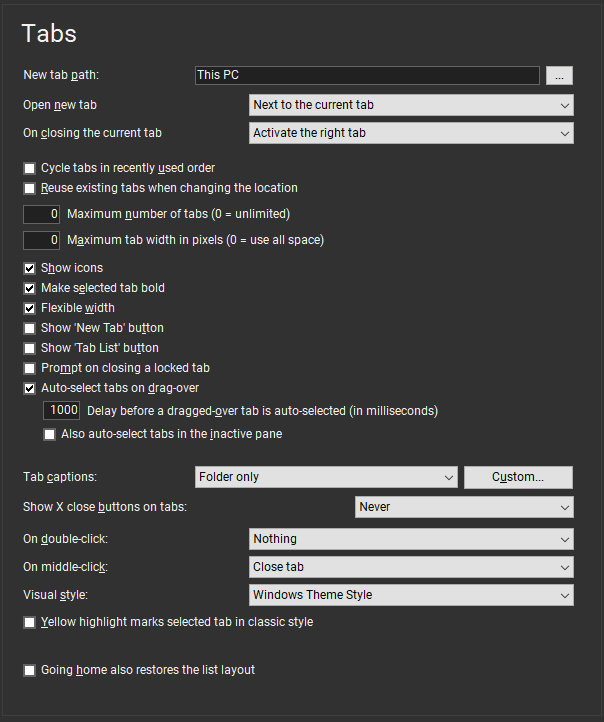
Here are my Tab settings in case it's relevant: https://pictshare.net/n10118.png.

Let me know if you need anything else.


Best regards.
Last edited by satisfyship on 07 Dec 2019 16:04, edited 2 times in total.

admin
Site Admin
Posts: 65351
Joined: 22 May 2004 16:48
Location: Win8.1, Win10, Win11, all @100%
Contact:

Re: New tab sometimes opens in the current tab

Post by admin »

"Downloads" is the only tab in that pane, and it's not defined as "default tab" (via right-clicking the tab header)?

satisfyship
Posts: 14
Joined: 21 Oct 2019 08:57

Re: New tab sometimes opens in the current tab

Post by satisfyship »

Hi,

yeah, in this example it's the only tab in the pane. I also experienced this issue with multiple tabs open.
And it's not defined as the default tab.

admin
Site Admin
Posts: 65351
Joined: 22 May 2004 16:48
Location: Win8.1, Win10, Win11, all @100%
Contact:

Re: New tab sometimes opens in the current tab

Post by admin »

I tried hard (with my settings and with your settings) but could not reproduce it. :|

satisfyship
Posts: 14
Joined: 21 Oct 2019 08:57

Re: New tab sometimes opens in the current tab

Post by satisfyship »

It seems I have solved this issue by doing something I probably should have done earlier.

At first, I've run my usual, registered XYplorer with a fresh configuration ("fresh;"), but the problem remained.
Then I tried a completely new installation of XYplorer, that is the trial version without registration and suddenly I wasn't able to reproduce the problem.
So I imported all my previous configurations except for the registration part in the XYplorer.ini, so it remained the trial version, and the problem still didn't re-appear.
Only when adding the registration info the problem occurred again.

I don't know how or why the registration details caused this, but I just registered again ("Update Registration Details...") and the problem seems to be gone for good now. Maybe I corrupted something in the past when backing up and restoring settings or something.

Anyway, thanks for your help and this great piece of software. :thumbsup:

Post Reply