 XYplorer Beta Club
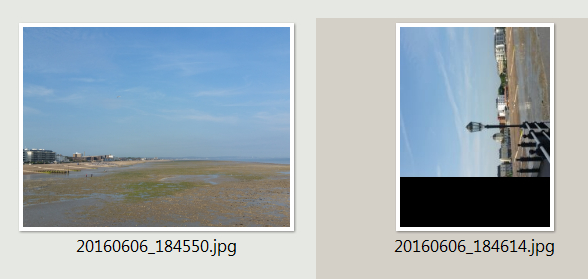
Thumbnails of 'portrait' pictures are shown laying 'on their side' with the bottom of the picture truncated. The lower part of the thumbnail area still shows the remains of the thumbnail of (normally) the most recent 'landscape' picture.
The image correctly shows 'portrait' in preview and also in the mouse down blow up, whether that is triggered from the file list thumbnail or from the preview.
Windows 7 Pro x64
CPU 3Gz X 2
Dell Optiplex 755
Please see attached screen grab
Thumbnails of 'portrait' pictures not shown correctly
Forum rules
 READ THIS AND DO IT!!!
 Please include the following information:
1) Your XYplorer Version (e.g., v28.00.0801)
2) Your Windows Version (e.g., Win 11)
3) Your Screen Scaling Percentage (e.g., 125%).
We strongly recommend adding your Windows Version and Screen Scaling Percentage to the Location field in your Profile or to your Signature. That way, you only have to type them once, and we won't have to search for that vital information.
When attaching an Image, please use the Attachment tab at the bottom of your post and click "Add files".
READ THIS AND DO IT!!!
READ THIS AND DO IT!!! Please include the following information:1) Your XYplorer Version (e.g., v28.00.0801)
2) Your Windows Version (e.g., Win 11)
3) Your Screen Scaling Percentage (e.g., 125%).
We strongly recommend adding your Windows Version and Screen Scaling Percentage to the Location field in your Profile or to your Signature. That way, you only have to type them once, and we won't have to search for that vital information. When attaching an Image, please use the Attachment tab at the bottom of your post and click "Add files". READ THIS AND DO IT!!!
-
geoffyates
- Posts: 60
- Joined: 15 Feb 2008 12:55
Thumbnails of 'portrait' pictures not shown correctly
- Attachments
-
- XY Thumbs - 2016-08-01_094848.jpg (97.49 KiB) Viewed 2543 times
Re: Thumbnails of 'portrait' pictures not shown correctly
Care to upload that original picture somewhere?
Configuration | Thumbnails | Auto-rotate thumbnails
is checked?
Configuration | Thumbnails | Auto-rotate thumbnails
is checked?
One of my scripts helped you out? Please donate via Paypal
-
geoffyates
- Posts: 60
- Joined: 15 Feb 2008 12:55
Re: Thumbnails of 'portrait' pictures not shown correctly
Sure, here it is...
https://dl.dropboxusercontent.com/s/xmz ... 4.jpg?dl=0
Too big for this XY site hence drop box link
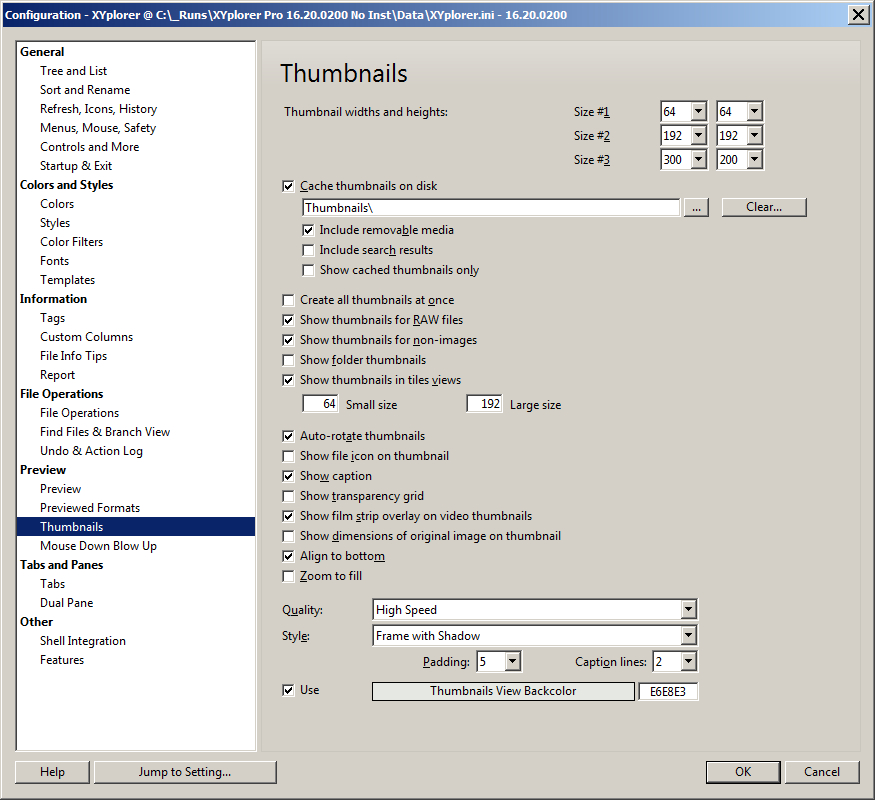
Configuration | Thumbnails | Auto-rotate thumbnails
is checked? = Yes it is!
https://dl.dropboxusercontent.com/s/xmz ... 4.jpg?dl=0
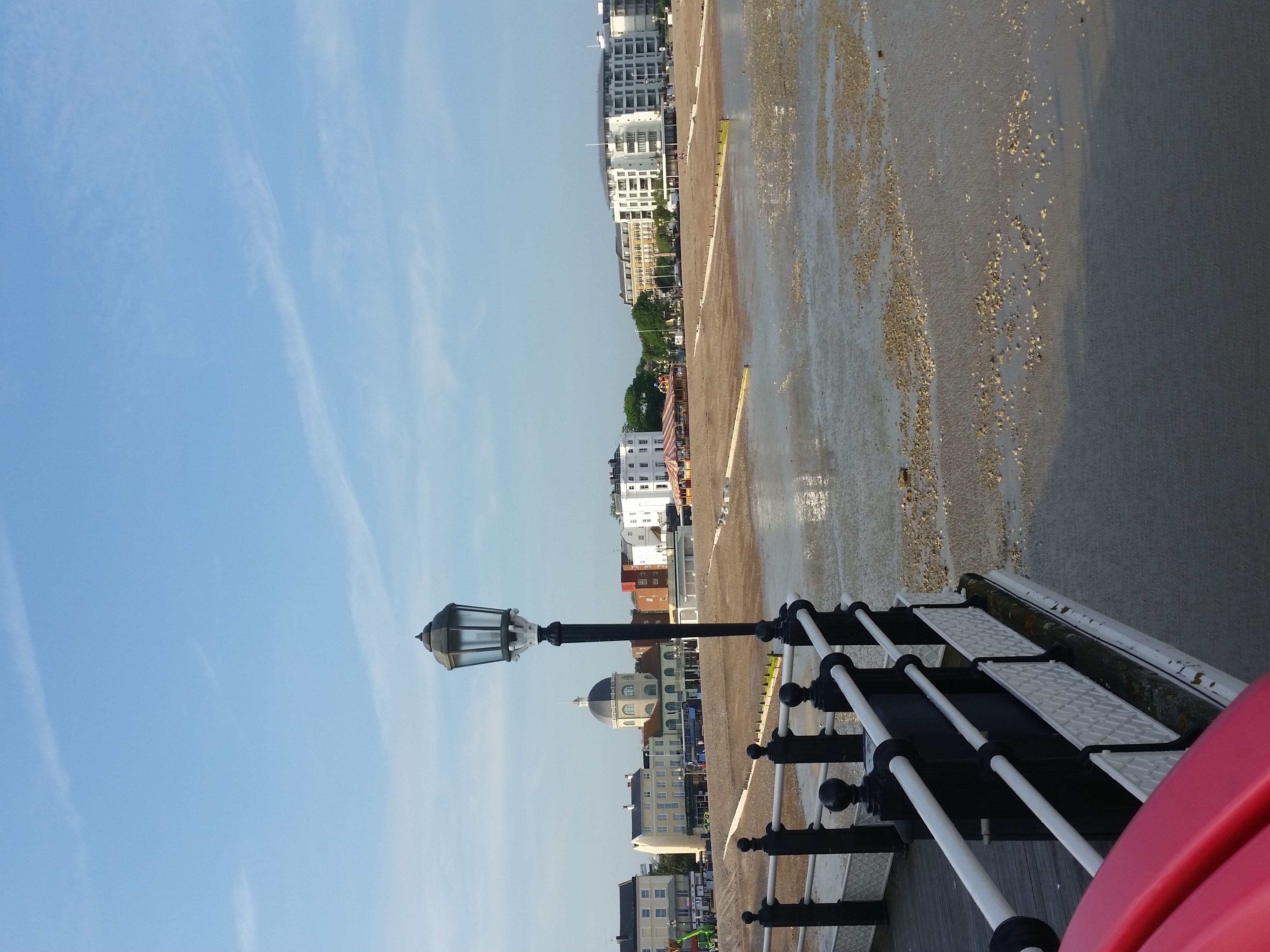
Too big for this XY site hence drop box link
Configuration | Thumbnails | Auto-rotate thumbnails
is checked? = Yes it is!
Re: Thumbnails of 'portrait' pictures not shown correctly
Thanks.
Again:
Configuration | Thumbnails | Auto-rotate thumbnails
is checked?
Because if it's not, I get the same result -> Wrong orientation for a thumbnail
But if it's checked (and it should be) -> Looks fine...
Again:
Configuration | Thumbnails | Auto-rotate thumbnails
is checked?
Because if it's not, I get the same result -> Wrong orientation for a thumbnail
But if it's checked (and it should be) -> Looks fine...
One of my scripts helped you out? Please donate via Paypal
-
geoffyates
- Posts: 60
- Joined: 15 Feb 2008 12:55
Re: Thumbnails of 'portrait' pictures not shown correctly
Again:
Configuration | Thumbnails | Auto-rotate thumbnails
is checked?
Yes, sure is. Here is the evidence...
https://dl.dropboxusercontent.com/s/2rc ... 4.jpg?dl=0
Configuration | Thumbnails | Auto-rotate thumbnails
is checked?
Yes, sure is. Here is the evidence...
https://dl.dropboxusercontent.com/s/2rc ... 4.jpg?dl=0
Re: Thumbnails of 'portrait' pictures not shown correctly
I downloaded your exact version (v16.20.0200) and it works fine as well...
1. What happens when you select this image and use:
Menu - View - Caches - Refresh Selected Thumbnails?
2. If 1. doesn't help, does it work in a fresh instance? ::fresh; {ENTER} from the address bar
1. What happens when you select this image and use:
Menu - View - Caches - Refresh Selected Thumbnails?
2. If 1. doesn't help, does it work in a fresh instance? ::fresh; {ENTER} from the address bar
One of my scripts helped you out? Please donate via Paypal
-
geoffyates
- Posts: 60
- Joined: 15 Feb 2008 12:55
Re: Thumbnails of 'portrait' pictures not shown correctly
1. What happens when you select this image and use:
Menu - View - Caches - Refresh Selected Thumbnails?
2. If 1. doesn't help, does it work in a fresh instance? ::fresh; {ENTER} from the address bar
1. Gives the result below. Only difference is that the lower part of the thumbnail area is black instead of still showing the remains of the thumbnail of (normally) the most recent 'landscape' picture.
2. No further difference. Interesting that other thumbnails of 'portrait' pictures are completely unchanged after both moves.
https://dl.dropboxusercontent.com/s/0uy ... 3.jpg?dl=0
Menu - View - Caches - Refresh Selected Thumbnails?
2. If 1. doesn't help, does it work in a fresh instance? ::fresh; {ENTER} from the address bar
1. Gives the result below. Only difference is that the lower part of the thumbnail area is black instead of still showing the remains of the thumbnail of (normally) the most recent 'landscape' picture.
2. No further difference. Interesting that other thumbnails of 'portrait' pictures are completely unchanged after both moves.
https://dl.dropboxusercontent.com/s/0uy ... 3.jpg?dl=0
Re: Thumbnails of 'portrait' pictures not shown correctly
Ok, it seems I can confirm that bug.
It does happen in Windows 7 but e.g not in Windows 8.1 (or Server 2012 R2).
It doesn't matter if your using your (outdated) version or the latest official one. Both show the same behavior (at least for the picture that geoffyates uploaded): Wrong orientation and 1/5 of the bottom image has either a black bar or a different part of the same picture...
You have to wait until Don sees this thread
It does happen in Windows 7 but e.g not in Windows 8.1 (or Server 2012 R2).
It doesn't matter if your using your (outdated) version or the latest official one. Both show the same behavior (at least for the picture that geoffyates uploaded): Wrong orientation and 1/5 of the bottom image has either a black bar or a different part of the same picture...
You have to wait until Don sees this thread
One of my scripts helped you out? Please donate via Paypal
-
geoffyates
- Posts: 60
- Joined: 15 Feb 2008 12:55
Re: Thumbnails of 'portrait' pictures not shown correctly
Thanks for your efforts!
-
admin
- Site Admin
- Posts: 65456
- Joined: 22 May 2004 16:48
- Location: Win8.1, Win10, Win11, all @100%
- Contact:
Re: Thumbnails of 'portrait' pictures not shown correctly
Works well in Win 8.1.
No Win 7 here.
No Win 7 here.
FAQ | XY News RSS | XY X
Re: Thumbnails of 'portrait' pictures not shown correctly
Install Hyper-V (if you're using the Pro version) / VMWare Player / VirtualBoxNo Win 7 here.


One of my scripts helped you out? Please donate via Paypal
Re: Thumbnails of 'portrait' pictures not shown correctly
It has already been discussed before because this was my very same problem too. (I am lazy to search back.) You probably use the "Fast" quality method of creating thumbnails. Wrong. Switch to another one, because this one simply extracts the thumbnail saved into the jpg file. Or, if you stick to the "Fast" quality, you have to remove the thumbnail from the jpg, for example, using exiftool and this command:After that you will get the correct thumbnail.
And don't forget to refresh the thumbnail cache in case of any modifications.
Code: Select all
exiftool -thumbnailimage= FILEAnd don't forget to refresh the thumbnail cache in case of any modifications.
-
duarte.framos
- Posts: 23
- Joined: 14 Jan 2016 05:19
- Location: Lisbon, Portugal
- Contact:
Re: Thumbnails of 'portrait' pictures not shown correctly
Yeah, I've been having this problem too under windows 7 64bits, with all versions since I started using XYPlorer.
Switching from Tools Configuration > Thumbnails > Quality > High Speed to Fast seems to have solved the problem
Thanks for the help
Switching from Tools Configuration > Thumbnails > Quality > High Speed to Fast seems to have solved the problem
Thanks for the help