 XYplorer Beta Club
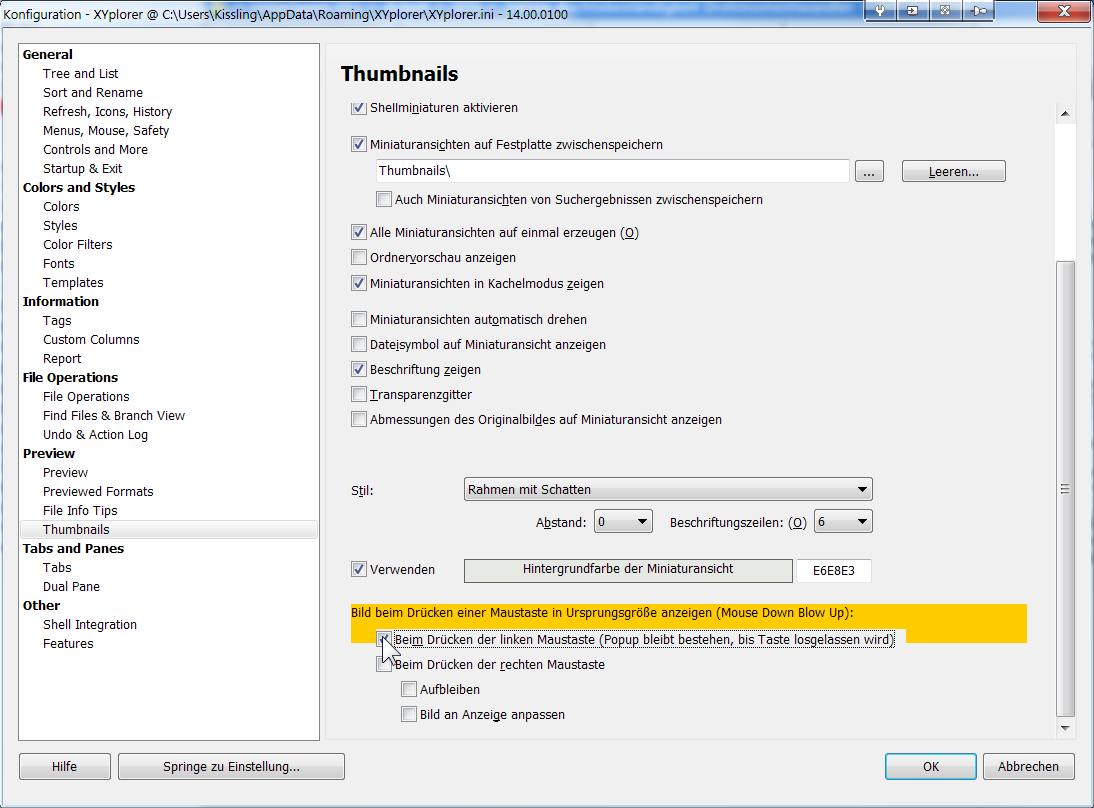
Floating preview pdf and previews thumbs
-
David.P
- Posts: 72
- Joined: 09 Dec 2006 11:21
Re: Floating preview pdf and previews thumbs
Aaahh at least this is sorted:
-
klownboy
- Posts: 4462
- Joined: 28 Feb 2012 19:27
- Location: Windows 11, 25H2 Build 26200.8737 at 100% 2560x1440
Re: Floating preview pdf and previews thumbs
You can't drag a file on the thumbnail itself, you have to drag the file from the filename.David.P wrote:And I can't manually sort because when thumbs are shown (in thumbnails mode or in details & thumbnails mode), as soon as I try to start to drag an item, XY starts to to the Mouse Down Blow Up and won't let me drag.
-
David.P
- Posts: 72
- Joined: 09 Dec 2006 11:21
Re: Floating preview pdf and previews thumbs
I definitely can drag the thumb itself here (as long as MDBU is deactivated).
-
klownboy
- Posts: 4462
- Joined: 28 Feb 2012 19:27
- Location: Windows 11, 25H2 Build 26200.8737 at 100% 2560x1440
Re: Floating preview pdf and previews thumbs
My point was, you don't have to deactivate MDBU as long as you drag directly from the filename.
-
David.P
- Posts: 72
- Joined: 09 Dec 2006 11:21
Re: Floating preview pdf and previews thumbs
True!
Great -- thanks!
Great -- thanks!
-
Filehero
- Posts: 2731
- Joined: 27 Feb 2012 18:50
- Location: Windows 11@100%
Re: Floating preview pdf and previews thumbs
Well, the "thumbnail/pdf/preview" magic has returned, will be somehow releated to reinstallation of the PDF viewer.
Cheers,
Filehero
Cheers,
Filehero
-
IHipschman
- Posts: 16
- Joined: 28 Apr 2014 16:59
Re: Floating preview pdf and previews thumbs
Let me put myself into this very long chain of posts. I also cannot preview pdf''s nor see them in thumbs. I'm using Windows 8 64 bit and have NitroPDF installed as my .pdf viewer. The .pdf extension is tied to Nitro and double clicking the file brings it up fine. Any suggestions.
Thanks
Thanks
-
David.P
- Posts: 72
- Joined: 09 Dec 2006 11:21
Re: Floating preview pdf and previews thumbs
Well some people seem to have had success with PDF-XChange Viewer (or -Editor).
However, I only could manage to get PDF Thumbnails in XYPlorer by installing Adobe Reader XI, AND making it standard PDF file open handler.
Still, PDF Thumbnail generation in Windows Explorer (and other file managers) is about 10 times as fast as in XYP. Which is something I can live with at the moment since the thumbs, once generated, are cached.
The thumbs by XYP are not only much slower, but also somewhat sharper, thus there must be some difference in the way of thumbnails creation between XY and Explorer.
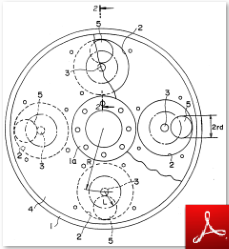
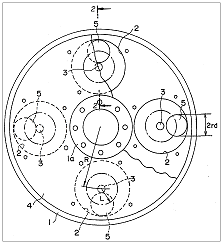
Left: Windows Explorer ------------------ Right: XYplorer
Regards David.P
However, I only could manage to get PDF Thumbnails in XYPlorer by installing Adobe Reader XI, AND making it standard PDF file open handler.
Still, PDF Thumbnail generation in Windows Explorer (and other file managers) is about 10 times as fast as in XYP. Which is something I can live with at the moment since the thumbs, once generated, are cached.
The thumbs by XYP are not only much slower, but also somewhat sharper, thus there must be some difference in the way of thumbnails creation between XY and Explorer.
Left: Windows Explorer ------------------ Right: XYplorer
Regards David.P
-
klownboy
- Posts: 4462
- Joined: 28 Feb 2012 19:27
- Location: Windows 11, 25H2 Build 26200.8737 at 100% 2560x1440
Re: Floating preview pdf and previews thumbs
I'm not sure if it's been mentioned in this thread, but have you tried to see what the difference in speed may be if you enable "Super-fast Thumbnails" in Configuration | Thumbnails? I personally don't have it checked because I like the highest quality thumbs, but you may want to give it a go.
Ken
Ken
-
admin
- Site Admin
- Posts: 66360
- Joined: 22 May 2004 16:48
- Location: Win8.1, Win10, Win11, all @100%
- Contact:
Re: Floating preview pdf and previews thumbs
Coud you send me that particular PDF file for testing?David.P wrote:Well some people seem to have had success with PDF-XChange Viewer (or -Editor).
However, I only could manage to get PDF Thumbnails in XYPlorer by installing Adobe Reader XI, AND making it standard PDF file open handler.
Still, PDF Thumbnail generation in Windows Explorer (and other file managers) is about 10 times as fast as in XYP. Which is something I can live with at the moment since the thumbs, once generated, are cached.
The thumbs by XYP are not only much slower, but also somewhat sharper, thus there must be some difference in the way of thumbnails creation between XY and Explorer.
Left: Windows Explorer ------------------ Right: XYplorer
Regards David.P
FAQ | XY News RSS | XY X
-
David.P
- Posts: 72
- Joined: 09 Dec 2006 11:21
Re: Floating preview pdf and previews thumbs
Yes, I've tried both of those options with no noticeable difference.klownboy wrote:I'm not sure if it's been mentioned in this thread, but have you tried to see what the difference in speed may be if you enable "Super-fast Thumbnails" in Configuration | Thumbnails? I personally don't have it checked because I like the highest quality thumbs, but you may want to give it a go.
Ken
Yes Don, I'll send you the file.admin wrote: Coud you send me that particular PDF file for testing?
It is a USPTO PDF that has been ClearScan-OCR'ed with Adobe Acrobat 11 and some pages rearranged. However, I see the same speed of thumbnail generation in XYplorer with all sorts of every-day PDF files.
Regards David.P
-
admin
- Site Admin
- Posts: 66360
- Joined: 22 May 2004 16:48
- Location: Win8.1, Win10, Win11, all @100%
- Contact:
Re: Floating preview pdf and previews thumbs
Thanks, got the file. Works perfectly here. Fast and high quality. I'm using PDF-XChange.
Tip: Remove as many Adobe products as you can from your system. Then all will be fine.
Tip: Remove as many Adobe products as you can from your system. Then all will be fine.
FAQ | XY News RSS | XY X
-
David.P
- Posts: 72
- Joined: 09 Dec 2006 11:21
Re: Floating preview pdf and previews thumbs
Yep, Adobe software can suck.
Cheers David.P
Pls. note that with one file, it may feel fast, but with like 40 files in a folder, thumbnail generation takes like 15 seconds here with XY, while it takes like 1.5 seconds in Windows Explorer.admin wrote:Fast and high quality
Cheers David.P
-
autocart
- Posts: 1387
- Joined: 26 Sep 2013 15:22
Re: Floating preview pdf and previews thumbs
1) So, has anybody found a working solution for the threads title question: "Floating preview pdf"?
2) Preferrably with Sumatra as the Standard for opening, but maybe I can trick the Standard out by using Portable File Associations????
EDIT:
At least the pdf thumbs work now, using Filehero's suggestion to look up the reg-trick in the FAQ:
I almost freaked out, but finally it works again after (as, again, stated in the FAQ ) I updated/reinstalled BOTH Adobe Reader AND X-ChangePDF Viewer AND made one of them the system default AND did the registry tweak (including multiple restarts). Since I want all pdf files to open with Sumatra PDF, though, i ran into problems because as soon as I changed the system default to Sumatra, the PDF thumbnails in XY would not work anymore.
Work-around: System default to Adobe or X-Change and using Custom File Associations as well as Custom File Icons in XY.
EDIT (again):
Ok, the above work-around is stupid. The moment I open a pdf from inside another program (e.g. file search agent ransack) then it of course opens in x-change pdf viewer.
I would prefer Sumatra out of 3 reasons: 1) Speed of opening 2) Close with Esc (tweak in extended options) 3) I really dislike the X-Change Icon (call me brain-crippled but I don't like an eye staring at me) 4) I like the way how Sumatra handles panning/text-selection much better.
However, for now I still ended up using X-Change everywhere with these new work-arounds/"solutions": 1) It's either our new intranet-server or the latest update to X-Change or both, but it is faster than before and now almost as fast as Sumatra (at least fast enough for me). 2) I finally found out how to assign a keyboard-shortcut to a command (Esc to Quit) and changed the setting in X-Change to "single document" and "allow more than 1 instance". (This way it also behaves like Sumatra.) 3) I changed the system wide icon for pdf with ExtMan.exe to the Sumatra Icon. The X-Change Icon is still visible inside X-Change but only small and only once in the left upper corner. I think I can live with that. 4) X-Change implements panning and text-selection as 2 different tools. The panning tool is the default when opening a document. I did not find a better work-around than to assign "easy" keyboard shortcuts to both. It is way not satisfying but better than having Sumatra being used from inside XY and X-Change from everywhere else.
2) Preferrably with Sumatra as the Standard for opening, but maybe I can trick the Standard out by using Portable File Associations????
EDIT:
At least the pdf thumbs work now, using Filehero's suggestion to look up the reg-trick in the FAQ:
After getting a new user-account (at my place of work, and partly transferring the settings of the old one), PDF thumbs preview did not work anymore:Filehero wrote:- check wether the reg entry described in the FAQ is set
-- if no, set it & reboot
-- then reinstall PDF-XChange Viewer again (which could be done anyway)
I almost freaked out, but finally it works again after (as, again, stated in the FAQ
) I updated/reinstalled BOTH Adobe Reader AND X-ChangePDF Viewer AND made one of them the system default AND did the registry tweak (including multiple restarts). Since I want all pdf files to open with Sumatra PDF, though, i ran into problems because as soon as I changed the system default to Sumatra, the PDF thumbnails in XY would not work anymore. Work-around: System default to Adobe or X-Change and using Custom File Associations as well as Custom File Icons in XY.
EDIT (again):
Ok, the above work-around is stupid. The moment I open a pdf from inside another program (e.g. file search agent ransack) then it of course opens in x-change pdf viewer.
I would prefer Sumatra out of 3 reasons: 1) Speed of opening 2) Close with Esc (tweak in extended options) 3) I really dislike the X-Change Icon (call me brain-crippled but I don't like an eye staring at me) 4) I like the way how Sumatra handles panning/text-selection much better.
However, for now I still ended up using X-Change everywhere with these new work-arounds/"solutions": 1) It's either our new intranet-server or the latest update to X-Change or both, but it is faster than before and now almost as fast as Sumatra (at least fast enough for me). 2) I finally found out how to assign a keyboard-shortcut to a command (Esc to Quit) and changed the setting in X-Change to "single document" and "allow more than 1 instance". (This way it also behaves like Sumatra.) 3) I changed the system wide icon for pdf with ExtMan.exe to the Sumatra Icon. The X-Change Icon is still visible inside X-Change but only small and only once in the left upper corner. I think I can live with that. 4) X-Change implements panning and text-selection as 2 different tools. The panning tool is the default when opening a document. I did not find a better work-around than to assign "easy" keyboard shortcuts to both. It is way not satisfying but better than having Sumatra being used from inside XY and X-Change from everywhere else.
[AHK] redirecting Windows Explorer to XY, [XYS] Mini Tree with open tabs (cur loc expanded, tab folders highlighted), [AHK] customInlineRenameKeys, [AHK] clipboardHelper_and_XYEscToList