 XYplorer Beta Club
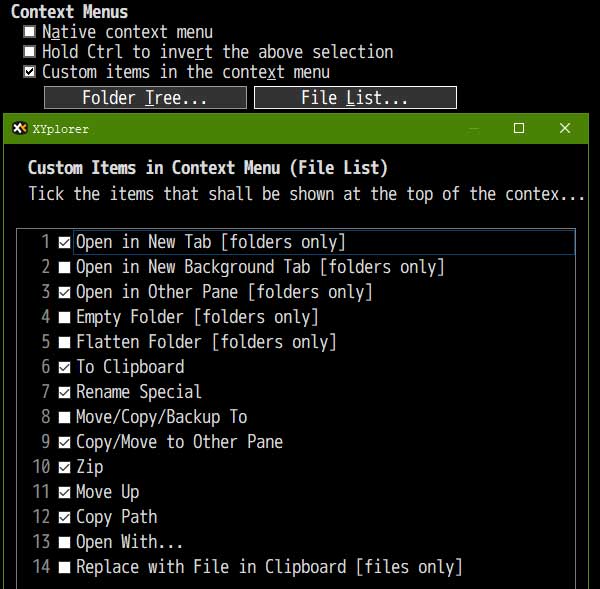
Copy Path not present in context menu
-
jFrankParnell
- Posts: 5
- Joined: 29 Feb 2024 23:27
Copy Path not present in context menu
I am able to ctrl - p to get the path of the selected item but I thought there used to be context menu items for copy path, copy containing path, that type of thing? At any rate, I dont have any 'copy path' in my context menu even though i have apparantly made the right settings.
-
highend
- Posts: 14922
- Joined: 06 Feb 2011 00:33
- Location: Win Server 2022 @100%
Re: Copy Path not present in context menu
XY version?
Screenshot of the context menu you get?
Screenshot of the context menu you get?
One of my scripts helped you out? Please donate via Paypal
-
jFrankParnell
- Posts: 5
- Joined: 29 Feb 2024 23:27
Re: Copy Path not present in context menu
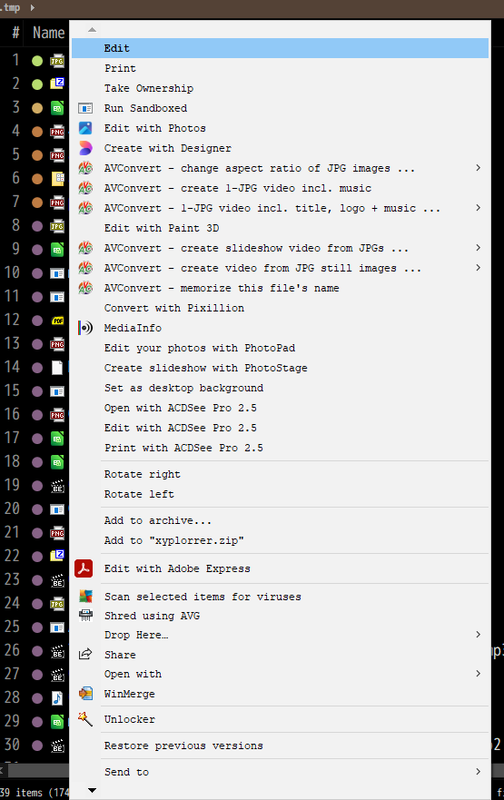
there's a few more, under the arrow, but theyre not copy path
-
Native2904
- Posts: 132
- Joined: 23 Apr 2025 18:48
- Location: Aachen
Re: Copy Path not present in context menu
You need to enable the XYplorer context menu; you are currently seeing the Windows context menu.
Lts. 64-bit XY-Port. ƒ JetBrainsMono @ Windows 11 Pro 24H2 ▣ 1920x1080 ⇵ 115%
Glückauf
Glückauf
-
jFrankParnell
- Posts: 5
- Joined: 29 Feb 2024 23:27
Re: Copy Path not present in context menu
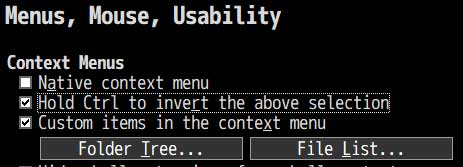
Ok.
So 'native' is xyplorer's contextmenu, I thought that was Windows native. Now that i have invert turnt on, I can get the xyplorer options when i ctrl right click.