Page 3 of 6
Re: Preview looping audio files but...perfect! (no delay)
Posted: 28 Mar 2021 15:28
by chumbo
Yup, that did it! Thx

(so, the change you were proposing, will that be in an upcoming update?)
Re: Preview looping audio files but...perfect! (no delay)
Posted: 28 Mar 2021 15:52
by admin
It will come within the next hour...

For this upcoming beta you will have to
tweak the INI to enable the feature. It's easy:
https://www.xyplorer.com/faq-topic.php?id=tweak
Re: Preview looping audio files but...perfect! (no delay)
Posted: 28 Mar 2021 16:35
by chumbo
Great! Thx

I guess you'll tell me later what is the tweak?
Re: Preview looping audio files but...perfect! (no delay)
Posted: 28 Mar 2021 16:45
by admin
It's in the release notes already:
BTW, do you have audio tools that can measure the exact length of a WAV file down to the millisecond? I need to do some calibration...
Re: Preview looping audio files but...perfect! (no delay)
Posted: 28 Mar 2021 17:16
by highend
https://mediaarea.net/en/MediaInfo/Download/Windows
E.g. when using the cli tool:
Code: Select all
MediaInfo.exe "R:\Halo - Ane Brun.wav"
General
Complete name                            : R:\Halo - Ane Brun.wav
Format                                   : Wave
File size                                : 2.56 MiB
Duration                                 : 15 s 232 ms
Overall bit rate mode                    : Constant
Overall bit rate                         : 1 411 kb/s

Audio
Format                                   : PCM
Format settings                          : Little / Signed
Codec ID                                 : 1
Duration                                 : 15 s 232 ms
Bit rate mode                            : Constant
Bit rate                                 : 1 411.2 kb/s
Channel(s)                               : 2 channels
Sampling rate                            : 44.1 kHz
Bit depth                                : 16 bits
Stream size                              : 2.56 MiB (100%)
Re: Preview looping audio files but...perfect! (no delay)
Posted: 28 Mar 2021 17:35
by admin

Thanks!
Re: Preview looping audio files but...perfect! (no delay)
Posted: 28 Mar 2021 18:04
by chumbo
Ah...ok, maybe I'm late then. But in case the other tool (which I'm not familiar with?), doesn't exactly do all that you need, you can try Audacity
https://portableapps.com/apps/music_vid ... y_portable.
It's free & portable.
I've made a super simple tutorial below just for the task you asked about. The only thing I couldn't show in the .gif is the zooming into the file: Ctrl + Mouswheel.
(you can also load multiple files simultaneously if necessary)

Re: Preview looping audio files but...perfect! (no delay)
Posted: 28 Mar 2021 18:21
by admin
Thanks. Maybe a little too much for now. Could you just measure the exact length of the hihat-sound attached, please. It should be 200msec, or more exactly: 199.637188208617 msec!
Re: Preview looping audio files but...perfect! (no delay)
Posted: 28 Mar 2021 18:29
by chumbo
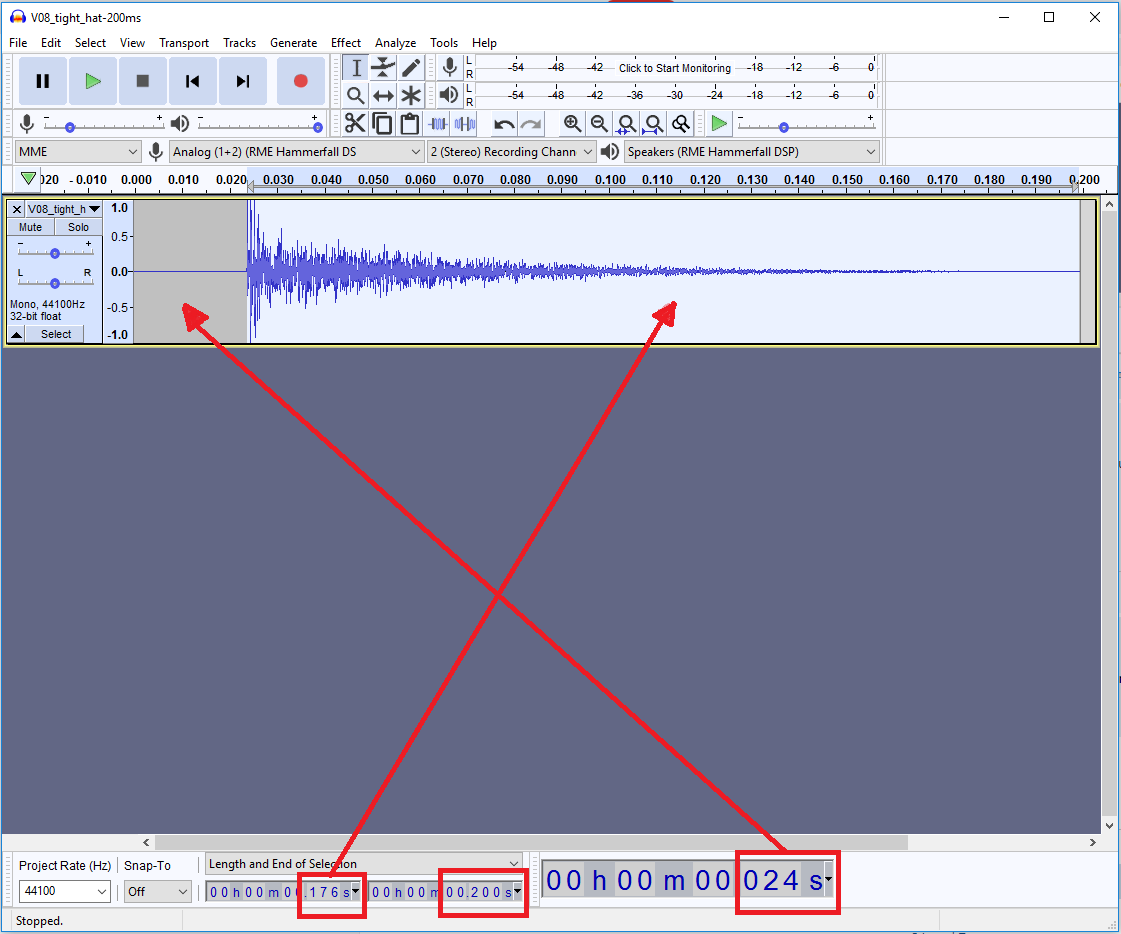
Yes, the file itself is 200ms long but there is a 24ms silence at the beginning of it. So from the transient of the hi-hat to the end, it becomes 176ms
Again, probably more than what you asked for

Re: Preview looping audio files but...perfect! (no delay)
Posted: 28 Mar 2021 18:32
by admin
Thanks!
Now, what about the feature. Did you try it?
Re: Preview looping audio files but...perfect! (no delay)
Posted: 28 Mar 2021 19:04
by chumbo

I hate to say it but...no, it's still noticeable. (yes, I changed the ini to MDBUaudioLoopTightWave=1).
You've spent a fair amount of time on this so I'd totally understand if you want to leave it at that

I've recorded an mp3 of XYPlorer playing some drumloops (you'd have a hard time dancing to that):
https://drive.google.com/file/d/1CsAFi9 ... sp=sharing
Re: Preview looping audio files but...perfect! (no delay)
Posted: 28 Mar 2021 19:07
by admin
Did you do it the right way? You should have seen this in the status bar:
Re: Preview looping audio files but...perfect! (no delay)
Posted: 28 Mar 2021 20:01
by chumbo
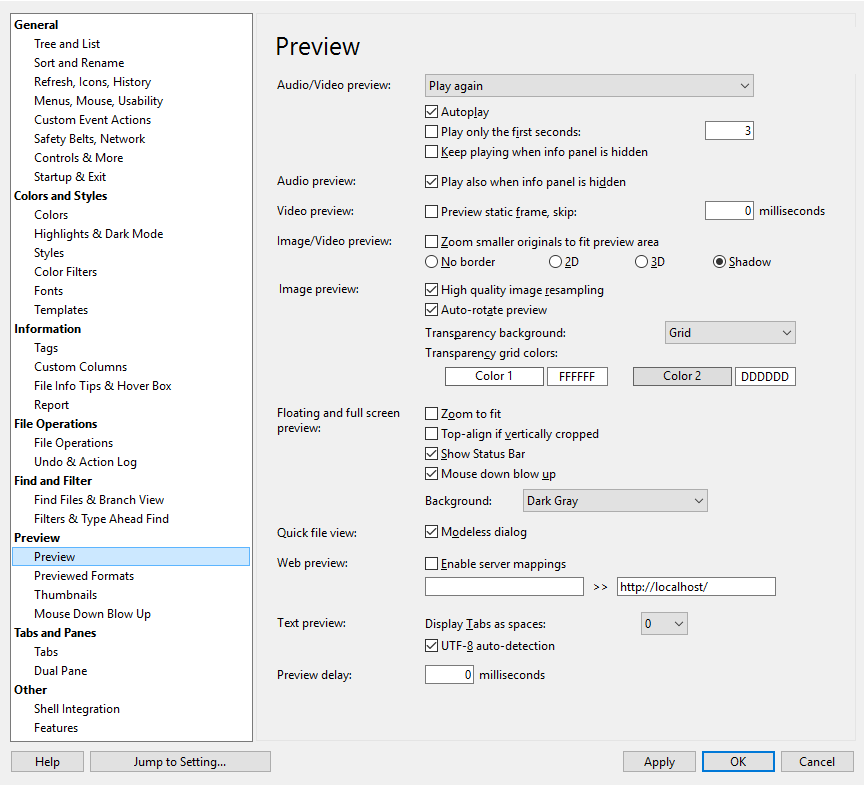
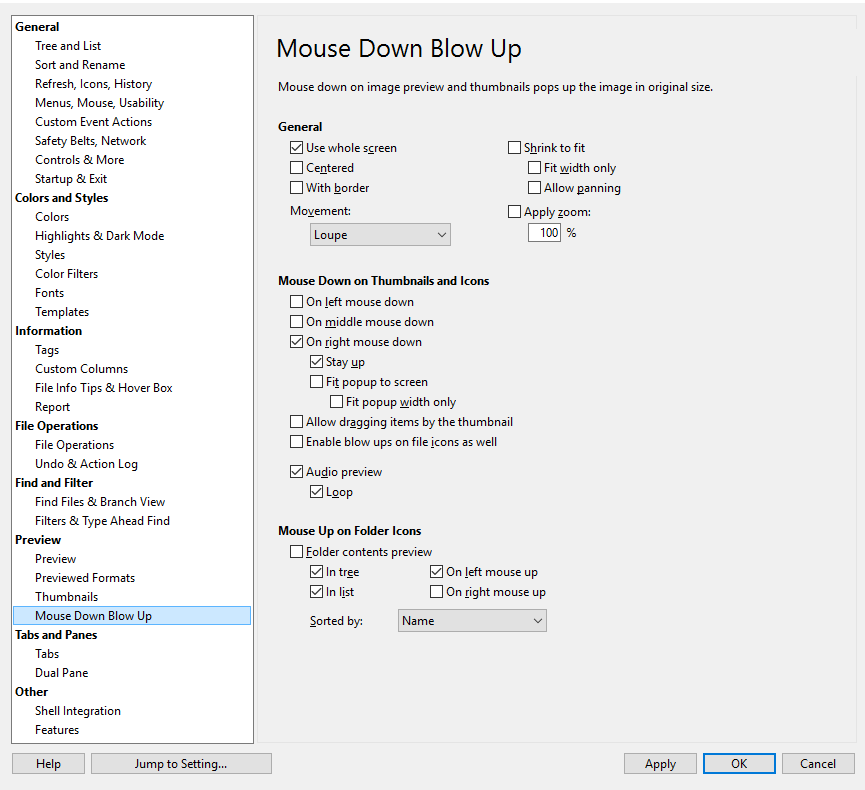
No, I don't, but I don't know what I did wrong? Are you talking about changing the .ini file? Yes, I followed the simple instructions. As for the other settings...
Re: Preview looping audio files but...perfect! (no delay)
Posted: 28 Mar 2021 20:10
by admin
Your settings look good.
1) Ensure that you did the tweaking right.
2) Read about "Quick Audio Preview" in the Help.
3) Read the release notes:
Code: Select all
    + Quick Audio Preview (Configuration | Preview | Mouse Down Blow Up | Mouse
      Down on Thumbnails and Icons | Audio preview): Now tight seamless looping
      of wave files (*.WAV), aka Seamless Wave Looping, is supported.
      How to enable the feature:
      - ATM only implemented as a tweak (soon also in GUI):
        MDBUaudioLoopTightWave=1
      Looks:
      - The Status Bar tells you the exact length of the looping file (down to
        the milliseconds) and the filename.
        Abuse of the "sync" icon (bight find a better one later).
        No live progress, no pausing.
      Functionality:
      - On left mouse down: Loop goes on until mouse button is released.
      - On right mouse down: Loop goes on until stopped.
        Necessary preconditions: Tick these options:
        - Configuration | Preview | Mouse Down Blow Up | Mouse Down on Thumbnails and Icons | On right mouse down
        - Configuration | Preview | Mouse Down Blow Up | Mouse Down on Thumbnails and Icons | Stay up
        How to stop an ongoing Tight Wave Loop:
        - Click icon of the playing file
        - Press ESC
        - Start another Quick Audio Preview
Re: Preview looping audio files but...perfect! (no delay)
Posted: 28 Mar 2021 21:22
by admin
No more tweaking, it's a GUI option now: Configuration | Preview | Mouse Down Blow Up | Mouse Down on Thumbnails and Icons | Seamless wave looping