 XYplorer Beta Club

When I click a folder in the right pane, the tree automatically expand its subfolders. How should I do?
Any scripts or something?
Expand tree
-
highend
- Posts: 14925
- Joined: 06 Feb 2011 00:33
- Location: Win Server 2022 @100%
Re: Expand tree
How should you do what, expanding the tree without entering that folder but just selecting it with a simple left-click?
Not possible
Not possible
One of my scripts helped you out? Please donate via Paypal
-
Andyxy
- Posts: 8
- Joined: 13 Dec 2023 11:13
-
admin
- Site Admin
- Posts: 66097
- Joined: 22 May 2004 16:48
- Location: Win8.1, Win10, Win11, all @100%
- Contact:
Re: Expand tree
Describe again what you mean. Use a picture to illustrate your point.
* * *
The feature you probably mean was removed from the GUI half a year ago:
But I'm willing (and now have the space) to add it again. I would now call it "Expand tree nodes on select". (That's already handled by Configuration | General | Tree and List | Tree | Expand tree nodes on single-click). I would now call it "Expand tree nodes on browse".
* * *
The feature you probably mean was removed from the GUI half a year ago:
Code: Select all
v24.30.0123 - 2023-04-25 17:00
    - Configuration | General | Tree and List | Tree | Expand destination node in tree:
      Removed that setting from Config but kept it as a tweak. It's a very old setting
      (v4.50.0055 - 2006-03-30 19:05) that feels a bit weird today, the caption is
      confusing users, it was off by default, it never worked in Mini Tree anyway by
      design, and I needed the space.
      The tweak is:
        ExpandOnBrowse=1
FAQ | XY News RSS | XY X
-
Andyxy
- Posts: 8
- Joined: 13 Dec 2023 11:13
Re: Expand tree
Hi, thanks for checking my post. My queston is as folllowsadmin wrote: ↑14 Dec 2023 08:31 Describe again what you mean. Use a picture to illustrate your point.
* * *
The feature you probably mean was removed from the GUI half a year ago:But I'm willing (and now have the space) to add it again.Code: Select all
v24.30.0123 - 2023-04-25 17:00 - Configuration | General | Tree and List | Tree | Expand destination node in tree: Removed that setting from Config but kept it as a tweak. It's a very old setting (v4.50.0055 - 2006-03-30 19:05) that feels a bit weird today, the caption is confusing users, it was off by default, it never worked in Mini Tree anyway by design, and I needed the space. The tweak is: ExpandOnBrowse=1I would now call it "Expand tree nodes on select".(That's already handled by Configuration | General | Tree and List | Tree | Expand tree nodes on single-click). I would now call it "Expand tree nodes on browse".
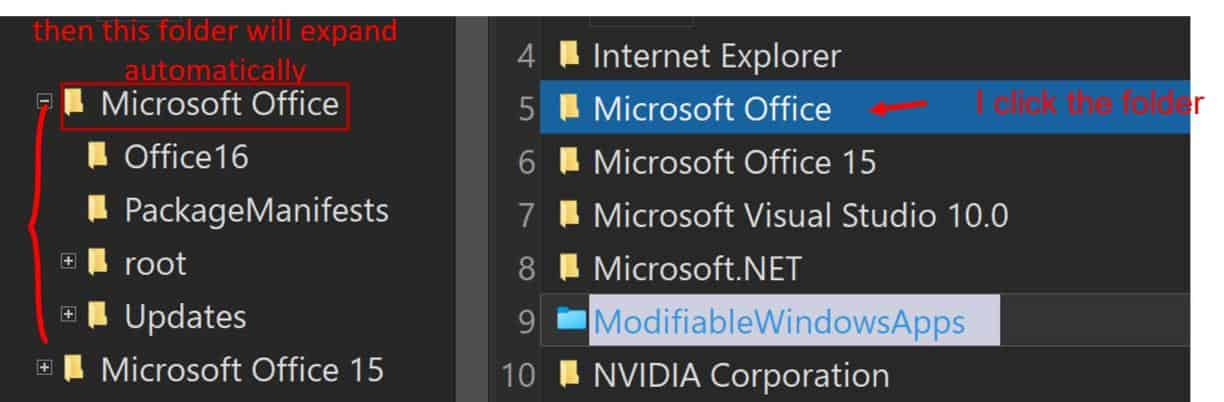
-
klownboy
- Posts: 4459
- Joined: 28 Feb 2012 19:27
- Location: Windows 11, 25H2 Build 26200.8037 at 100% 2560x1440
Re: Expand tree
Look at: Tools > Configuration > General > Mouse, Menus, Usability > Mouse > Single click to open an item and check, On the icon only and or Folder only
-
admin
- Site Admin
- Posts: 66097
- Joined: 22 May 2004 16:48
- Location: Win8.1, Win10, Win11, all @100%
- Contact:
Re: Expand tree
Actually it is this: Configuration | General | Tree and List | Tree | Expand tree nodes on browse (but only from v25.30.0015 - 2023-12-14 12:43 onwards!).
FAQ | XY News RSS | XY X
-
klownboy
- Posts: 4459
- Joined: 28 Feb 2012 19:27
- Location: Windows 11, 25H2 Build 26200.8037 at 100% 2560x1440
Re: Expand tree
I thought he would have already seen v25.30.0015 by his last entry. In any case, single clicking on a folder in the list and having the corresponding folder open in the tree can be done with the option I gave above without having Configuration | General | Tree and List | Tree | Expand tree nodes on browse. If I disable "Expand tree nodes on browse" the other option alone (e.g., single click to open an item (in the list)) will open the folder in the tree.
OK I see what you mean, it opens the folder but doesn't expand it. But, I still think he'd want both options if his intent is a single click on a folder in the list panel.
OK I see what you mean, it opens the folder but doesn't expand it. But, I still think he'd want both options if his intent is a single click on a folder in the list panel.
-
Andyxy
- Posts: 8
- Joined: 13 Dec 2023 11:13
Re: Expand tree
Hi, I mean when I choose one folder by single click LButton, then this folder will expand automaticlly in tree. (I'm not sure if you understand my meaning.)
-
admin
- Site Admin
- Posts: 66097
- Joined: 22 May 2004 16:48
- Location: Win8.1, Win10, Win11, all @100%
- Contact:
Re: Expand tree
Single click where? In the file list? No, that won't happen.
FAQ | XY News RSS | XY X
-
klownboy
- Posts: 4459
- Joined: 28 Feb 2012 19:27
- Location: Windows 11, 25H2 Build 26200.8037 at 100% 2560x1440
Re: Expand tree
Have you read the earlier posts? viewtopic.php?p=216572#p216572. If you do as that post states along with what Don suggested, when you single click a folder in the list it will open and expand that folder in the tree.
- Tools > Configuration > General > Mouse, Menus, Usability > Mouse > Single click to open an item and check, On the icon only and or Folder only
- Configuration | General | Tree and List | Tree | Expand tree nodes on browse (but only from v25.30.0015 - 2023-12-14 12:43 onwards!).
- Tools > Configuration > General > Mouse, Menus, Usability > Mouse > Single click to open an item and check, On the icon only and or Folder only
- Configuration | General | Tree and List | Tree | Expand tree nodes on browse (but only from v25.30.0015 - 2023-12-14 12:43 onwards!).