Page 1 of 3
Network Files not visible in latest version
Posted: 14 Jun 2010 09:56
by Pulinski
I am having a problem with no files showing in my network with XYplorer v9.2.
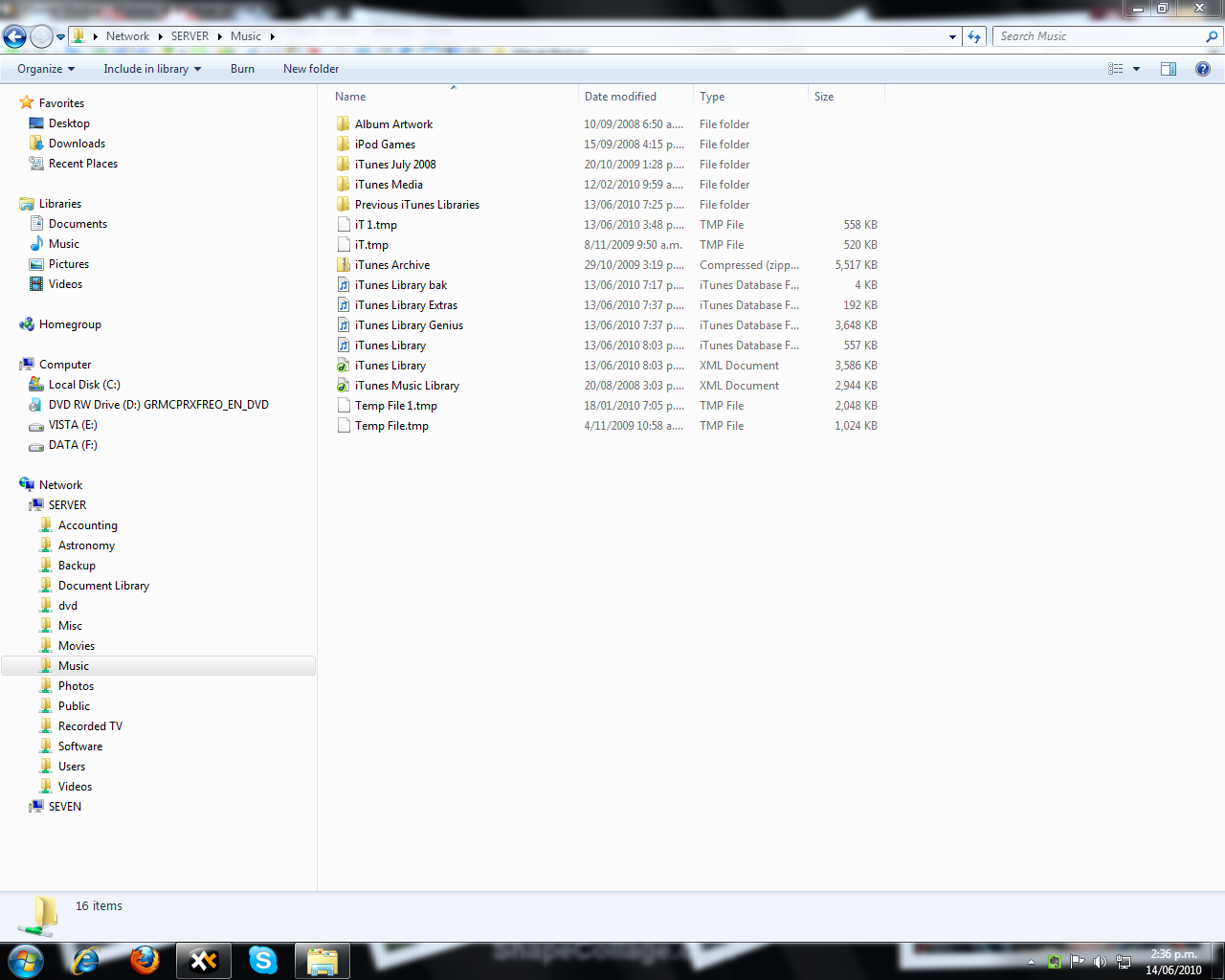
The files are visible in Explorer as you can see from the first screenshot. Files in subdirectories are visible.
Older versions of XyPlorer show the files just not the newer version.
Screenshots attached.
Any thoughts?
Paul Kemp
Auckland, NEW ZEALAND
- 2010-06-14 14-36-15.png (171.04 KiB) Viewed 3247 times

- 2010-06-14 14-38-14.png (162.81 KiB) Viewed 3247 times
Re: Network Files not visible in latest version
Posted: 14 Jun 2010 10:29
by Pulinski
Version v9.0 is the last version that I can see the files on the Server.
Please note that it is not only this directory...it is all directories immediately below \\SERVER

- 2010-06-14 20-26-28.png (84.84 KiB) Viewed 3241 times
Re: Network Files not visible in latest version
Posted: 15 Jun 2010 10:18
by admin
Cannot explain. I did not change code related to network browsing for a long time.
To rule out any configuration factors: could you test it with a fresh unregistered copy of 9.20, please?
Re: Network Files not visible in latest version
Posted: 18 Jun 2010 07:39
by Pulinski
Donald,
I have downloaded the no install version of v9.2. No luck. I have tried v9.2 on two different machines a Windows 7 32bit and Windows 7 64bit...without luck. The last known working version is Xyplorer v9.00.0207
For the record, the Server is Windows Home Server v6.0.2423.0
Paul
Re: Network Files not visible in latest version
Posted: 18 Jun 2010 08:52
by admin
Hm.
Why are folders listed and not files?
Why does no other user report this?
I have no answers at the moment.

Re: Network Files not visible in latest version
Posted: 19 Jun 2010 03:01
by Pulinski
The files in the folders under this directory are visible just not the top of the tree.
e.g
[\\SERVER\Music] shows no files.
[\\SERVER\Music\iTunes Media] shows all files.
This behavior is consistent across all shares and on all computers accessing these directories with XyPlorer v9.2
Mapping a drive shows the files correctly.
Paul
Re: Network Files not visible in latest version
Posted: 19 Jun 2010 09:31
by admin
Pulinski wrote:The files in the folders under this directory are visible just not the top of the tree.
e.g
[\\SERVER\Music] shows no files.
[\\SERVER\Music\iTunes Media] shows all files.
This behavior is consistent across all shares and on all computers accessing these directories with XyPlorer v9.2
Mapping a drive shows the files correctly.
Paul
Looks like a rights thing. Could you check the rights of those folders?
Re: Network Files not visible in latest version
Posted: 20 Jun 2010 04:28
by Pulinski
Well I can see the files in Windows Explorer. I can see and use the files in the directory.
I have tried running XY as admin, deleting permissions etc. I created a new share called \\SERVER\Test so as to not do some file damage. If I did not have rights to these directories...why can I see the files in Windows Explorer and with XY v 9.0.
I just don't know what to do...I am pulling my hair out over this one.
Paul
Re: Network Files not visible in latest version
Posted: 21 Jun 2010 09:28
by admin
Pulinski wrote:Well I can see the files in Windows Explorer. I can see and use the files in the directory.
I have tried running XY as admin, deleting permissions etc. I created a new share called \\SERVER\Test so as to not do some file damage. If I did not have rights to these directories...why can I see the files in Windows Explorer and with XY v 9.0.
I just don't know what to do...I am pulling my hair out over this one.
Paul
Same here. I pass this path to the normal browse procedure that's used for all paths in XY. There's no special treatment whatsoever. I wonder what in the world could cause the fact that it shows folders but not files...

What happens when you search the path? Does it also skip just the files of the top folder?
Re: Network Files not visible in latest version
Posted: 22 Jun 2010 06:14
by Pulinski
How would you like me to do that?
Re: Network Files not visible in latest version
Posted: 22 Jun 2010 06:18
by Pulinski
Donald,
What would be the best way to test permissions on the folder?
Paul
Re: Network Files not visible in latest version
Posted: 22 Jun 2010 08:02
by admin
Pulinski wrote:How would you like me to do that?
Go to the folder, then select menu
Edit / Show All Items in Branch.
Re: Network Files not visible in latest version
Posted: 22 Jun 2010 08:03
by admin
Pulinski wrote:Donald,
What would be the best way to test permissions on the folder?
Paul
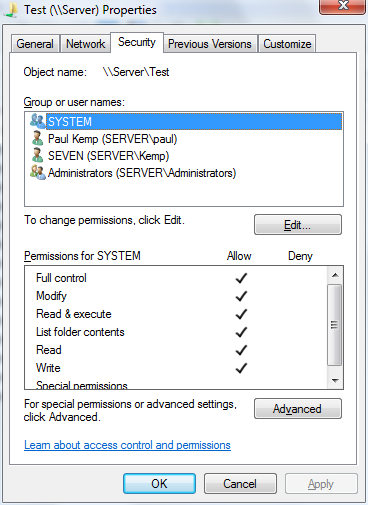
Right-click the folder and check out the security tab.
Re: Network Files not visible in latest version
Posted: 23 Jun 2010 04:22
by Pulinski
admin wrote:Go to the folder, then select menu Edit / Show All Items in Branch.
No files shown.
Paul
Re: Network Files not visible in latest version
Posted: 23 Jun 2010 04:24
by Pulinski
admin wrote:Right-click the folder and check out the security tab.
Yeah...I've been doing that.
- 2010-06-22 16-24-23.png (31.67 KiB) Viewed 3091 times
Any suggestions on a work around?
Paul