
Error opening with everything.exe app

Things you’d like to miss in the future...
Forum rules
:warnred20: :warnred20: :warnred20: :warnred20: :warnred20: READ THIS AND DO IT!!! :warnred20: :warnred20: :warnred20: :warnred20: :warnred20:

:info: Please include the following information:
1) Your XYplorer Version (e.g., v28.00.0801)
2) Your Windows Version (e.g., Win 11)
3) Your Screen Scaling Percentage (e.g., 125%).

:info: We strongly recommend adding your Windows Version and Screen Scaling Percentage to the Location field in your Profile or to your Signature. That way, you only have to type them once, and we won't have to search for that vital information.

:info: When attaching an Image, please use the Attachment tab at the bottom of your post and click "Add files".

:warnred20: :warnred20: :warnred20: :warnred20: :warnred20: READ THIS AND DO IT!!! :warnred20: :warnred20: :warnred20: :warnred20: :warnred20:
Post Reply
SaiKarthik
Posts: 30
Joined: 05 Aug 2023 17:32

Error opening with everything.exe app

Post by SaiKarthik »

I am trying to add a custom button to open the <curname> or <curpath> from everything.exe app using the below script.

Code: Select all


 $app = "C:\Program Files\Everything\Everything.exe";

 $target = "";
 if ("<curname>" == "") {
   $target = "<curpath>";
 } else {
   $target = "<curname>";
 }

 run """$app"" ""$target""";
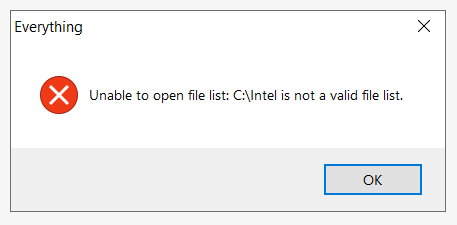
 
it is throwing below error but it works when right click and open the everything.exe app from right click menu.
Image

But, it is working completely fine with vscode with no errors and as required.

Code: Select all


 $app = "%USERPROFILE%\AppData\Local\Programs\Microsoft VS Code\Code.exe";

 $target = "";
 if ("<curname>" == "") {
   $target = "<curpath>";
 } else {
   $target = "<curname>";
 }

 run """$app"" ""$target""";
 

highend
Posts: 14940
Joined: 06 Feb 2011 00:33
Location: Win Server 2022 @100%

Re: Error opening with everything.exe app

Post by highend »

So, from a command prompt:

Code: Select all

"C:\Program Files\Everything\Everything.exe" "C:\Intel"
works fine?
One of my scripts helped you out? Please donate via Paypal

SaiKarthik
Posts: 30
Joined: 05 Aug 2023 17:32

Re: Error opening with everything.exe app

Post by SaiKarthik »

This is throwing the same error.

As you posted the command, I can understand this is something which command prompt is getting executed with command.

Then I searched the documentation for everything.exe.

"C:\Program Files\Everything\Everything.exe" -p "C:\Intel"


This -p is missing and adding this fixed it.

Now I understood and fixed it.

Thanks.

Post Reply
