 XYplorer Beta Club
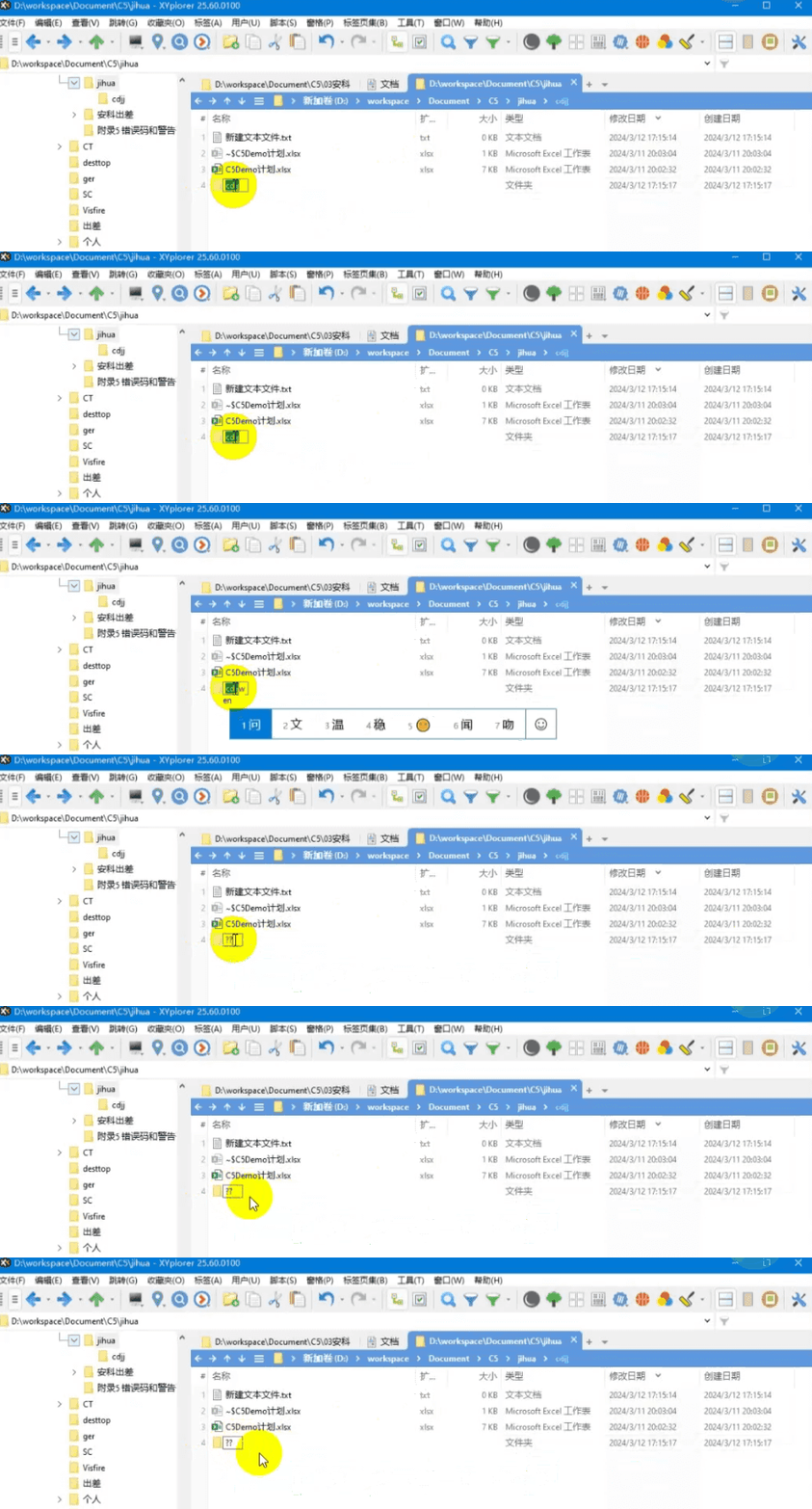
When the file is renamed, it will become "???"
Forum rules
 READ THIS AND DO IT!!!
 Please include the following information:
1) Your XYplorer Version (e.g., v28.00.0801)
2) Your Windows Version (e.g., Win 11)
3) Your Screen Scaling Percentage (e.g., 125%).
We strongly recommend adding your Windows Version and Screen Scaling Percentage to the Location field in your Profile or to your Signature. That way, you only have to type them once, and we won't have to search for that vital information.
When attaching an Image, please use the Attachment tab at the bottom of your post and click "Add files".
READ THIS AND DO IT!!!
READ THIS AND DO IT!!! Please include the following information:1) Your XYplorer Version (e.g., v28.00.0801)
2) Your Windows Version (e.g., Win 11)
3) Your Screen Scaling Percentage (e.g., 125%).
We strongly recommend adding your Windows Version and Screen Scaling Percentage to the Location field in your Profile or to your Signature. That way, you only have to type them once, and we won't have to search for that vital information. When attaching an Image, please use the Attachment tab at the bottom of your post and click "Add files". READ THIS AND DO IT!!!
-
apsgocom
- Posts: 13
- Joined: 04 Dec 2023 01:33
When the file is renamed, it will become "???"
When the file is renamed, it will become "???" You can enter it in English, but after entering Chinese, it will become ???,However, Chinese characters can be copied and renamed successfully, but cannot be entered.
-
admin
- Site Admin
- Posts: 66590
- Joined: 22 May 2004 16:48
- Location: Win8.1, Win10, Win11, all @100%
- Contact:
Re: When the file is renamed, it will become "???"
Can you type Chinese characters into the address bar?
FAQ | XY News RSS | XY X
-
apsgocom
- Posts: 13
- Joined: 04 Dec 2023 01:33
Re: When the file is renamed, it will become "???"
I just got a reply from a customer today, the same problem with the address bar.
-
admin
- Site Admin
- Posts: 66590
- Joined: 22 May 2004 16:48
- Location: Win8.1, Win10, Win11, all @100%
- Contact:
Re: When the file is renamed, it will become "???"
It probably depends on the input method (IME). I haven't heard such reports from other Chinese customers or other East Asian users who also use IME. Maybe the customer can try another input method?
FAQ | XY News RSS | XY X