Page 1 of 2
Can't get Glider to work
Posted: 07 Sep 2023 17:05
by acheton
Hi Don,
I'm on the current beta and have enable the glider using the menu option. However when I hover to the left or right of a folder in the tree, whether selected or not, nothing appears. What am I doing wrong?
thanks
Ach
Re: Can't get Glider to work
Posted: 07 Sep 2023 17:13
by klownboy
Try hovering to the left or right side of the tree frame as opposed to just to the left or right of the folder itself.
Re: Can't get Glider to work
Posted: 07 Sep 2023 17:45
by admin
Tools | Customize Tree | Show Glider
Re: Can't get Glider to work
Posted: 07 Sep 2023 19:29
by acheton
klownboy wrote: ↑07 Sep 2023 17:13
Try hovering to the left or right side of the tree frame as opposed to just to the left or right of the folder itself.
I've tried this, but it still doesn't appear.
Re: Can't get Glider to work
Posted: 07 Sep 2023 19:30
by acheton
admin wrote: ↑07 Sep 2023 17:45
Tools | Customize Tree | Show Glider
Already enabled!
Re: Can't get Glider to work
Posted: 08 Sep 2023 08:46
by kiwichick
I was having trouble too until I figured out exactly where the hover needs to happen. Please your cursor just to the left of the 'dividing' panel between the tree and the list (marked in red on my screenshot).
EDITED TO ADD: The cursor can be placed further in than that but if it works right next to the dividing panel, at least you'll know it's working. [Thanks Don for pointing out that my comment was misleading.]
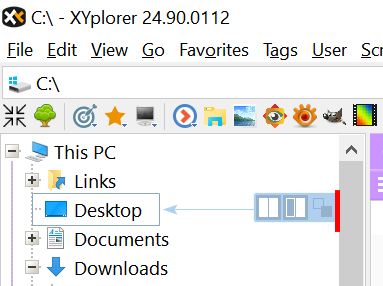
- 2023-09-08_184231.png (23.3 KiB) Viewed 2163 times
Re: Can't get Glider to work
Posted: 08 Sep 2023 09:02
by admin
The pic is misleading. The hover zone is at least as wide as the scrollbar (can be made 4 times wider).
Re: Can't get Glider to work
Posted: 08 Sep 2023 09:12
by kiwichick
admin wrote: ↑08 Sep 2023 09:02
The pic is misleading. The hover zone is at least as wide as the scrollbar (can be made 4 times wider).
Yes, you are right. Maybe I should have worded my comment better. I was trying to point out that by starting at least that close to the dividing panel, it would be obvious if the glider is working or not. I'll re-word my comment.
Re: Can't get Glider to work
Posted: 09 Sep 2023 18:34
by acheton
Thanks everyone, I am happy to report that in the latest beta, it seems to have started working. Thanks everyone for your help!
Re: Can't get Glider to work
Posted: 14 Sep 2023 23:42
by Malarki
I was puzzled too until I remembered / realized that something must be selected (not just highlighted) in a List pane before the Glider will appear in the Tree. Then it works exactly as shown by kiwichick above.
Re: Can't get Glider to work
Posted: 15 Sep 2023 08:20
by admin
No, not really. The glider always appears, only two of the buttons are disabled when nothing is selected in the list.
Re: Can't get Glider to work
Posted: 15 Sep 2023 09:39
by Malarki
Yes, the Glider does appear if an object is highlighted. Maybe I'm thinking of how an earlier version worked, or moused too fast in a trial of it.
Re: Can't get Glider to work
Posted: 15 Sep 2023 09:46
by admin
Malarki wrote: ↑15 Sep 2023 09:39
Yes, the Glider does appear if an object is highlighted.
No, the Glider does appear when the mouse stops in the hover zone.
Re: Can't get Glider to work
Posted: 28 Oct 2023 06:59
by zanny
Thanks kiwichick for helping me find it!
My issue is that I'm using a dark theme, so besides from not finding the right spot for the cursor initially, the hover box is black.
Now I have switched colour to white (FFFFFF) and changed settings to "both edges", "all white space" and "extra large" and "buttons per row = 4" and now it's much better for me.
Think instructions need to be a tad clearer boss. But I just love that XYplorer development keeps going, bringing new functions, not just bug squashes like other apps.
Re: Can't get Glider to work
Posted: 28 Oct 2023 11:08
by admin
Why does Dark Mode make a difference here?