
I can't select pdf files when opening the preview pane.

Things you’d like to miss in the future...
Forum rules
:warnred20: :warnred20: :warnred20: :warnred20: :warnred20: READ THIS AND DO IT!!! :warnred20: :warnred20: :warnred20: :warnred20: :warnred20:

:info: Please include the following information:
1) Your XYplorer Version (e.g., v28.00.0801)
2) Your Windows Version (e.g., Win 11)
3) Your Screen Scaling Percentage (e.g., 125%).

:info: We strongly recommend adding your Windows Version and Screen Scaling Percentage to the Location field in your Profile or to your Signature. That way, you only have to type them once, and we won't have to search for that vital information.

:info: When attaching an Image, please use the Attachment tab at the bottom of your post and click "Add files".

:warnred20: :warnred20: :warnred20: :warnred20: :warnred20: READ THIS AND DO IT!!! :warnred20: :warnred20: :warnred20: :warnred20: :warnred20:
Post Reply
minikyu
Posts: 4
Joined: 06 May 2023 09:32

I can't select pdf files when opening the preview pane.

Post by minikyu »

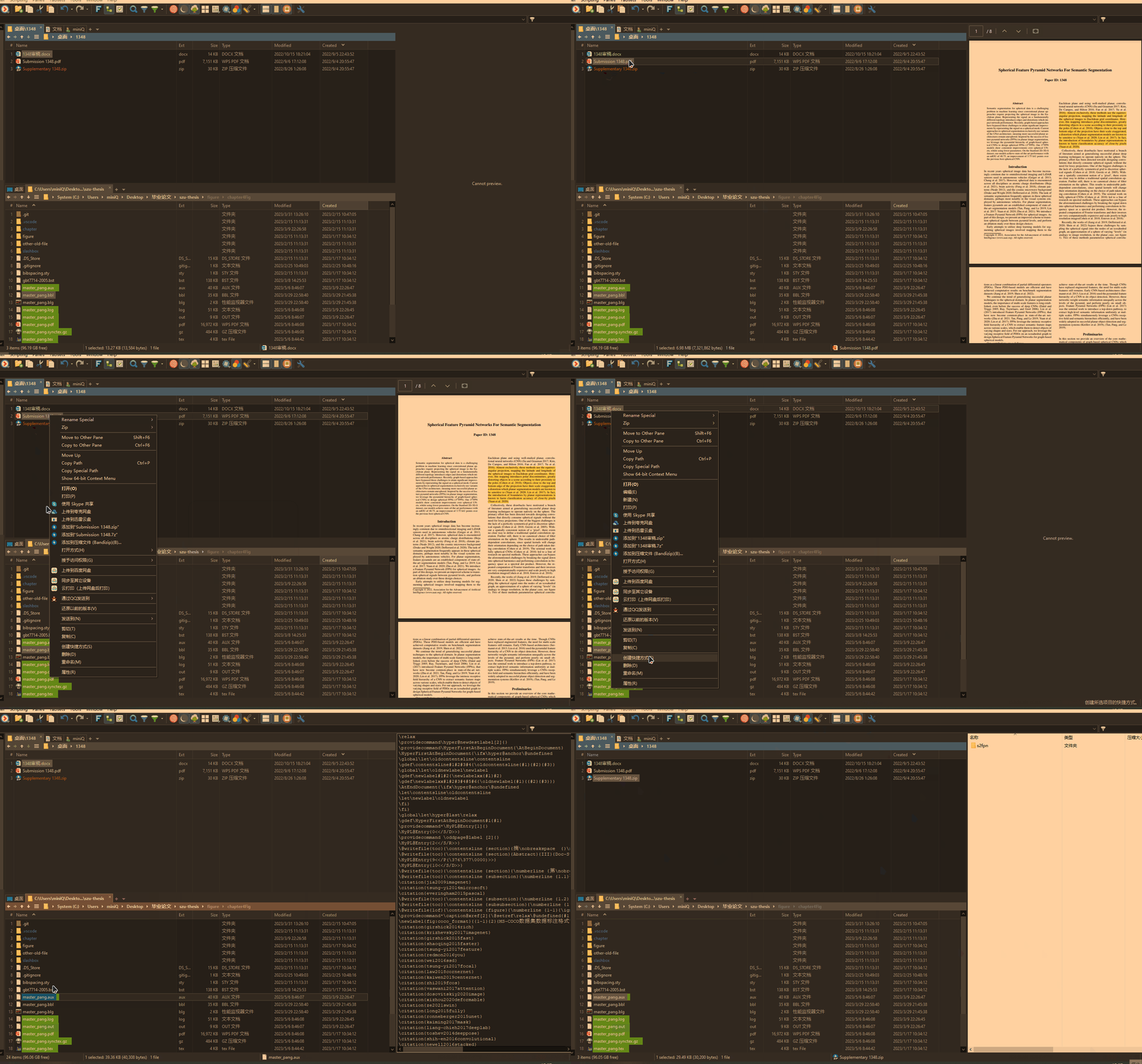
My operating system is Window 10, and XYplorer version is 24.30.0100. I make a gif to show this bug. (maybe)

1. When selecting other files, everything is OK. The color filter shows blue, meaning I am selecting it, and I can rename, copy or do other things.

2. When selecting a pdf file, the color filter shows grey. I can still open the file by double-clicking, but all the right-click functions such as rename, delete, etc. are disabled. When I try to do that, XYplorer just warns " Tree or List must have input focus", or "Nothing to delete". It seems that I didn't choose a file.

3. What's more, after I choose a pdf file, the whole working pane gets wrong, I can't select other files as well, even though I can do so a moment ago.

4. When I select a file in the other working pane, the first pane returns to normal until I select a pdf file again.

5. When I close the preview pane, things return to normal. So I think it has something to do with the preview pane.
Image

XAlphaClub
Posts: 6
Joined: 09 May 2023 14:11

Re: I can't select pdf files when opening the preview pane.

Post by XAlphaClub »

Same bug here. The last official release OK was 24.20.0500.
24.30.0100 and more are KO.
Between them, I dont know because I never load beta version.

admin
Site Admin
Posts: 66584
Joined: 22 May 2004 16:48
Location: Win8.1, Win10, Win11, all @100%
Contact:

Re: I can't select pdf files when opening the preview pane.

Post by admin »

Interesting, but I cannot reproduce it here. Probably depends on the preview handler responsible for PDF.

While the PDF preview is shown, paste this into the address bar and press ENTER:

Code: Select all

text get("previewhandler");
What is returned?

PS: Anyway, should be fixed in the next beta.

XAlphaClub
Posts: 6
Joined: 09 May 2023 14:11

Re: I can't select pdf files when opening the preview pane.

Post by XAlphaClub »

Bug fixed with v24.40.0002. Thanks.

minikyu
Posts: 4
Joined: 06 May 2023 09:32

Re: I can't select pdf files when opening the preview pane.

Post by minikyu »

admin wrote: 12 May 2023 17:19 Interesting, but I cannot reproduce it here. Probably depends on the preview handler responsible for PDF.

While the PDF preview is shown, paste this into the address bar and press ENTER:

Code: Select all

text get("previewhandler");
What is returned?

PS: Anyway, should be fixed in the next beta.
It returns

Code: Select all

Previewed Extension: pdf
Preview Handler: PDF Preview Handler [64-bit]
Display Name: PDF Preview Handler
GUID: {3a84f9c2-6164-485c-a7d9-4b27f8ac009e}
Initialization: IInitializeWithFile
OS: Windows 10 Pro, 64-bit, Version 22H2, Build 19045.2965 (10.0), .NET v4.8.04084
Screen Scaling: 100%
XYplorer 24.30.0100  -  Lifetime License Professional (Discount)  -  2023-05-16 19:31:05

admin
Site Admin
Posts: 66584
Joined: 22 May 2004 16:48
Location: Win8.1, Win10, Win11, all @100%
Contact:

Re: I can't select pdf files when opening the preview pane.

Post by admin »

Is it fixed in v24.40.0002 or later?

minikyu
Posts: 4
Joined: 06 May 2023 09:32

Re: I can't select pdf files when opening the preview pane.

Post by minikyu »

admin wrote: 16 May 2023 14:38 Is it fixed in v24.40.0002 or later?
It fix now. Thanks!

Post Reply
