Page 1 of 2
[Half the problem is solved]How does 'win+E' open with a new TAB and then don't as a new window?
Posted: 11 Mar 2022 09:17
by star
1. If the xyplorer window does not exist, open the new window. If the window existed, there would be a new TAB.
Wonder what script can redirect the hidden XY process in the lower right tray and then open a new TAB in the existing window process.
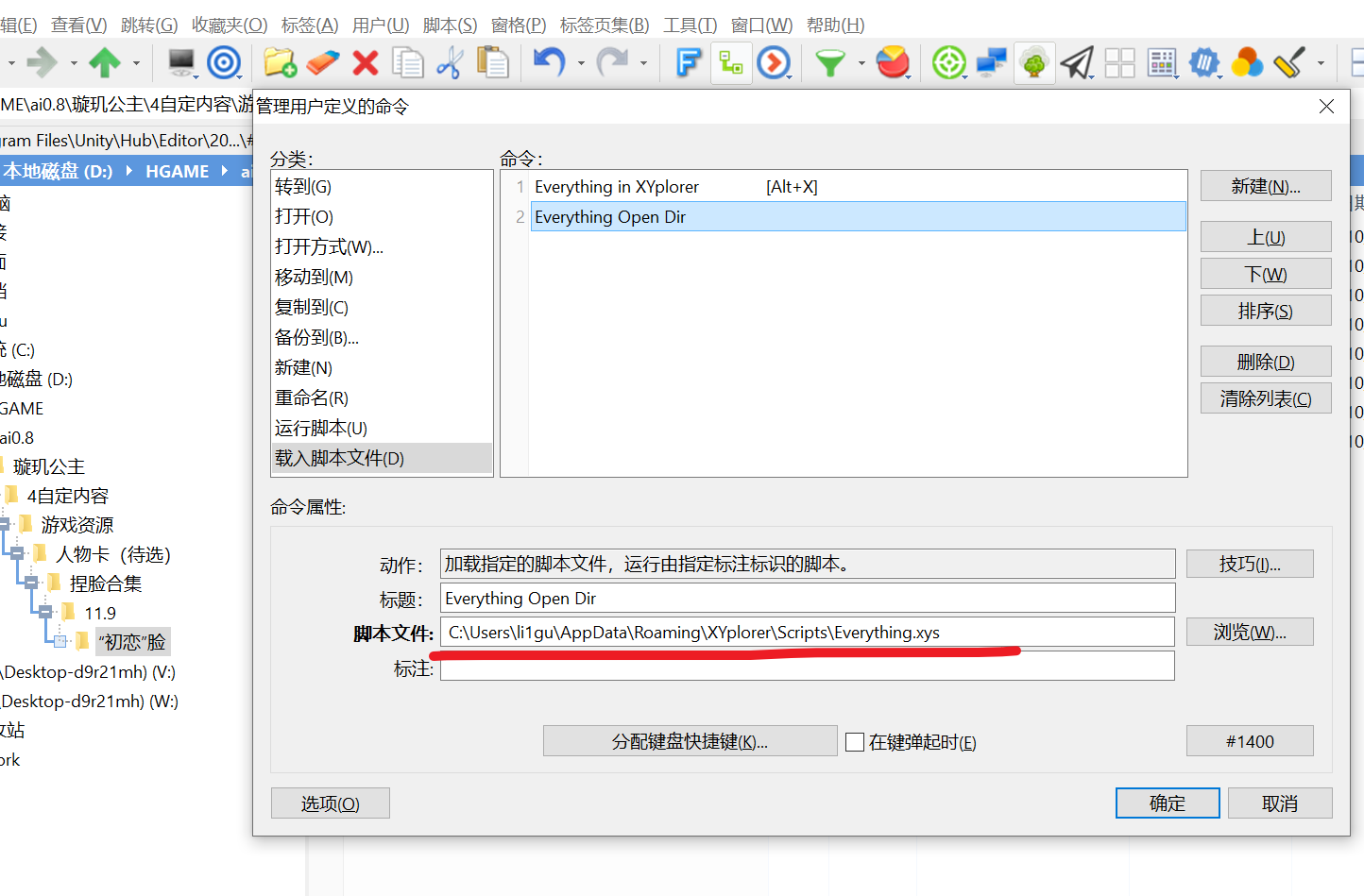
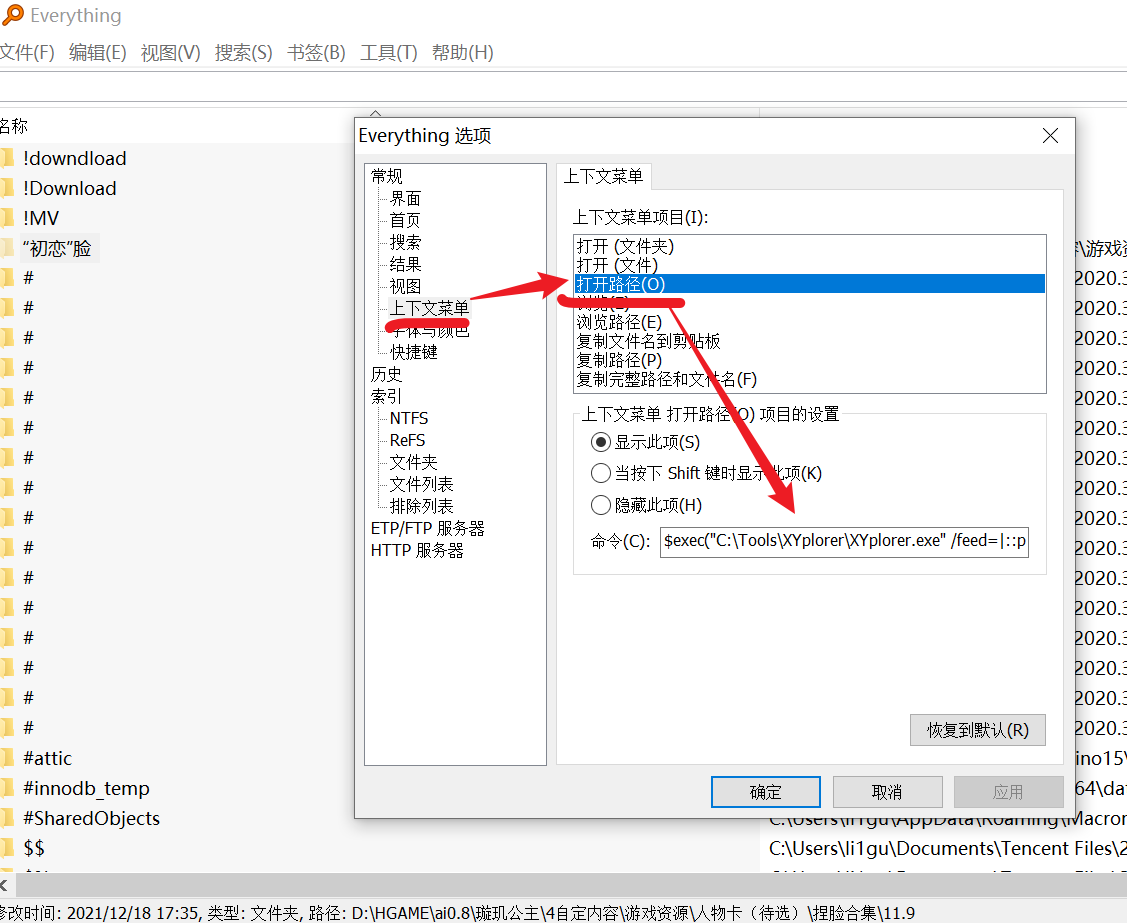
2. [resolved]I search for the file in everything and open the file path and open it with a new TAB?

$exec("C:\Tools\XYplorer\XYplorer.exe" /feed=|::perm $$P_EVERYTHING_FOLDER = "%1"; load "Everything.xys";|)
Create a new xys file in the script directory, and open it in TXT format:
Code: Select all
perm $P_EVERYTHING_FOLDER;

    if (exists($P_EVERYTHING_FOLDER) == 2) {
        tab("new", $P_EVERYTHING_FOLDER);
    }
    unset $P_EVERYTHING_FOLDER;
Re: How does 'win+E' open with a new TAB and then don't as a new window?
Posted: 11 Mar 2022 09:40
by highend
1. Only possible via external tools
E.g. via an ahk script
Win+E [New tab].zip
2. What does "open it with a new tag" mean?
Re: How does 'win+E' open with a new TAB and then don't as a new window?
Posted: 11 Mar 2022 11:15
by star
highend wrote: ↑11 Mar 2022 09:40
1. Only possible via external tools
E.g. via an ahk script
Win+E [New tab].zip
2. What does "open it with a new tag" mean?
Sorry, I'm a foreigner and my English may not be very good
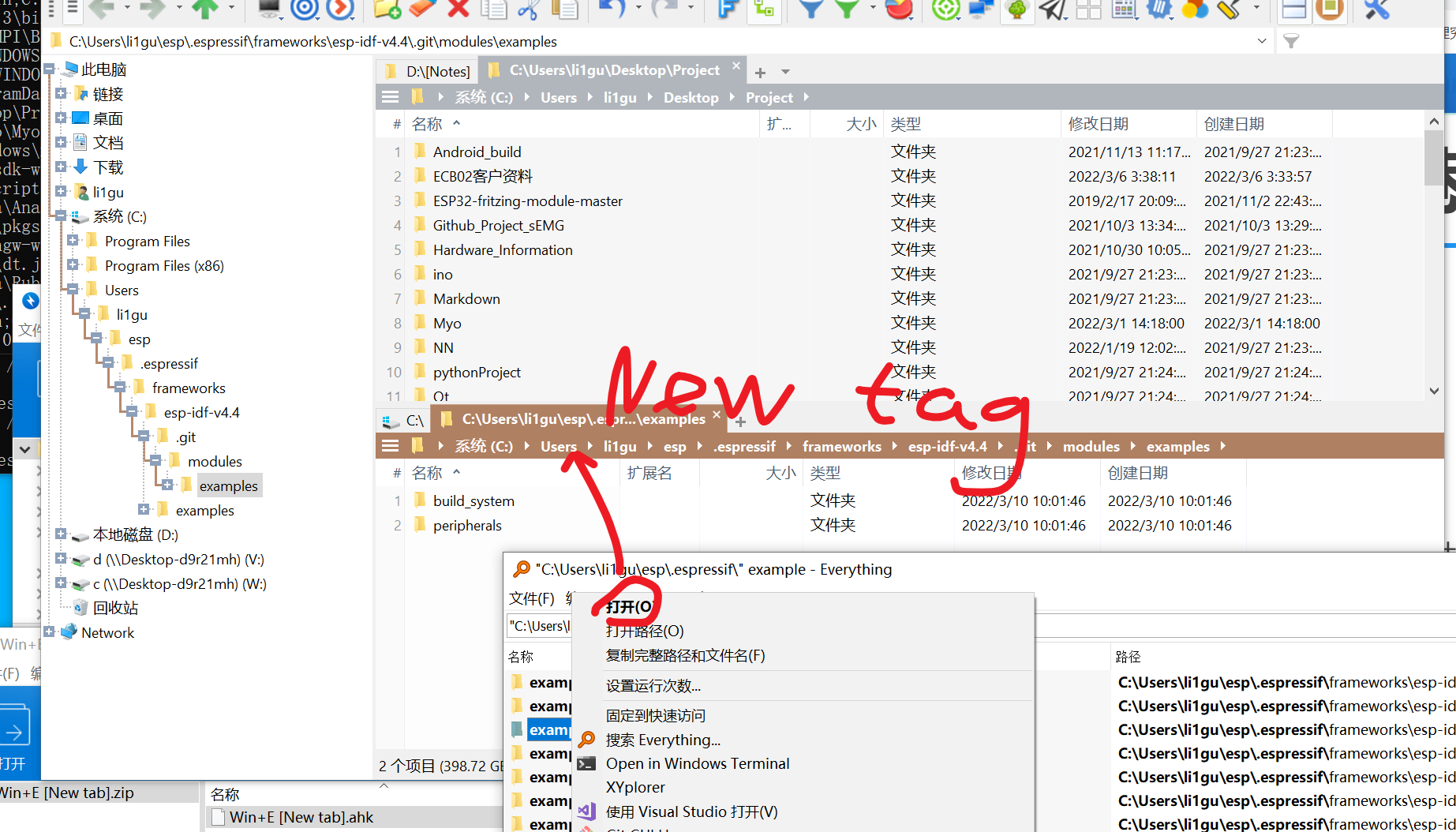
How does open with a new tag?
Re: How does 'win+E' open with a new TAB and then don't as a new window?
Posted: 11 Mar 2022 11:24
by star
highend wrote: ↑11 Mar 2022 09:40
1. Only possible via external tools
E.g. via an ahk script
Win+E [New tab].zip
2. What does "open it with a new tag" mean?
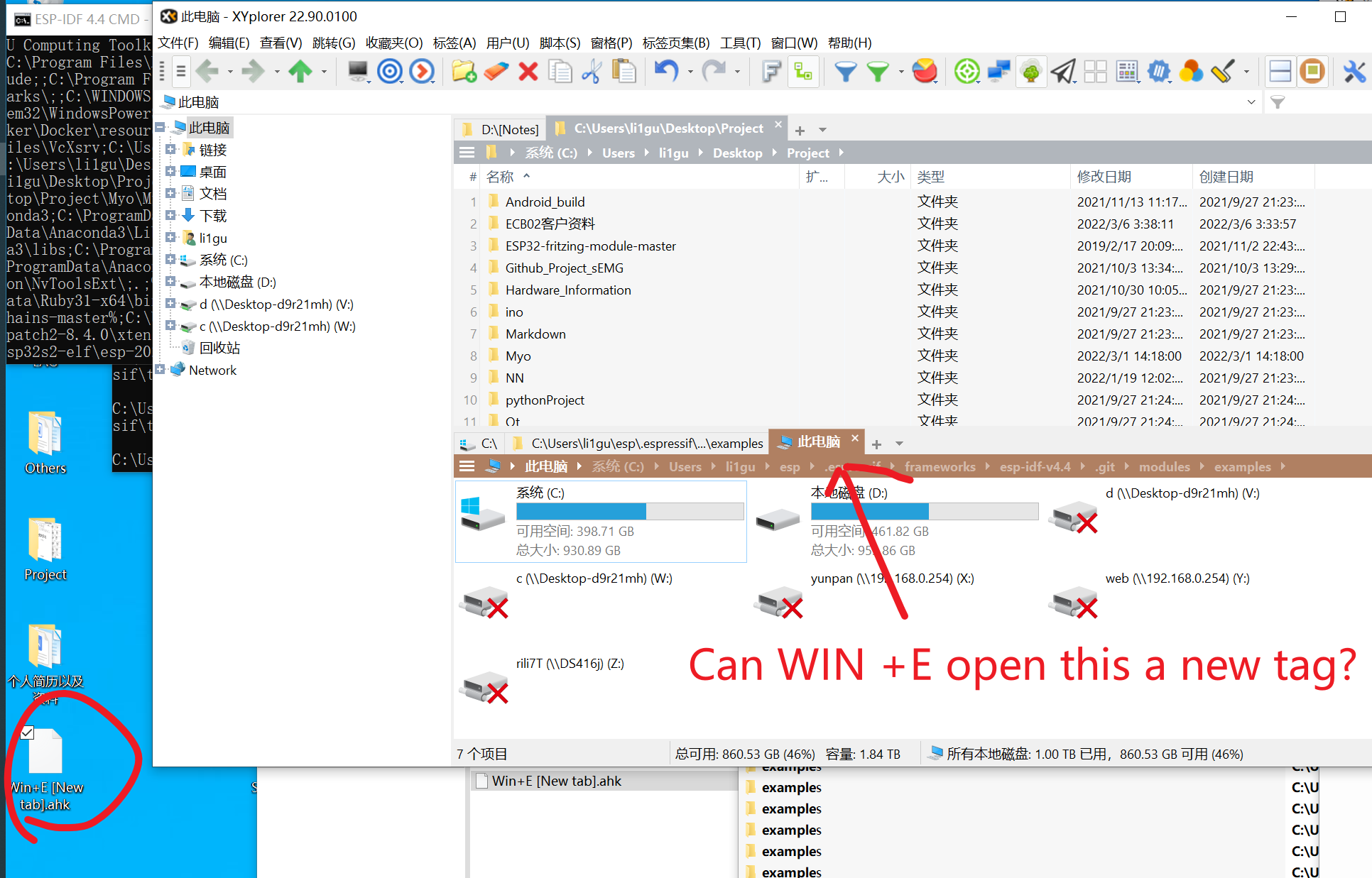
Sorry, ahK seems to be a keyboard macro. Is that how it works?
Re: How does 'win+E' open with a new TAB and then don't as a new window?
Posted: 11 Mar 2022 12:13
by highend
ahk is a programming language:
https://www.autohotkey.com
Still no clue what a tag should be...
If you mean that you want to be able to open a folder from everything via XYplorer as a new tab you would configure it's context menu configuration for "Open (Folders)" e.g. like this:
Command:
Code: Select all
$exec("D:\Tools\XYplorer\XYplorer.exe" /feed=|::perm $$P_EVERYTHING_FOLDER = "%1"; load "Open folders via Everything.xys";|)
while that script could look like this:
Code: Select all
perm $P_EVERYTHING_FOLDER;

    if (exists($P_EVERYTHING_FOLDER) == 2) {
        tab("new", $P_EVERYTHING_FOLDER);
    }
    unset $P_EVERYTHING_FOLDER;
and needs to reside in
%APPDATA%\XYplorer\Scripts
Re: How does 'win+E' open with a new TAB and then don't as a new window?
Posted: 11 Mar 2022 13:19
by Norn
Re: How does 'win+E' open with a new TAB and then don't as a new window?
Posted: 11 Mar 2022 15:16
by star
highend wrote: ↑11 Mar 2022 12:13
ahk is a programming language:
https://www.autohotkey.com
Still no clue what a tag should be...
If you mean that you want to be able to open a folder from everything via XYplorer as a new tab you would configure it's context menu configuration for "Open (Folders)" e.g. like this:
Command:
Code: Select all
$exec("D:\Tools\XYplorer\XYplorer.exe" /feed=|::perm $$P_EVERYTHING_FOLDER = "%1"; load "Open folders via Everything.xys";|)
while that script could look like this:
Code: Select all
perm $P_EVERYTHING_FOLDER;

    if (exists($P_EVERYTHING_FOLDER) == 2) {
        tab("new", $P_EVERYTHING_FOLDER);
    }
    unset $P_EVERYTHING_FOLDER;
and needs to reside in
%APPDATA%\XYplorer\Scripts
I downloaded the AHK program and it worked perfectly

, but that "Open the file path" didn't open a folder from Everything via XYplorer as a new tab, and then it open the path in the most recently active TAB.
I'm studying your AHK file and honestly don't quite understand it.

"$exec....." I'm new, so I'll study this order by reading the documentation.

Re: How does 'win+E' open with a new TAB and then don't as a new window?
Posted: 11 Mar 2022 15:23
by highend
It's not ANK, it's AHK
My Everything doesn't have any "Open the file path" context menu entries...
You obviously misconfigured something, because that XY script always opens a path as a new tab: tab("new", $P_EVERYTHING_FOLDER);
Re: How does 'win+E' open with a new TAB and then don't as a new window?
Posted: 11 Mar 2022 15:54
by star
Thank you

I found that when I minimized the XY tray, pressing Win +E opened a new window, and the script didn't seem to detect the existing XY window process, cannot open a new TAB from that process.
Re: How does 'win+E' open with a new TAB and then don't as a new window?
Posted: 11 Mar 2022 16:15
by star
highend wrote: ↑11 Mar 2022 15:23
It's not ANK, it's AHK
My Everything doesn't have any "Open the file path" context menu entries...
You obviously misconfigured something, because that XY script always opens a path as a new tab:
tab("new", $P_EVERYTHING_FOLDER);
Sorry, I translated "打开路径" into "Open the file path". I checked online and it should be translated into "Open path".
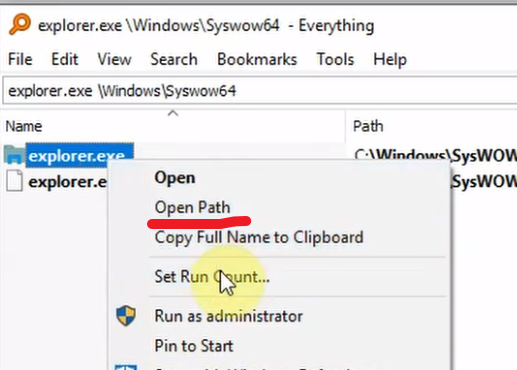
First time to use XY, not sure how to use scripts. I reading the document and will reply later.
Re: How does 'win+E' open with a new TAB and then don't as a new window?
Posted: 11 Mar 2022 16:29
by highend
Obviously you need to configure the "Open Path" entry in the context menu config option in Everything then?
Re: How does 'win+E' open with a new TAB and then don't as a new window?
Posted: 11 Mar 2022 16:44
by star
highend wrote: ↑11 Mar 2022 15:23
It's not ANK, it's AHK
My Everything doesn't have any "Open the file path" context menu entries...
You obviously misconfigured something, because that XY script always opens a path as a new tab:
tab("new", $P_EVERYTHING_FOLDER);
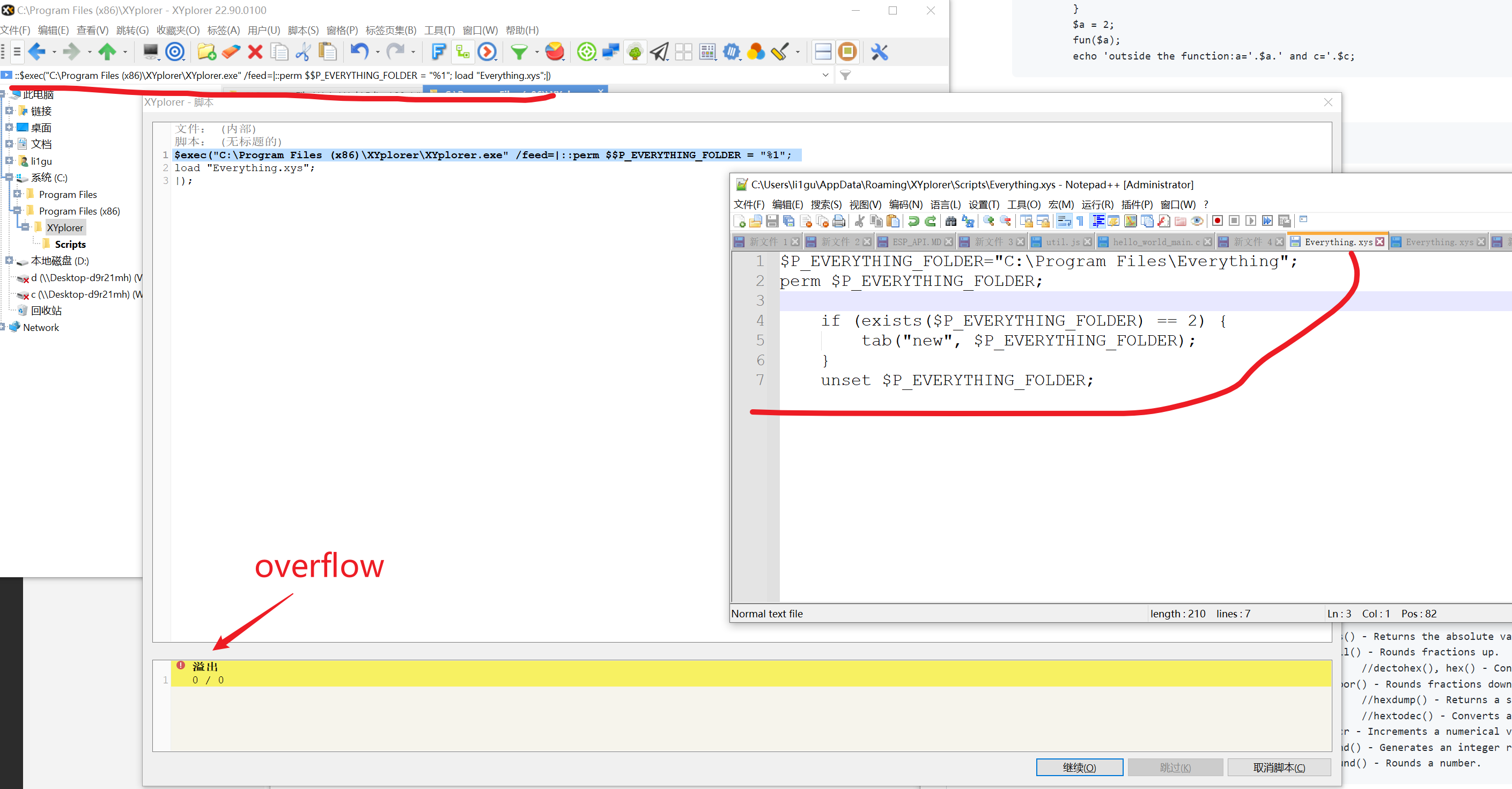

I read about the use of the command, sorry I don't quite understand how it works in Everything.
Re: How does 'win+E' open with a new TAB and then don't as a new window?
Posted: 11 Mar 2022 16:50
by star
highend wrote: ↑11 Mar 2022 16:29
Obviously you need to configure the "Open Path" entry in the context menu config option in Everything then?
Yes✔ *^____^*
This gif is a previous problem, but I don't know how to use it.. Now the problem has been solved, thanks to Norn user for his advice.
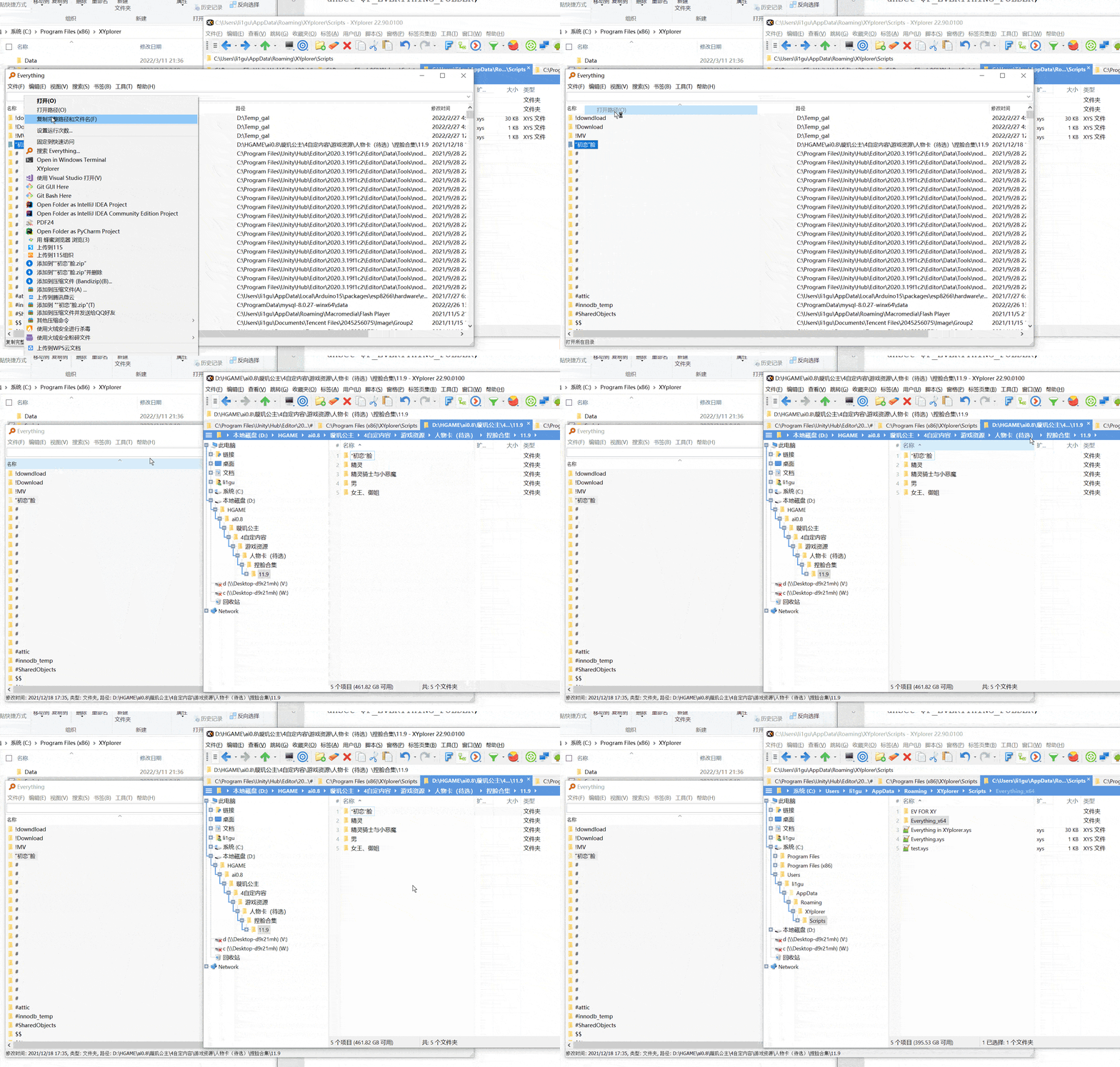
ANK can detect the hidden XY process of tray, and then Win+E can open a new TAB through this process?
I'm a little sorry that Norn doesn't think redirecting to hidden processes is feasible
Re: How does 'win+E' open with a new TAB and then don't as a new window?
Posted: 11 Mar 2022 17:19
by Norn
star wrote: ↑11 Mar 2022 15:54
Thank you
I found that when I minimized the XY tray, pressing Win +E opened a new window, and the script didn't seem to detect the existing XY window process, cannot open a new TAB from that process.
"[AHK] redirecting Windows Explorer to XY" Can't support XY minimize to tray...
viewtopic.php?f=11&t=23880
This script can:
star wrote: ↑11 Mar 2022 15:16
highend wrote: ↑11 Mar 2022 12:13
ahk is a programming language:
https://www.autohotkey.com
Still no clue what a tag should be...
If you mean that you want to be able to open a folder from everything via XYplorer as a new tab you would configure it's context menu configuration for "Open (Folders)" e.g. like this:
Command:
Code: Select all
$exec("D:\Tools\XYplorer\XYplorer.exe" /feed=|::perm $$P_EVERYTHING_FOLDER = "%1"; load "Open folders via Everything.xys";|)
while that script could look like this:
Code: Select all
perm $P_EVERYTHING_FOLDER;

    if (exists($P_EVERYTHING_FOLDER) == 2) {
        tab("new", $P_EVERYTHING_FOLDER);
    }
    unset $P_EVERYTHING_FOLDER;
and needs to reside in
%APPDATA%\XYplorer\Scripts
I downloaded the AHK program and it worked perfectly
, but that "Open the file path" didn't open a folder from Everything via XYplorer as a new tab, and then it open the path in the most recently active TAB.
I'm studying your AHK file and honestly don't quite understand it.
"$exec....." I'm new, so I'll study this order by reading the documentation.
Re: How does 'win+E' open with a new TAB and then don't as a new window?
Posted: 11 Mar 2022 17:59
by star
Norn wrote: ↑11 Mar 2022 17:19
star wrote: ↑11 Mar 2022 15:54
Thank you
I found that when I minimized the XY tray, pressing Win +E opened a new window, and the script didn't seem to detect the existing XY window process, cannot open a new TAB from that process.
"[AHK] redirecting Windows Explorer to XY" Can't support XY minimize to tray...
viewtopic.php?f=11&t=23880
This script can:
star wrote: ↑11 Mar 2022 15:16
highend wrote: ↑11 Mar 2022 12:13
ahk is a programming language:
https://www.autohotkey.com
Still no clue what a tag should be...
If you mean that you want to be able to open a folder from everything via XYplorer as a new tab you would configure it's context menu configuration for "Open (Folders)" e.g. like this:
Command:
Code: Select all
$exec("D:\Tools\XYplorer\XYplorer.exe" /feed=|::perm $$P_EVERYTHING_FOLDER = "%1"; load "Open folders via Everything.xys";|)
while that script could look like this:
Code: Select all
perm $P_EVERYTHING_FOLDER;

    if (exists($P_EVERYTHING_FOLDER) == 2) {
        tab("new", $P_EVERYTHING_FOLDER);
    }
    unset $P_EVERYTHING_FOLDER;
and needs to reside in
%APPDATA%\XYplorer\Scripts
I downloaded the AHK program and it worked perfectly
, but that "Open the file path" didn't open a folder from Everything via XYplorer as a new tab, and then it open the path in the most recently active TAB.
I'm studying your AHK file and honestly don't quite understand it.
"$exec....." I'm new, so I'll study this order by reading the documentation.
Thank you!!! The problem was solved successfully.
But the path cannot be found, Copy the XY folder to another path is fine:


 , but that "Open the file path" didn't open a folder from Everything via XYplorer as a new tab, and then it open the path in the most recently active TAB.


