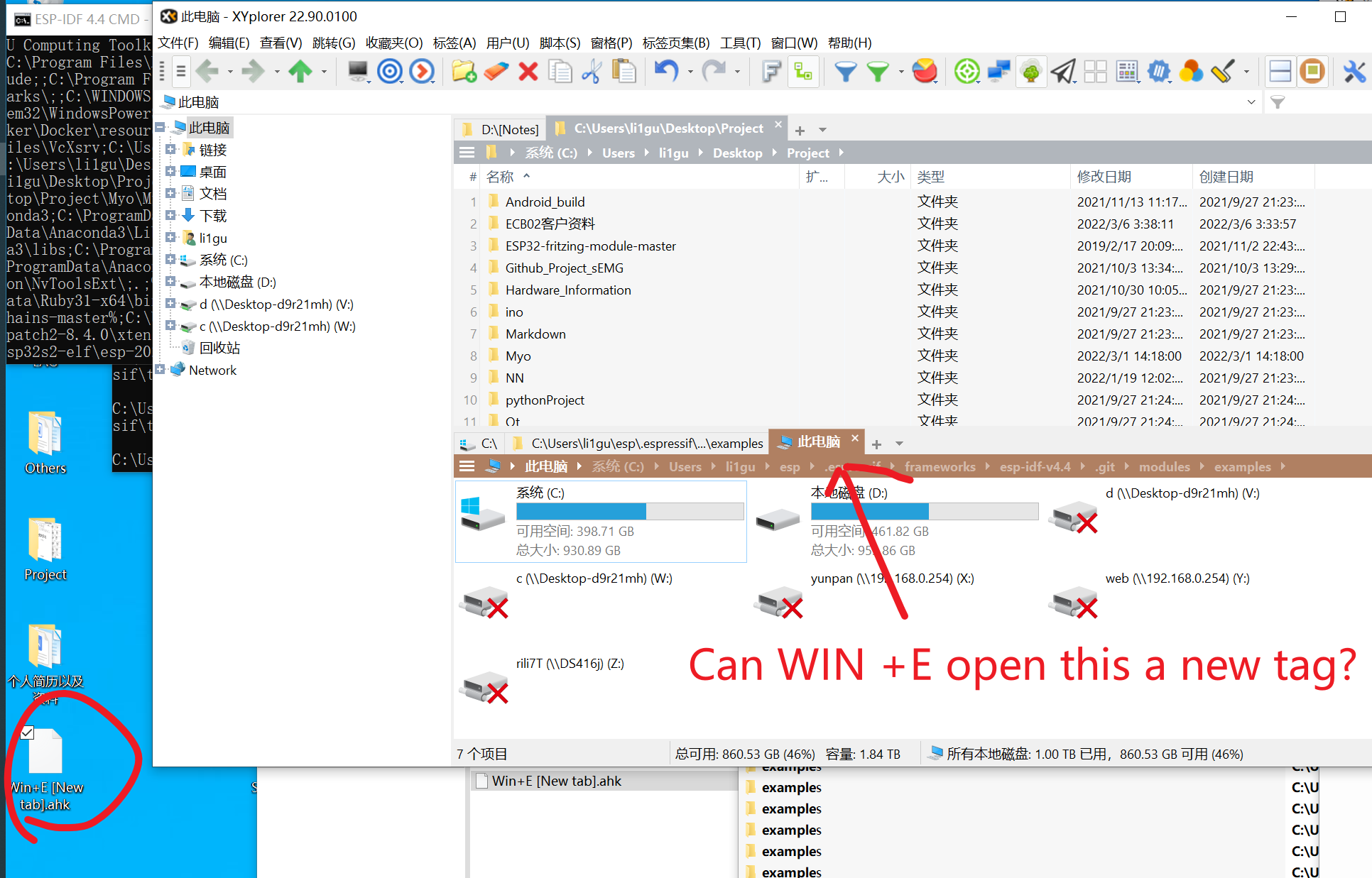
[Half the problem is solved]How does 'win+E' open with a new TAB and then don't as a new window?

Please check the FAQ (https://www.xyplorer.com/faq.php) before posting a question...
star
Posts: 46
Joined: 11 Mar 2022 08:18

[Half the problem is solved]How does 'win+E' open with a new TAB and then don't as a new window?

Post by star »

1. If the xyplorer window does not exist, open the new window. If the window existed, there would be a new TAB.

Wonder what script can redirect the hidden XY process in the lower right tray and then open a new TAB in the existing window process.

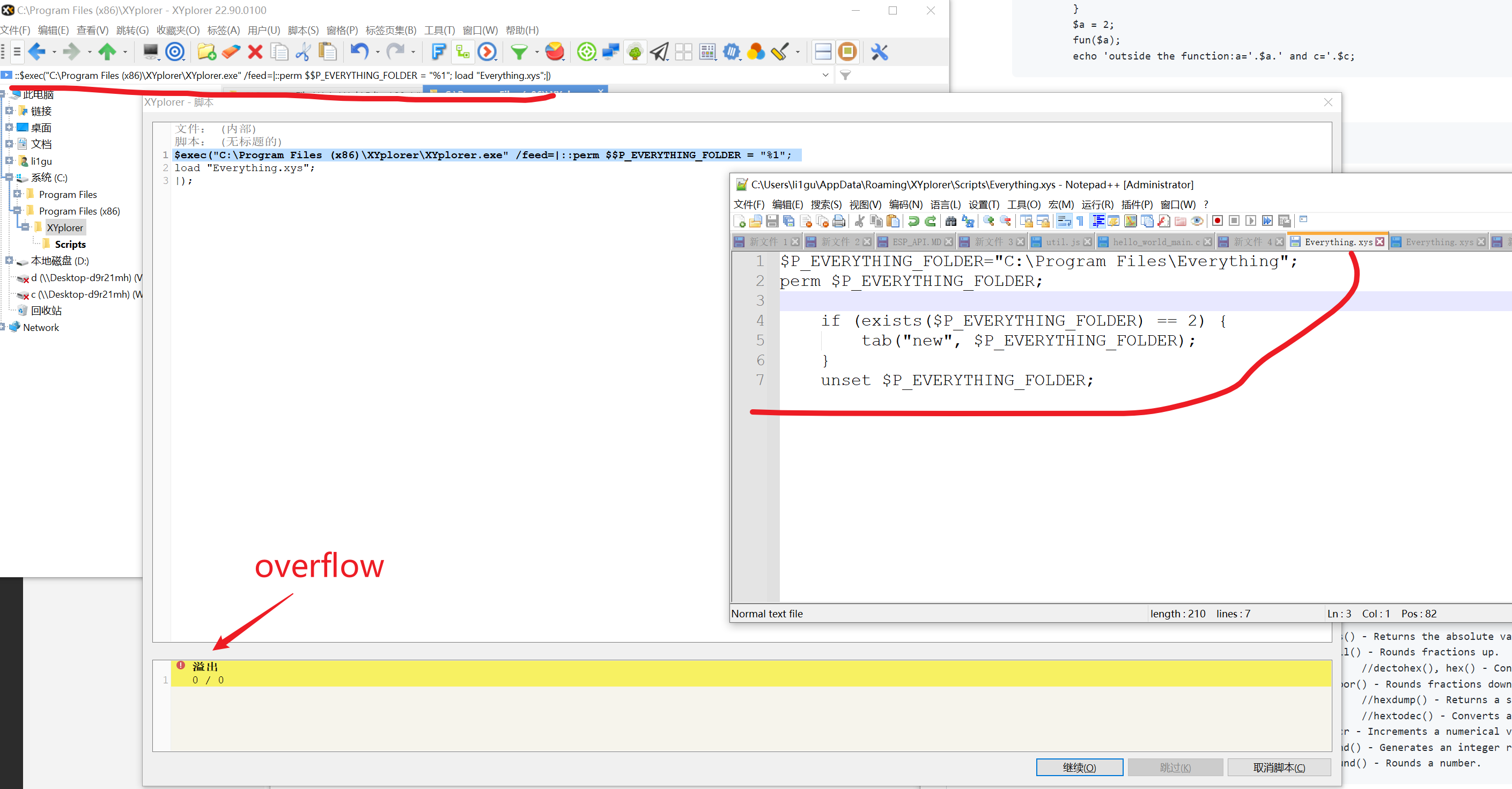
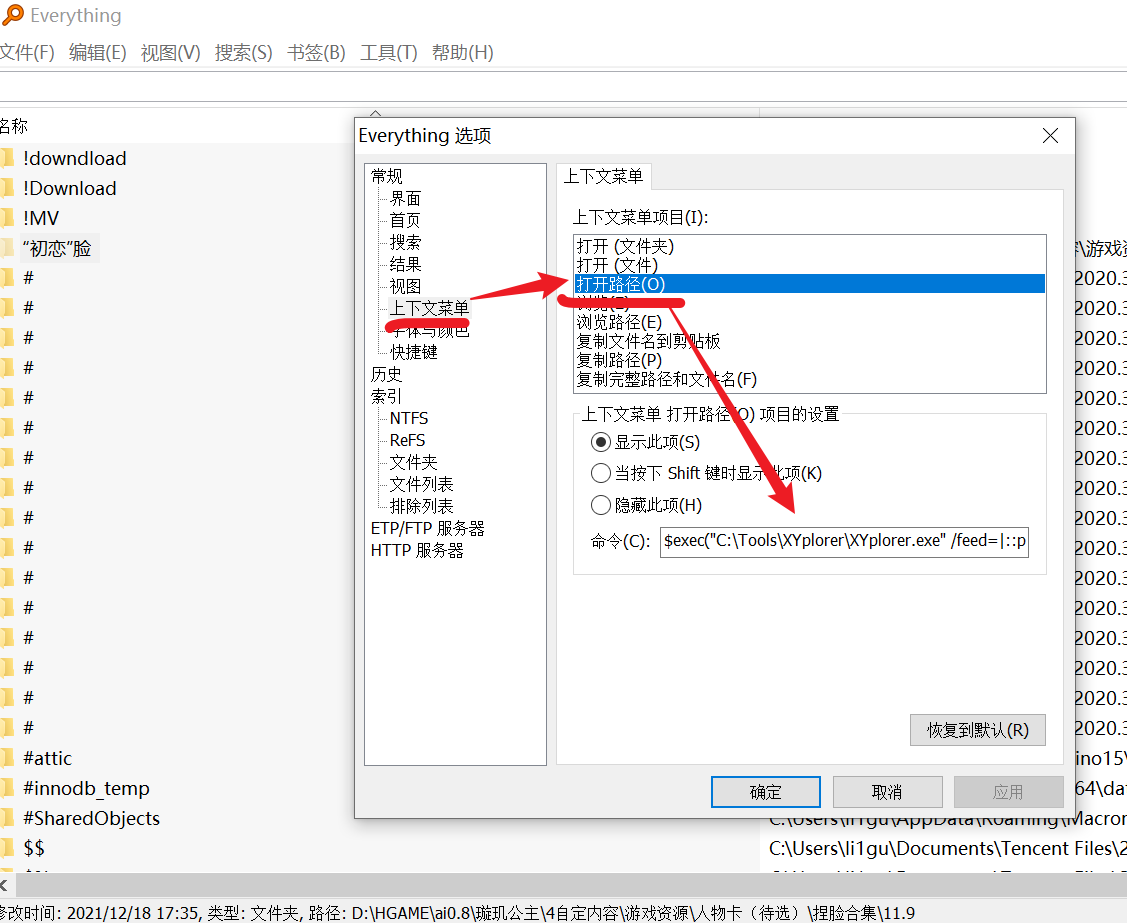
2. [resolved]I search for the file in everything and open the file path and open it with a new TAB?

Image

$exec("C:\Tools\XYplorer\XYplorer.exe" /feed=|::perm $$P_EVERYTHING_FOLDER = "%1"; load "Everything.xys";|)

Create a new xys file in the script directory, and open it in TXT format:

Code: Select all

perm $P_EVERYTHING_FOLDER;

    if (exists($P_EVERYTHING_FOLDER) == 2) {
        tab("new", $P_EVERYTHING_FOLDER);
    }
    unset $P_EVERYTHING_FOLDER;
Image

Image
Last edited by star on 11 Mar 2022 18:20, edited 2 times in total.
XYPlorer x32 Ver 27.10.0600, Win10 LSTC Enterprise 21H2, scaling percentage 200%(Display 4K)

highend
Posts: 15016
Joined: 06 Feb 2011 00:33
Location: Win Server 2022 @100%

Re: How does 'win+E' open with a new TAB and then don't as a new window?

Post by highend »

1. Only possible via external tools
E.g. via an ahk script
Win+E [New tab].zip
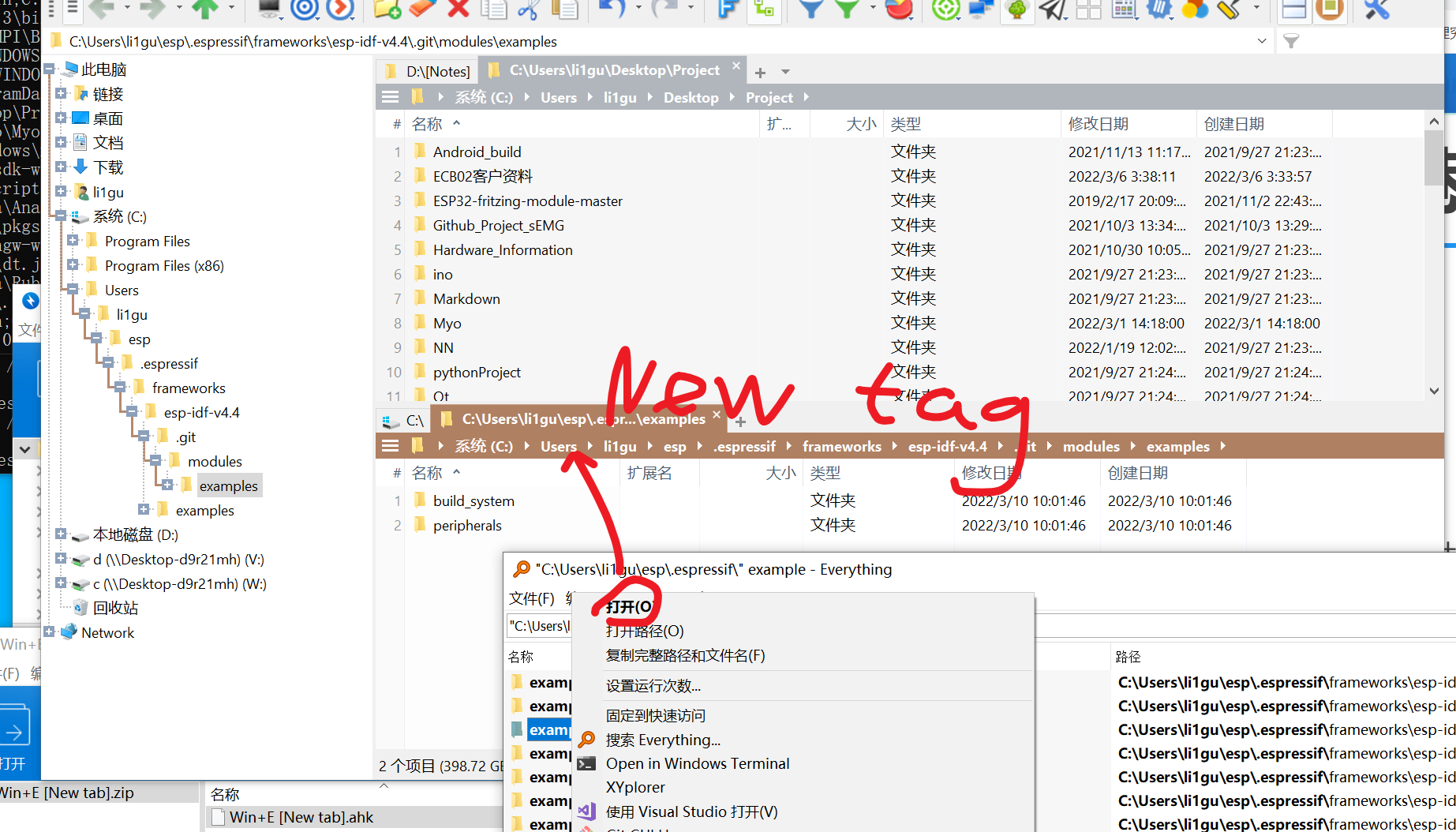
2. What does "open it with a new tag" mean?
To see the attached files, you need to log into the forum.
One of my scripts helped you out? Please donate via Paypal

star
Posts: 46
Joined: 11 Mar 2022 08:18

Re: How does 'win+E' open with a new TAB and then don't as a new window?

Post by star »

highend wrote: ↑11 Mar 2022 09:40 1. Only possible via external tools
E.g. via an ahk script
Win+E [New tab].zip

2. What does "open it with a new tag" mean?
Sorry, I'm a foreigner and my English may not be very good

Image
How does open with a new tag?
XYPlorer x32 Ver 27.10.0600, Win10 LSTC Enterprise 21H2, scaling percentage 200%(Display 4K)

star
Posts: 46
Joined: 11 Mar 2022 08:18

Re: How does 'win+E' open with a new TAB and then don't as a new window?

Post by star »

highend wrote: ↑11 Mar 2022 09:40 1. Only possible via external tools
E.g. via an ahk script
Win+E [New tab].zip

2. What does "open it with a new tag" mean?
Sorry, ahK seems to be a keyboard macro. Is that how it works?
Image
XYPlorer x32 Ver 27.10.0600, Win10 LSTC Enterprise 21H2, scaling percentage 200%(Display 4K)

highend
Posts: 15016
Joined: 06 Feb 2011 00:33
Location: Win Server 2022 @100%

Re: How does 'win+E' open with a new TAB and then don't as a new window?

Post by highend »

ahk is a programming language: https://www.autohotkey.com

Still no clue what a tag should be...

If you mean that you want to be able to open a folder from everything via XYplorer as a new tab you would configure it's context menu configuration for "Open (Folders)" e.g. like this:
Command:

Code: Select all

$exec("D:\Tools\XYplorer\XYplorer.exe" /feed=|::perm $$P_EVERYTHING_FOLDER = "%1"; load "Open folders via Everything.xys";|)
Ofc you would need to adapt the XYplorer path!

while that script could look like this:

Code: Select all

perm $P_EVERYTHING_FOLDER;

    if (exists($P_EVERYTHING_FOLDER) == 2) {
        tab("new", $P_EVERYTHING_FOLDER);
    }
    unset $P_EVERYTHING_FOLDER;
and needs to reside in %APPDATA%\XYplorer\Scripts
One of my scripts helped you out? Please donate via Paypal

Norn
Posts: 522
Joined: 24 Oct 2021 16:10

Re: How does 'win+E' open with a new TAB and then don't as a new window?

Post by Norn »

1)That's a tab, not a tag...
:whistle: viewtopic.php?f=5&t=23843
This PC -> 此电脑

2)viewtopic.php?f=7&t=10671

Also look at this:
viewtopic.php?p=195781#p195781
viewtopic.php?f=7&t=23224
To see the attached files, you need to log into the forum.
Windows 11 24H2 @100% 2560x1440

star
Posts: 46
Joined: 11 Mar 2022 08:18

Re: How does 'win+E' open with a new TAB and then don't as a new window?

Post by star »

highend wrote: ↑11 Mar 2022 12:13 ahk is a programming language: https://www.autohotkey.com

Still no clue what a tag should be...

If you mean that you want to be able to open a folder from everything via XYplorer as a new tab you would configure it's context menu configuration for "Open (Folders)" e.g. like this:
Command:

Code: Select all

$exec("D:\Tools\XYplorer\XYplorer.exe" /feed=|::perm $$P_EVERYTHING_FOLDER = "%1"; load "Open folders via Everything.xys";|)
Ofc you would need to adapt the XYplorer path!

while that script could look like this:

Code: Select all

perm $P_EVERYTHING_FOLDER;

    if (exists($P_EVERYTHING_FOLDER) == 2) {
        tab("new", $P_EVERYTHING_FOLDER);
    }
    unset $P_EVERYTHING_FOLDER;
and needs to reside in %APPDATA%\XYplorer\Scripts
I downloaded the AHK program and it worked perfectly👍, but that "Open the file path" didn't open a folder from Everything via XYplorer as a new tab, and then it open the path in the most recently active TAB.

I'm studying your AHK file and honestly don't quite understand it. 😁

"$exec....." I'm new, so I'll study this order by reading the documentation.😆
Last edited by star on 11 Mar 2022 16:51, edited 1 time in total.
XYPlorer x32 Ver 27.10.0600, Win10 LSTC Enterprise 21H2, scaling percentage 200%(Display 4K)

highend
Posts: 15016
Joined: 06 Feb 2011 00:33
Location: Win Server 2022 @100%

Re: How does 'win+E' open with a new TAB and then don't as a new window?

Post by highend »

It's not ANK, it's AHK

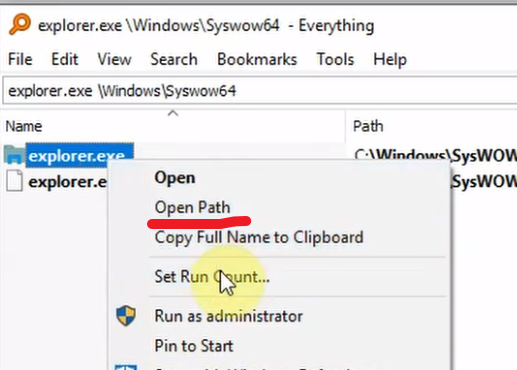
My Everything doesn't have any "Open the file path" context menu entries...

You obviously misconfigured something, because that XY script always opens a path as a new tab: tab("new", $P_EVERYTHING_FOLDER);
One of my scripts helped you out? Please donate via Paypal

star
Posts: 46
Joined: 11 Mar 2022 08:18

Re: How does 'win+E' open with a new TAB and then don't as a new window?

Post by star »

Norn wrote: ↑11 Mar 2022 13:19 1)That's a tab, not a tag...
:whistle: viewtopic.php?f=5&t=23843
This PC -> 此电脑

2)viewtopic.php?f=7&t=10671

Also look at this:
viewtopic.php?p=195781#p195781
viewtopic.php?f=7&t=23224
Thank you😃

I found that when I minimized the XY tray, pressing Win +E opened a new window, and the script didn't seem to detect the existing XY window process, cannot open a new TAB from that process.
XYPlorer x32 Ver 27.10.0600, Win10 LSTC Enterprise 21H2, scaling percentage 200%(Display 4K)

star
Posts: 46
Joined: 11 Mar 2022 08:18

Re: How does 'win+E' open with a new TAB and then don't as a new window?

Post by star »

highend wrote: ↑11 Mar 2022 15:23 It's not ANK, it's AHK

My Everything doesn't have any "Open the file path" context menu entries...

You obviously misconfigured something, because that XY script always opens a path as a new tab: tab("new", $P_EVERYTHING_FOLDER);
Sorry, I translated "打开路径" into "Open the file path". I checked online and it should be translated into "Open path".

Image

First time to use XY, not sure how to use scripts. I reading the document and will reply later.
XYPlorer x32 Ver 27.10.0600, Win10 LSTC Enterprise 21H2, scaling percentage 200%(Display 4K)

highend
Posts: 15016
Joined: 06 Feb 2011 00:33
Location: Win Server 2022 @100%

Re: How does 'win+E' open with a new TAB and then don't as a new window?

Post by highend »

Obviously you need to configure the "Open Path" entry in the context menu config option in Everything then?
One of my scripts helped you out? Please donate via Paypal

star
Posts: 46
Joined: 11 Mar 2022 08:18

Re: How does 'win+E' open with a new TAB and then don't as a new window?

Post by star »

highend wrote: ↑11 Mar 2022 15:23 It's not ANK, it's AHK

My Everything doesn't have any "Open the file path" context menu entries...

You obviously misconfigured something, because that XY script always opens a path as a new tab: tab("new", $P_EVERYTHING_FOLDER);
Image

Image

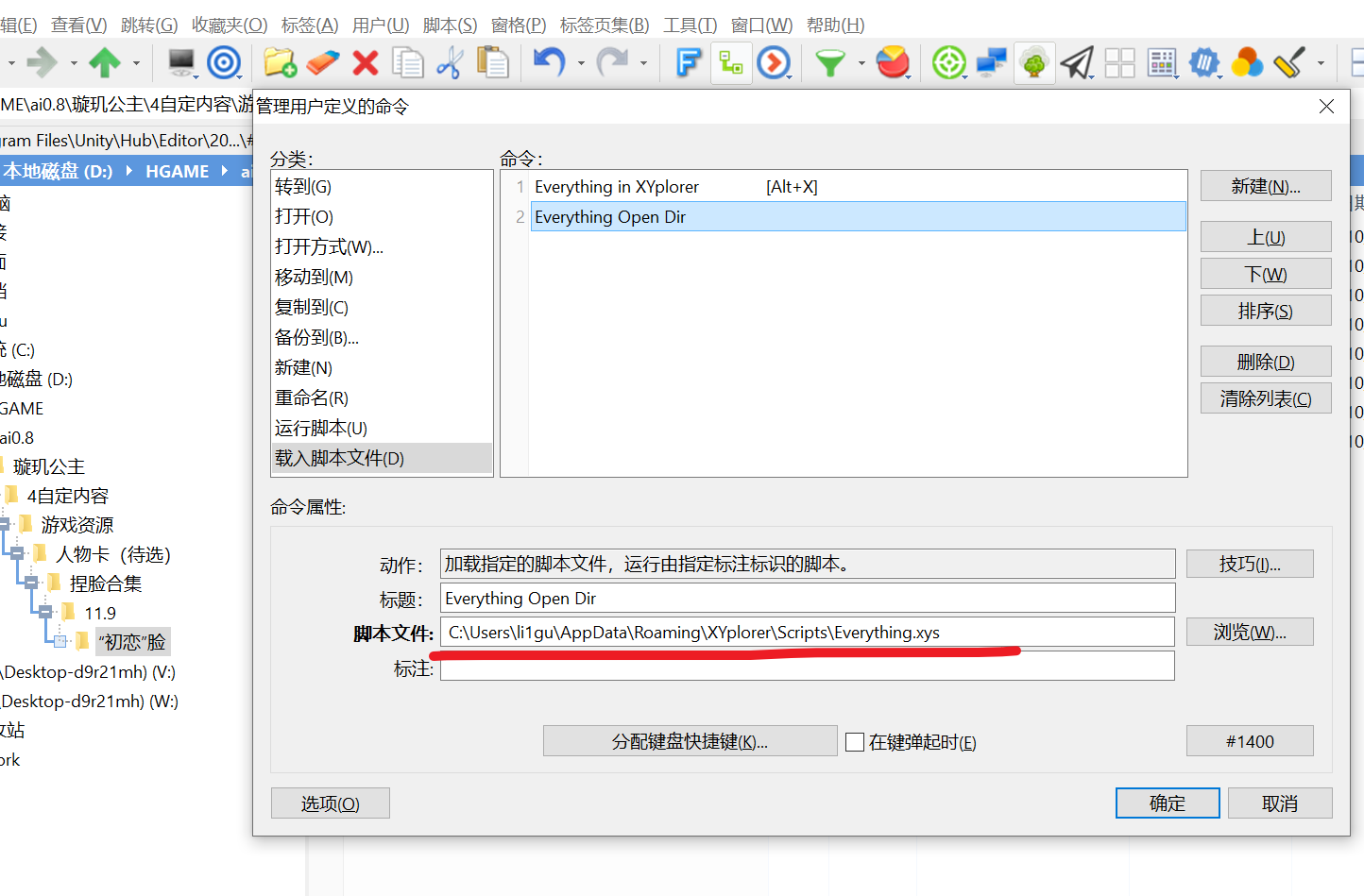
I read about the use of the command, sorry I don't quite understand how it works in Everything.
Last edited by star on 11 Mar 2022 16:52, edited 1 time in total.
XYPlorer x32 Ver 27.10.0600, Win10 LSTC Enterprise 21H2, scaling percentage 200%(Display 4K)

star
Posts: 46
Joined: 11 Mar 2022 08:18

Re: How does 'win+E' open with a new TAB and then don't as a new window?

Post by star »

highend wrote: ↑11 Mar 2022 16:29 Obviously you need to configure the "Open Path" entry in the context menu config option in Everything then?
Yes✔ *^____^*

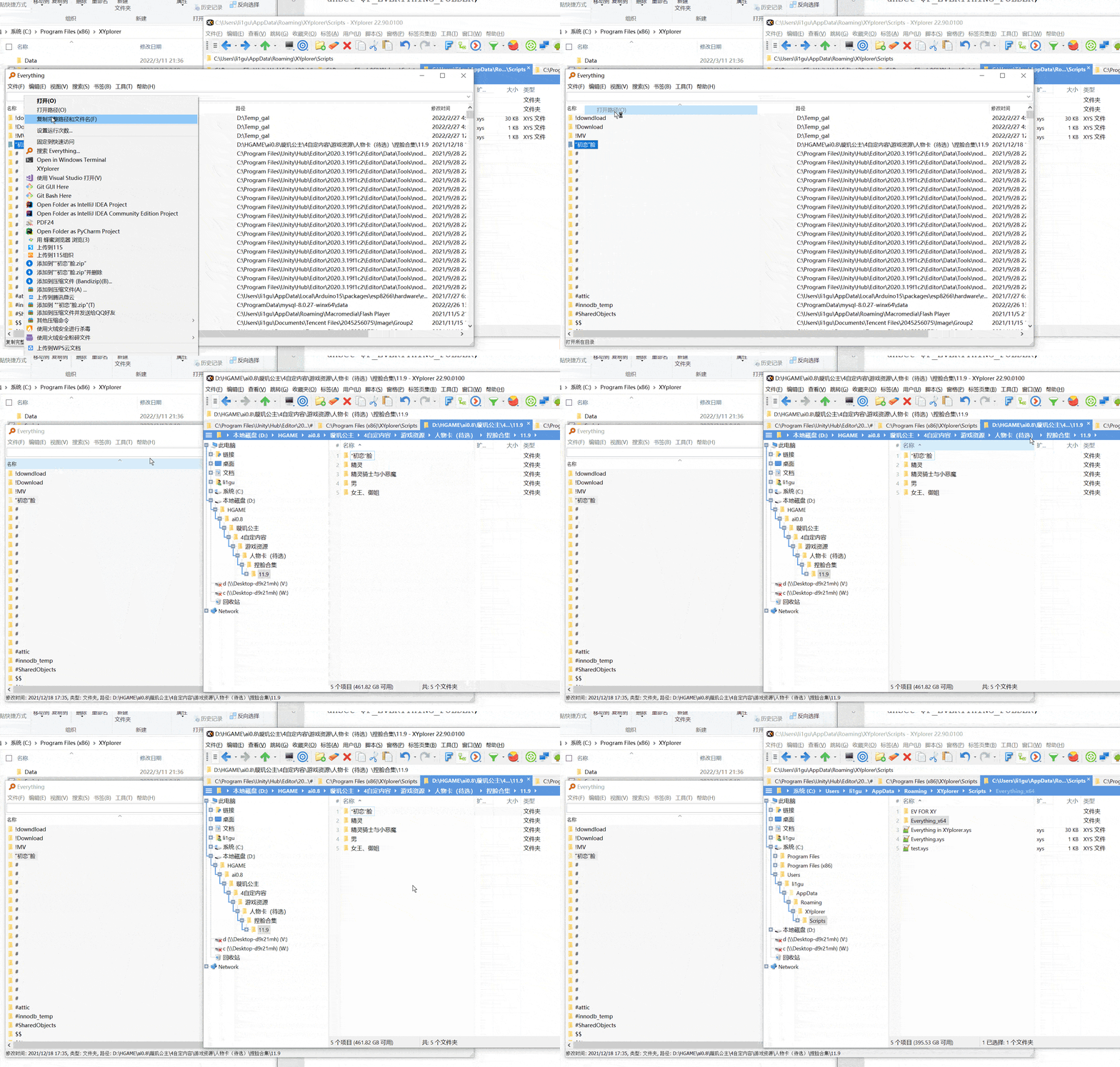
This gif is a previous problem, but I don't know how to use it.. Now the problem has been solved, thanks to Norn user for his advice.

Image

ANK can detect the hidden XY process of tray, and then Win+E can open a new TAB through this process?

I'm a little sorry that Norn doesn't think redirecting to hidden processes is feasible
Last edited by star on 11 Mar 2022 18:08, edited 2 times in total.
XYPlorer x32 Ver 27.10.0600, Win10 LSTC Enterprise 21H2, scaling percentage 200%(Display 4K)

Norn
Posts: 522
Joined: 24 Oct 2021 16:10

Re: How does 'win+E' open with a new TAB and then don't as a new window?

Post by Norn »

star wrote: ↑11 Mar 2022 15:54
Norn wrote: ↑11 Mar 2022 13:19 1)That's a tab, not a tag...
:whistle: viewtopic.php?f=5&t=23843
This PC -> 此电脑

2)viewtopic.php?f=7&t=10671

Also look at this:
viewtopic.php?p=195781#p195781
viewtopic.php?f=7&t=23224
Thank you😃

I found that when I minimized the XY tray, pressing Win +E opened a new window, and the script didn't seem to detect the existing XY window process, cannot open a new TAB from that process.
"[AHK] redirecting Windows Explorer to XY" Can't support XY minimize to tray...
viewtopic.php?f=11&t=23880


This script can:
star wrote: ↑11 Mar 2022 15:16
highend wrote: ↑11 Mar 2022 12:13 ahk is a programming language: https://www.autohotkey.com

Still no clue what a tag should be...

If you mean that you want to be able to open a folder from everything via XYplorer as a new tab you would configure it's context menu configuration for "Open (Folders)" e.g. like this:
Command:

Code: Select all

$exec("D:\Tools\XYplorer\XYplorer.exe" /feed=|::perm $$P_EVERYTHING_FOLDER = "%1"; load "Open folders via Everything.xys";|)
Ofc you would need to adapt the XYplorer path!

while that script could look like this:

Code: Select all

perm $P_EVERYTHING_FOLDER;

    if (exists($P_EVERYTHING_FOLDER) == 2) {
        tab("new", $P_EVERYTHING_FOLDER);
    }
    unset $P_EVERYTHING_FOLDER;
and needs to reside in %APPDATA%\XYplorer\Scripts
I downloaded the AHK program and it worked perfectly👍, but that "Open the file path" didn't open a folder from Everything via XYplorer as a new tab, and then it open the path in the most recently active TAB.

I'm studying your AHK file and honestly don't quite understand it. 😁

"$exec....." I'm new, so I'll study this order by reading the documentation.😆
To see the attached files, you need to log into the forum.
Windows 11 24H2 @100% 2560x1440

star
Posts: 46
Joined: 11 Mar 2022 08:18

Re: How does 'win+E' open with a new TAB and then don't as a new window?

Post by star »

Norn wrote: ↑11 Mar 2022 17:19
star wrote: ↑11 Mar 2022 15:54
Norn wrote: ↑11 Mar 2022 13:19 1)That's a tab, not a tag...
:whistle: viewtopic.php?f=5&t=23843
This PC -> 此电脑

2)viewtopic.php?f=7&t=10671

Also look at this:
viewtopic.php?p=195781#p195781
viewtopic.php?f=7&t=23224
Thank you😃

I found that when I minimized the XY tray, pressing Win +E opened a new window, and the script didn't seem to detect the existing XY window process, cannot open a new TAB from that process.
"[AHK] redirecting Windows Explorer to XY" Can't support XY minimize to tray...
viewtopic.php?f=11&t=23880


This script can:
star wrote: ↑11 Mar 2022 15:16
highend wrote: ↑11 Mar 2022 12:13 ahk is a programming language: https://www.autohotkey.com

Still no clue what a tag should be...

If you mean that you want to be able to open a folder from everything via XYplorer as a new tab you would configure it's context menu configuration for "Open (Folders)" e.g. like this:
Command:

Code: Select all

$exec("D:\Tools\XYplorer\XYplorer.exe" /feed=|::perm $$P_EVERYTHING_FOLDER = "%1"; load "Open folders via Everything.xys";|)
Ofc you would need to adapt the XYplorer path!

while that script could look like this:

Code: Select all

perm $P_EVERYTHING_FOLDER;

    if (exists($P_EVERYTHING_FOLDER) == 2) {
        tab("new", $P_EVERYTHING_FOLDER);
    }
    unset $P_EVERYTHING_FOLDER;
and needs to reside in %APPDATA%\XYplorer\Scripts
I downloaded the AHK program and it worked perfectly👍, but that "Open the file path" didn't open a folder from Everything via XYplorer as a new tab, and then it open the path in the most recently active TAB.

I'm studying your AHK file and honestly don't quite understand it. 😁

"$exec....." I'm new, so I'll study this order by reading the documentation.😆
Thank you!!! The problem was solved successfully.

But the path cannot be found, Copy the XY folder to another path is fine:
Image
XYPlorer x32 Ver 27.10.0600, Win10 LSTC Enterprise 21H2, scaling percentage 200%(Display 4K)

Post Reply