
Preview problem.

Things you’d like to miss in the future...
Forum rules
:warnred20: :warnred20: :warnred20: :warnred20: :warnred20: READ THIS AND DO IT!!! :warnred20: :warnred20: :warnred20: :warnred20: :warnred20:

:info: Please include the following information:
1) Your XYplorer Version (e.g., v28.00.0801)
2) Your Windows Version (e.g., Win 11)
3) Your Screen Scaling Percentage (e.g., 125%).

:info: We strongly recommend adding your Windows Version and Screen Scaling Percentage to the Location field in your Profile or to your Signature. That way, you only have to type them once, and we won't have to search for that vital information.

:info: When attaching an Image, please use the Attachment tab at the bottom of your post and click "Add files".

:warnred20: :warnred20: :warnred20: :warnred20: :warnred20: READ THIS AND DO IT!!! :warnred20: :warnred20: :warnred20: :warnred20: :warnred20:
Post Reply
CompSystems
Posts: 300
Joined: 09 Nov 2012 14:35
Location: Colombia
Contact:

Preview problem.

Post by CompSystems »

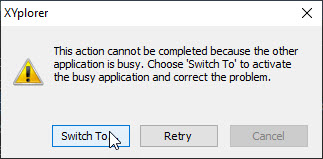
While I am browsing the files with the Preview tab, if the current file is being used by another application, the following image is displayed

Image

The options and [Switch to] or [Retry] many times does not respond or remains in an infinite cycle and the only way to get out of this pop-up window is by forcibly closing the application. This problem usually happens with very large office files, the [cancel] option is not because it is grayed out and I think that this should deactivate the preview of the current file.

admin
Site Admin
Posts: 66631
Joined: 22 May 2004 16:48
Location: Win8.1, Win10, Win11, all @100%
Contact:

Re: Preview problem.

Post by admin »

This dialog is a pest. I see it sometimes and it never does what it says it would do. Here it is mostly connected to mouse action while some other process is still ongoing. Sorry, I have no good tip, I wish one could just turn it off.

CompSystems
Posts: 300
Joined: 09 Nov 2012 14:35
Location: Colombia
Contact:

Re: Preview problem.

Post by CompSystems »

Hello

It is possible to make the Cancel button restart the explorer, that is, close it and reopen it.

Thanks

admin
Site Admin
Posts: 66631
Joined: 22 May 2004 16:48
Location: Win8.1, Win10, Win11, all @100%
Contact:

Re: Preview problem.

Post by admin »

? Is that a question? If yes, then the answer is no. :)

Post Reply
