
List View of Shortcuts

Please check the FAQ (https://www.xyplorer.com/faq.php) before posting a question...
Post Reply
warrenrh
Posts: 22
Joined: 22 Mar 2008 20:28

List View of Shortcuts

Post by warrenrh »

Can I make XYplorer have a display similar to the display in Windows Explorer, or my other file management program xplorer2?
I'm a New user of XYplorer.
I run an independent instance of XYplorer, on a folder of mine, which I use to launch my various programs and applications. Many people might use say the Desktop -- I use a separate folder. I use the List view, without the Tree being shown.

Partially, XYplorer looks like the following:
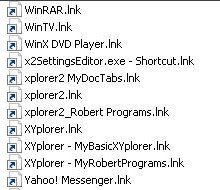
Image

Windows Explorer or my Other File Management Program looks like:
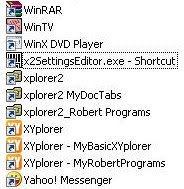
Image

Notice the Colors on the Icons, and the Shortcut .lnk extensions.
Can I get XYplorer to display this like Explorer would?
That is with Colors and without the .Ink extension?

j_c_hallgren
XY Blog Master
Posts: 5826
Joined: 02 Jan 2006 19:34
Location: So. Chatham MA/Clearwater FL
Contact:

Re: List View of Shortcuts

Post by j_c_hallgren »

warrenrh wrote:Notice the Colors on the Icons, and the Shortcut .lnk extensions.
Can I get XYplorer to display this like Explorer would?
That is with Colors and without the .Ink extension?
Well, as far as the colors go: What do you have set for the "use generic icons" on the middle left side of Advanced tab in Config? It would appear you have that turned on, and thus see only the plain vers.

Regarding extensions: Most users of XY (I suspect) are people who want to know exactly what is going on in their systems (that's why some of use XY!), and hiding extensions (even for shortcuts) is something most beginning users of Windows seem to do, in my experience...When I use someone elses system and they have extensions hidden in WE, it's the first thing I change before I attempt to do anything on it...so while that's just my opinion, I'd suspect that you may be in a very small minority of users who'd not want to see them.
Still spending WAY TOO much time here! But it's such a pleasure helping XY be a treasure!
(XP on laptop with touchpad and thus NO mouse!) Using latest beta vers when possible.

warrenrh
Posts: 22
Joined: 22 Mar 2008 20:28

Post by warrenrh »

Thanks. You were right spot on about the option in the Advanced tab.

In this one case, I can easily tell these are shortcuts, because of the icon. But generally, I agree with you about extensions.

j_c_hallgren
XY Blog Master
Posts: 5826
Joined: 02 Jan 2006 19:34
Location: So. Chatham MA/Clearwater FL
Contact:

Post by j_c_hallgren »

warrenrh wrote:Thanks. You were right spot on about the option in the Advanced tab.

In this one case, I can easily tell these are shortcuts, because of the icon. But generally, I agree with you about extensions.
You're welcome! I kinda suspected it was something on your setup, as I saw colors here!

About extension on shortcut: I agree that those icons arrows make them unique but would one want to isolate them for XY special display handling? Hummm...inconsistency then.
Still spending WAY TOO much time here! But it's such a pleasure helping XY be a treasure!
(XP on laptop with touchpad and thus NO mouse!) Using latest beta vers when possible.

Post Reply
