 XYplorer Beta Club

Right click for context menu brings up Run Dialogue
Forum rules
You might want to read this if you're looking for priority service
 Please Include The Following Information
1) Your XYplorer Version (e.g., v28.00.0801)
2) Your Windows Version (e.g., Win 11)
3) Your Screen Scaling Percentage (e.g., 125%).
Use Your Profile Or Signature
We strongly recommend adding your Windows Version and Screen Scaling Percentage to the Location field in your Profile or to your Signature. That way, you only have to type them once, and we won't have to search for that vital information.
How To Attach Images
When attaching an Image, please use the Attachment tab at the bottom of your post and click "Add files".
You might want to read this if you're looking for priority service
Please Include The Following Information1) Your XYplorer Version (e.g., v28.00.0801)
2) Your Windows Version (e.g., Win 11)
3) Your Screen Scaling Percentage (e.g., 125%).
Use Your Profile Or SignatureWe strongly recommend adding your Windows Version and Screen Scaling Percentage to the Location field in your Profile or to your Signature. That way, you only have to type them once, and we won't have to search for that vital information.
How To Attach ImagesWhen attaching an Image, please use the Attachment tab at the bottom of your post and click "Add files".
-
fsieber
- Posts: 8
- Joined: 18 Jun 2013 23:29
Right click for context menu brings up Run Dialogue
When I right click on any file or directory on list view or tree view, I get a Run Dialogue "Do you want to run this file", I click cancel, then get the context menu I was expecting. WIndows 10 pro, xyplorer 18.90.0100.
-
jupe
- Posts: 3570
- Joined: 20 Oct 2017 21:14
- Location: Win10 22H2 120dpi
Re: Right click for context menu brings up Run Dialogue
Strange, a Run dialog on right clicking a folder... as a troubleshooting step can you try disabling this and see if it helps:
Configuration | General | Menus, Mouse, Safety | Context Menus | Hide shell extensions from shell context menu
Configuration | General | Menus, Mouse, Safety | Context Menus | Hide shell extensions from shell context menu
-
fsieber
- Posts: 8
- Joined: 18 Jun 2013 23:29
Re: Right click for context menu brings up Run Dialogue
I tried the suggestion by jupe, it did not work. I do not get this behavior in Microsofts file explorer.
-
jupe
- Posts: 3570
- Joined: 20 Oct 2017 21:14
- Location: Win10 22H2 120dpi
Re: Right click for context menu brings up Run Dialogue
Can you try entering the following in the XY address bar:
it will bring up a XY window with virgin settings, does it still do it in this new XY window?, this is so as to see if the problem is in your profile somewhere.
Code: Select all
fresh;-
fsieber
- Posts: 8
- Joined: 18 Jun 2013 23:29
Re: Right click for context menu brings up Run Dialogue
I did try this, using the portable zip version, I installed it in a new directory, I did NOT try to copy my ./data subdir in from previous versions (many ancient), then I did not get this behavior. I may have to do this and recreate all my settings, if nothing else can be found, something must be amuck in there.
-
jupe
- Posts: 3570
- Joined: 20 Oct 2017 21:14
- Location: Win10 22H2 120dpi
Re: Right click for context menu brings up Run Dialogue
It could possibly be a dodgy entry in Portable File Associations, try disabling them temporarily:
Configuration | Other | Features | Portable File Associations / Portable Openwith Menu
Configuration | Other | Features | Portable File Associations / Portable Openwith Menu
-
fsieber
- Posts: 8
- Joined: 18 Jun 2013 23:29
Re: Right click for context menu brings up Run Dialogue
Same result using "fresh;" in address, bar, everything works fine, indicating problem in profile, ancient, perhaps some incompatibility with latest version of xyplorer.
-
jupe
- Posts: 3570
- Joined: 20 Oct 2017 21:14
- Location: Win10 22H2 120dpi
Re: Right click for context menu brings up Run Dialogue
If that works fine with Portable File Associations disabled in your old profile, then try re-enabling them and entering this as the very top line in PFA
that might fix it without having to track down the incorrect entry you have in there.
Code: Select all
\>#-
fsieber
- Posts: 8
- Joined: 18 Jun 2013 23:29
Re: Right click for context menu brings up Run Dialogue
Disabling Portable File Associations did not solve the problem.
-
jupe
- Posts: 3570
- Joined: 20 Oct 2017 21:14
- Location: Win10 22H2 120dpi
Re: Right click for context menu brings up Run Dialogue
One more thing you could try is if you are on 64 bit try this setting:
Configuration | Other | Shell Integration | 64-bit Windows | Show the 64-bit context menu
Other than that, wait and see what the developer says, sorry I couldn't help.
Configuration | Other | Shell Integration | 64-bit Windows | Show the 64-bit context menu
Other than that, wait and see what the developer says, sorry I couldn't help.
-
admin
- Site Admin
- Posts: 67271
- Joined: 22 May 2004 16:48
- Location: Win8.1, Win10, Win11, all @100%
- Contact:
Re: Right click for context menu brings up Run Dialogue
Very strange, can't explain it either. You might send me your XYplorer.ini file by email so I can check if I can reproduce it.
FAQ | XY News RSS | XY X
-
fsieber
- Posts: 8
- Joined: 18 Jun 2013 23:29
Re: Right click for context menu brings up Run Dialogue
Here is the whole portable package with my data files. You can get it at <removed for privacy, url sent to admin>
-
highend
- Posts: 15016
- Joined: 06 Feb 2011 00:33
- Location: Win Server 2022 @100%
Re: Right click for context menu brings up Run Dialogue
Your package works fine here, no run dialog when right clicking a folder in the tree / a folder in a pane / a file in a pane.
You're probably running some third party app on your OS that is causing this...
You're probably running some third party app on your OS that is causing this...
One of my scripts helped you out? Please donate via Paypal
-
jupe
- Posts: 3570
- Joined: 20 Oct 2017 21:14
- Location: Win10 22H2 120dpi
Re: Right click for context menu brings up Run Dialogue
Yeah I think it could be this bug,
https://www.sordum.org/7615/easy-context-menu-v1-6/
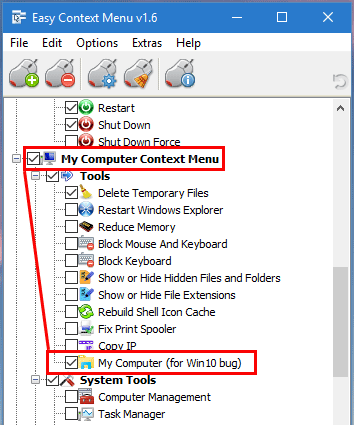
Strange why a fresh; works though... (ahh.. it may be because by default 64bit context menu is disabled and you have it enabled in your ini)
PS: your ini file works fine here too, on Win10 1803 x64
I noticed it in your ini file you had this installed, it may be the culprit if it isn't actually the above specific bug.Windows 10 BUG
Please be aware of a well known (except, apparently, by Microsoft) bug in Windows 10 — if you change the “Open File Explorer to” This PC, and then add context menu items, you cannot use Windows Explorer properly because explorer.exe will automatically run the most recently added right click item. We have reported this bug here (with no response, as yet).
There is a temporary workaround you can use – if you add anything under the My Computer context menu, please check the box by “My Computer (for Win 10 bug)” entry as well. Then you’ll be able to use Windows Explorer normally.
https://www.sordum.org/7615/easy-context-menu-v1-6/
Strange why a fresh; works though... (ahh..
it may be because by default 64bit context menu is disabled and you have it enabled in your ini)PS: your ini file works fine here too, on Win10 1803 x64
-
admin
- Site Admin
- Posts: 67271
- Joined: 22 May 2004 16:48
- Location: Win8.1, Win10, Win11, all @100%
- Contact:
Re: Right click for context menu brings up Run Dialogue
Wow, thanks for solving that one! 
FAQ | XY News RSS | XY X