Cycle tabs in recently used order not working
Posted: 07 Jun 2017 09:42
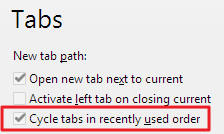
Hi, I'm using version 17.90.0300 and have ticked the option, in the Tabs section, to "Cycle tabs in recently used order". I assume this means that using CTRL-TAB works like some other apps, eg. Visual Studio, where it keeps track of which tabs you last viewed.. often called "last viewed order" or similar.
Screenshot: http://imagizer.imageshack.us/v2/224x13 ... fx0zLj.png
When this option is ticked, I don't see any change to CTRL-TAB behaviour. Whether it's ticked or not, CTRL-TAB cycles through the tabs in left-to-right order, not recently-viewed order. Am I missing something, or does this option not do what I think it should do?
Screenshot: http://imagizer.imageshack.us/v2/224x13 ... fx0zLj.png
When this option is ticked, I don't see any change to CTRL-TAB behaviour. Whether it's ticked or not, CTRL-TAB cycles through the tabs in left-to-right order, not recently-viewed order. Am I missing something, or does this option not do what I think it should do?