
Cycle tabs in recently used order not working

Please check the FAQ (https://www.xyplorer.com/faq.php) before posting a question...
Post Reply
sanguinelemon
Posts: 2
Joined: 07 Jun 2017 09:33

Cycle tabs in recently used order not working

Post by sanguinelemon »

Hi, I'm using version 17.90.0300 and have ticked the option, in the Tabs section, to "Cycle tabs in recently used order". I assume this means that using CTRL-TAB works like some other apps, eg. Visual Studio, where it keeps track of which tabs you last viewed.. often called "last viewed order" or similar.

Screenshot: http://imagizer.imageshack.us/v2/224x13 ... fx0zLj.png
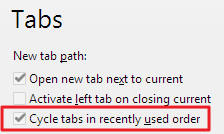
When this option is ticked, I don't see any change to CTRL-TAB behaviour. Whether it's ticked or not, CTRL-TAB cycles through the tabs in left-to-right order, not recently-viewed order. Am I missing something, or does this option not do what I think it should do? :)

highend
Posts: 14604
Joined: 06 Feb 2011 00:33
Location: Win Server 2022 @100%

Re: Cycle tabs in recently used order not working

Post by highend »

Please update to v18 and try again.
One of my scripts helped you out? Please donate via Paypal

admin
Site Admin
Posts: 65147
Joined: 22 May 2004 16:48
Location: Win8.1, Win10, Win11, all @100%
Contact:

Re: Cycle tabs in recently used order not working

Post by admin »

Might be you first have to activate "Cycle tabs in recently used order", and then use some tabs. AFAIK, the recent order is only saved when the setting is turned on.

Post Reply
