 XYplorer Beta Club

I made a little script for myself, but I think that others may want it. The script sets file "title". What's title? It depends, as it uses exiftool and it tries to put the title in the best place. For JPEG files it would be XMP, for raw files it was IPTC AFAIR. Supported formats: http://www.sno.phy.queensu.ca/~phil/exiftool/#supported (all with "W" in second column, but if you only want to read title, "R" in column is enough). You can use my tool as standalone app. Just drag file you want to tag and drop it on the application or add it to Windows "send to" menu. Sorry it's written in AHK, but I'm web developer, so I don't know languages which can be easily compiled to exe.
So the script is:
Code: Select all
"Change Exif title : Titler"
	foreach($photoFile, "<get SelectedItemsPathNames |>") {
		run("""C:\path\exifTitler.exe"" ""$photoFile"""), , 1, 0
	}
- (GPL; the core) http://www.sno.phy.queensu.ca/~phil/exiftool/ (download "Windows Executable", extract it, rename it to exiftool.exe, put in system path, e.g. c:\windows)
- (MIT; the GUI for setting title by ExifTool) http://download/krzysiu.net/exifTitler.exe - if you don't trust that file, compile it yourself (AHK script)
- (MIT/CC BY 4.0) http://up.krzysiu.net/YWFxUNT/icon.ico - optional, multipage icon file
- 64 bit Windows (if you want version for 32 bit, compile it by yourself or tell me)
* Download files.
* Customize the path to exifTitler.exe in the script.
* Follow instructions above to get exiftool.exe
Installation (for custom button):
* Add custom button
* Set icon to icon.ico (or any other of course)
* Paste the XYP script as action
Usage:
* Select file(s) (supported formats: http://www.sno.phy.queensu.ca/~phil/exiftool/#supported)
* Click on the button
* For each image window will appear:
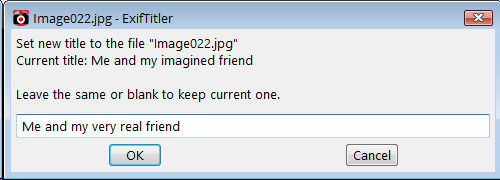
The input box will contain current title. If you don't want to change/set title you can either: leave it blank; don't change anything; press cancel
Sorry for such short description, but I hope it's clear. For me critical function was to support both Unicode titles and Unicode filenames - it works fine. Also the title you'd set will be visible as image title in Windows explorer. The title is of course saved in file, not some database, so it "travels" together with it. Most photo gallery scripts should recognize titles added by Exiftool/ExifTitler.
PS: If you wonder what's the genesis of the ExifTitler name - well, it's just "title" with "r", as it sets titles. Also it's the name of NSWF Reddit, which is an absurd parody of Hitler with breasts and as I like absurd, it's kind of homage to that reddit.