Page 1 of 2
binary content search using regex seems broken
Posted: 14 Sep 2015 18:14
by xman
Searching for content in binary files using regex doesn't work correctly.
Searching for something like this works:
\x49
But searching for something like this does not:
\xFF
It can find only bytes in range \x00 to \x7F

.
Seems something somewhere ought to be an unsigned variable instead of a signed one.
Re: binary content search using regex seems broken
Posted: 14 Sep 2015 19:57
by admin
Works fine here.

Re: binary content search using regex seems broken
Posted: 14 Sep 2015 20:03
by xman
Interesting. Maybe it somehow depends on options set?
Here is mine:
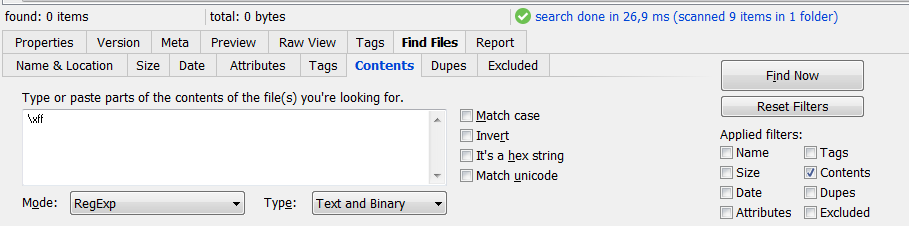
- Clipboard-20150914-01.png (20.24 KiB) Viewed 5037 times
I also tried with ::fresh, got the same result.
edit:
Can someone else perhaps confirm?
Re: binary content search using regex seems broken
Posted: 14 Sep 2015 20:06
by admin
Looks like mine.
What kind of files are you searching. Can you send me one?
Re: binary content search using regex seems broken
Posted: 14 Sep 2015 20:11
by xman
I originally tried to search something in a bunch of jpeg files, but now I tried to search for \xFF in entire C:\Program Files, and so far no hit (and there should be thousands of hits!). It just can't find \xFF at all. I will experiment with this further to see if I can make it work somehow

.
Re: binary content search using regex seems broken
Posted: 14 Sep 2015 20:12
by admin
Rights? Run as Admin?
Re: binary content search using regex seems broken
Posted: 14 Sep 2015 20:16
by xman
Full admin rights.
And I got two hits after all, but those were some XML files that didn't even contain \xFF byte.
Re: binary content search using regex seems broken
Posted: 14 Sep 2015 20:20
by admin
Try Binary instead of Text and Binary. That should remove the XML files.
Re: binary content search using regex seems broken
Posted: 14 Sep 2015 20:22
by Marco
The Bible says
The characters that ‹\x80› through ‹\xFF› match depends on how your regex engine
interprets them, and which code page your subject text is encoded in. We recommend
that you not use ‹\x80› through ‹\xFF›. Instead, use the Unicode code point token
described in Recipe 2.7.
Re: binary content search using regex seems broken
Posted: 14 Sep 2015 20:35
by xman
admin wrote:Try Binary instead of Text and Binary. That should remove the XML files.
Nope, they are found when either of the 3 options (Text, Binary, Text and Binary) is set.
I have managed to reduce one of those XML files to just 5 bytes, where if I remove any single one of them, it no longer is found using \xFF. \xFF itself is not among those 5 bytes of course. Sample attached.
It's possible, that this is related to codepage, so I will try to change regional settings, but not right now, as it requires computer restart.
update:
attached file was wrong, uploaded again
Re: binary content search using regex seems broken
Posted: 14 Sep 2015 20:37
by xman
Marco wrote:The Bible says
The characters that ‹\x80› through ‹\xFF› match depends on how your regex engine
interprets them, and which code page your subject text is encoded in. We recommend
that you not use ‹\x80› through ‹\xFF›. Instead, use the Unicode code point token
described in Recipe 2.7.
The bible talks about searching text, I search binary, so encoding should be totally irrelevant.

.
Re: binary content search using regex seems broken
Posted: 14 Sep 2015 21:07
by admin
Yes, something is wrong.
The specimen_.xml you sent is an UTF8 file that is interpreted as byte 0xFF. So it's okay when "Text and Binary" matches 0xFF.
However, "Binary" alone should not match it. Gonna fix...
Re: binary content search using regex seems broken
Posted: 15 Sep 2015 18:41
by xman
Thanks, now the XML file is not matched. But it doesn't solve the original problem (not being able to find bytes in range \x80 to \xFF).
I investigated and there is more. Download and extract the attached png file to a new folder. Now try to find \x89 in that image. 0x89 is the first byte and this value is not found anywhere else in the image. It should match, here it doesn't.
Now try to find \xA9 in that image, it should match.
Now go to regional settings and change format to "Chinese (Simplified, PRC)", it doesn't require restart. Chinese is not what I use, but it seems to work more consistently. And now try to find \xA9 again.
Re: binary content search using regex seems broken
Posted: 15 Sep 2015 20:22
by admin
Confirmed. ATM I cannot solve this riddle.
I suggest you use XY's built-in hex content search meanwhile:
Re: binary content search using regex seems broken
Posted: 15 Sep 2015 20:48
by xman
Thanks. Hex-content search was what I used before, but it doesn't really work, when one wants to find all files that start with some pattern (for instance).
For the record, this bug seems to "work" not just for Chinese, but also for Arabic, Russian, Serbian, Czech, Greek and probably many other languages, but sometimes it worked for these languages, don't know why. I couldn't get the bug working at all (aside from the first of the two problems) with English, German, Spanish, French.
It seems to me that the regex engine tries to interpret files based on system settings and doesn't really treat them as just a bunch of bytes.