Page 2 of 2
Re: Word Document Preview
Posted: 21 Oct 2015 14:04
by TheQwerty
Nhiep Nguyen wrote:Also I do not understand what exactly is Mouse down or Mouse up. What exactly and actually the moves to perform such actions?
There is a lot of Mouse down and mouse up in the help file but what they are and how to perform are no where to be seen.
Take a look at this:
http://www.xyplorer.com/highlights.php#mdbu
And you can also try reading through all of the links for Mouse Down Blow Up (MDBU) from the
features page.
Holding down the left mouse button on a thumbnail will trigger MDBU, and for Word Documents it should show the plain text extracted from the document.
My screenshot was from a fresh instance of XYplorer, so it was showing it all working right out of the box, so to speak.
Based on your screenshot I'd suggest double-checking your
Previewed Formats configuration.
- Open Tools | Configuration | Previewed Formats
- Under Category select Text Files.
- In the lower File types within category Text Files pane ensure that there is not an entry for *.docx
- Now select the Web & Office Files category.
- Ensure that the lower pane contains *.docx and that it is checked.
After that you may need to deselect and then re-select the document to update the preview but it should work.
Re: Word Document Preview
Posted: 21 Oct 2015 16:34
by Nhiep Nguyen

- XYPlorer-6.jpg (515.8 KiB) Viewed 3199 times
Hello,
I've done all the configuration (text files and Web files) but the results are still the same.
Thanks to the links you provide me with I understand the usage of mouse down blow up now but in my case the Mouse down Blow up works with plain text file (*.txt) but not with word files (doc or docx)
Maybe because my office is of 2007?
Re: Word Document Preview
Posted: 21 Oct 2015 16:48
by Nhiep Nguyen
Apparently most of my formats are working fine with previews except for Office documents, word, excel etc...
Re: Word Document Preview
Posted: 21 Oct 2015 17:04
by TheQwerty
There's actually two pieces in play here.
For MDBU XYplorer relies on a Windows' shell extension called an IFilter which attempts to extract text from a file.
You could try installing the IFilter's separately:
http://www.microsoft.com/en-us/download ... x?id=20109
There's also the 2010 version:
http://www.microsoft.com/en-us/download ... x?id=17062
However, one problem I've run into is XY requires the 32-bit versions be installed and Microsoft will sometimes only install the ones that match the OS bitness, so on 64-bit it can be tricky.
The preview tab at the bottom actually makes use of the web browser plugin, so generally if the file can be displayed in Internet Explorer it should work in XY. Further complicating this is there are a number of browser and system settings that can prevent it from working. In other words, what happens if you attempt to view the file in IE?
Re: Word Document Preview
Posted: 21 Oct 2015 17:22
by Nhiep Nguyen
Hello,
I do not get what the *.doc(x) documents have to do with Internet Explorer?
The purposes are : preview a word document, and how would I open the document in Internet Explorer anyway?
Thank you a lot for taking time helping me.
Re: Word Document Preview
Posted: 21 Oct 2015 19:18
by TheQwerty
As I said in the previous post XY uses a web browser component and the corresponding plugins to display the Web & HTML previews.
You can open the document in IE either via drag and drop or by browsing to it using 'file:///C:/path/to/word.docx'.
Re: Word Document Preview
Posted: 21 Oct 2015 20:44
by Nhiep Nguyen
Hello,
The issue is not with the Wed & HTML BUT Word document preview in XYPlorer.
I've tried to do as you lastly advised and Chrome, FireFox and Edge all try or offer to open with Microsoft Word. I can open them in word outright without need to go to browser.
I think that my case is hopeless unless the XY developer can throw in some light (which I doubt) from a careless vendor.
Otherwise I throw in the sponge.
Anyway you have been helpful, thank you.
Re: Word Document Preview
Posted: 21 Oct 2015 21:02
by TheQwerty
Nhiep Nguyen wrote:The issue is not with the Wed & HTML BUT Word document preview in XYPlorer.
The only way to have Word documents rendered in the Preview pane is to enable them in the
Web & Office (mis-typed previously) category of
Previewed Formats.
For all file types in that category XY makes use of the WebBrowser component of Windows, which is essentially a stripped down Internet Explorer. The WebBrowser component makes use of a plugin architecture to open and display certain file types. Most commonly this is used for Office documents, PDFs, etc.
Thus a simple test to determine if XY can preview a file format in the
Web & Office Files category is to attempt opening it in Internet Explorer. No other browser will tell us anything meaningful in this scenario.
Re: Word Document Preview
Posted: 21 Oct 2015 22:43
by Nhiep Nguyen
Hello, First of All there is no longer Internet Explorer with W10.
Second, pdf files show up alright with the preview pane and information panel.
The problems are exclusively with Office documents be it word or excel or pps.
I've unchecked and suppressed them in text and checked them in Web & Office to no avail.
Re: Word Document Preview
Posted: 22 Oct 2015 04:36
by RalphM
Nhiep Nguyen wrote:Hello,
...I think that my case is hopeless unless the XY developer can throw in some light (which I doubt) from a careless vendor..
That's a bit rich of you at a post count of 13, with the majority of them being posted within the last three weeks while the developer seems to be on a well deserved vacation!
Re: Word Document Preview
Posted: 22 Oct 2015 05:56
by bdeshi
who told you Internet Explorer is no longer in Windows 10?
start > all apps > windows accessories > internet explorer.
Now check if office docs can be viewed in IE as TheQwerty has suggested.
Re: Word Document Preview
Posted: 22 Oct 2015 21:37
by Nhiep Nguyen
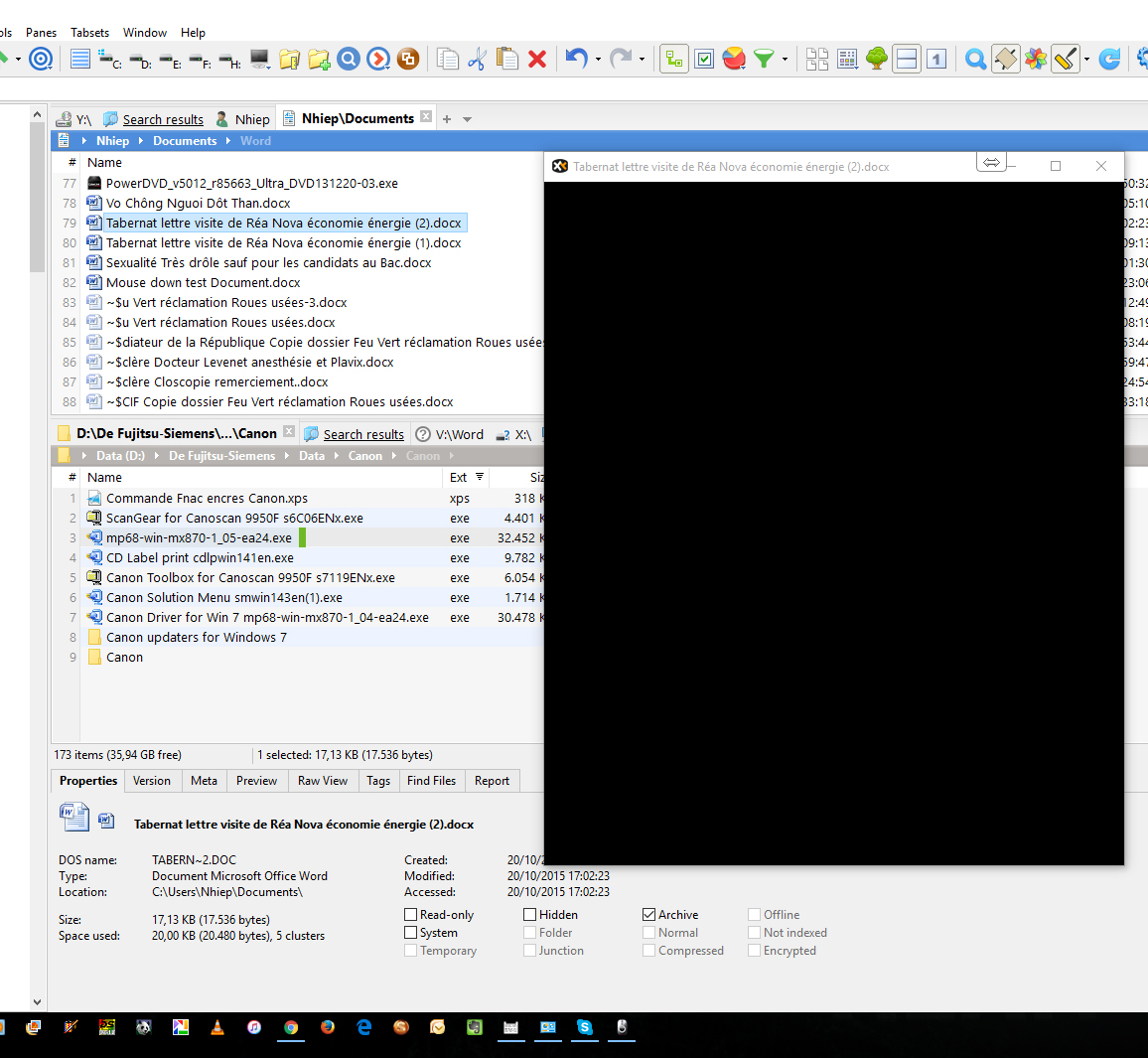
- XYPlorer-8.jpg (678.13 KiB) Viewed 3145 times

- XYPlorer-7.jpg (725.08 KiB) Viewed 3145 times
TheQwerty wrote:Nhiep Nguyen wrote:The issue is not with the Wed & HTML BUT Word document preview in XYPlorer.
The only way to have Word documents rendered in the Preview pane is to enable them in the
Web & Office (mis-typed previously) category of
Previewed Formats.
For all file types in that category XY makes use of the WebBrowser component of Windows, which is essentially a stripped down Internet Explorer. The WebBrowser component makes use of a plugin architecture to open and display certain file types. Most commonly this is used for Office documents, PDFs, etc.
Thus a simple test to determine if XY can preview a file format in the
Web & Office Files category is to attempt opening it in Internet Explorer. No other browser will tell us anything meaningful in this scenario.
Hello TheQwerty,
The situation get more confused!
As you can see from the two attachments I have two versions of the same file and one is visible on the floating Preview Pane and the other not!
I'm really lost.
Re: Word Document Preview
Posted: 22 Oct 2015 21:56
by TheQwerty
When someone saved the working file they configured Word to include a thumbnail.
The same was not done with the non-working file.*
To repeat:
TheQwerty wrote:Floating Preview and Full Screen Preview only show previews for anything for which XY can show thumbnails. Your list pane is in a thumbnail mode and XY is not showing contents for the docx which means those previews will not work for it.
*And in my experience attempting to add the thumbnail to an existing file by overwriting it with Save As does not work correctly. You're better off saving with thumbnail to a new file and then swapping the names.
Re: Word Document Preview
Posted: 23 Oct 2015 14:43
by Nhiep Nguyen
Hi TheQuerty,
I think that you get in the bull eye here.
When I save a new doc(x) and includ a thumbnail, I got the preview floating pane right.
At long last I understand the working of it now, thanks to your observations.
Thanks a lot.

