 XYplorer Beta Club
Depending on how much time/effort Don wants to put into this, I can imagine this leading to a few more sales, just because some people cannot live without dual pane.
Something (most likely a popup) asking whether you want single or dual pane should probably also be implemented. This would show up if you haven't set a flag in the .ini. Selecting one of them would set this flag and prevent it from coming up again. Am I making any sense?
2nd pane, anyone?
-
lukescammell
- Posts: 744
- Joined: 28 Jul 2006 13:15
- Location: Kent, UK
- Contact:
-
admin
- Site Admin
- Posts: 66514
- Joined: 22 May 2004 16:48
- Location: Win8.1, Win10, Win11, all @100%
- Contact:
Okay, back to the old dual pane topic.
1. Why I do not simply make it optional
As you know, I'm not generally into this "You don't like it, make it optional" philosophy, because that's the highway to bloat. While I do add some optional features from time to time that I won't use myself, those are never any bigger ones, just smallies.
It's not only about bloat, it's also about profile/character (of the app, not of me ): XYplorer puts a LOT of focus in usability, and all of it makes sense in a single-pane environment. Adding a 2nd pane now would be a bit like working for years on a fast bike, and then adding an optional third wheel for, well, just in case somebody prefers riding a tricycle. It would be a UI-oxymoron.
2. How to convince me
But, I'm open for other points of view. Remember how I fought against Color Filters and Locked Tabs? Now I use them myself all the time!
The main question for me (and the also the point where to crack me up) is: what is it that makes the 2nd pane so attractive for many users? What need does it fulfill? I mean I manage my files ever since with a single pane and I just can't think/feel myself into that need. I simply don't miss that pane, and I cannot make out any need that it would serve.
What need does it fulfill? The only answer (apart from "I'm used to it") I got for that question up to now is: "the comfort of visual confirmation" that some files are where they are supposed to be. And I find this not very convincing! For example: if you do not trust your computer/file manager to make a simple copy operation, why do you trust it to reliably list a directory? To me the 2nd pane remains a fetish of magic thinking until better answers to What need does it fulfill? are offered.
1. Why I do not simply make it optional
As you know, I'm not generally into this "You don't like it, make it optional" philosophy, because that's the highway to bloat. While I do add some optional features from time to time that I won't use myself, those are never any bigger ones, just smallies.
It's not only about bloat, it's also about profile/character (of the app, not of me
): XYplorer puts a LOT of focus in usability, and all of it makes sense in a single-pane environment. Adding a 2nd pane now would be a bit like working for years on a fast bike, and then adding an optional third wheel for, well, just in case somebody prefers riding a tricycle. It would be a UI-oxymoron.2. How to convince me
But, I'm open for other points of view. Remember how I fought against Color Filters and Locked Tabs? Now I use them myself all the time!
The main question for me (and the also the point where to crack me up) is: what is it that makes the 2nd pane so attractive for many users? What need does it fulfill? I mean I manage my files ever since with a single pane and I just can't think/feel myself into that need. I simply don't miss that pane, and I cannot make out any need that it would serve.
What need does it fulfill? The only answer (apart from "I'm used to it") I got for that question up to now is: "the comfort of visual confirmation" that some files are where they are supposed to be. And I find this not very convincing! For example: if you do not trust your computer/file manager to make a simple copy operation, why do you trust it to reliably list a directory? To me the 2nd pane remains a fetish of magic thinking until better answers to What need does it fulfill? are offered.
-
RalphM
- Posts: 2108
- Joined: 27 Jan 2005 23:38
- Location: Cairns, Australia
Ok here are my 2 cts on dual pane.
I think dual pane only makes sense for:
1. Visual comparison of the content of two folders without switching back and forth between the two folders.
2. If some synch functions are in development, which would definitely need dual pane in order to see which files will be synched and how. (currently I'm using Foldermatch for this purpose)
And honestly, I don't think there's a way to do a horizontal split of the two panes with much sense. Comparing folder contents only makes sense for me if you can have them side by side and maybe a function to scroll both panes simultaneously. My eyes just move much easier horizontally for comparison jobs than vertically.
I think dual pane only makes sense for:
1. Visual comparison of the content of two folders without switching back and forth between the two folders.
2. If some synch functions are in development, which would definitely need dual pane in order to see which files will be synched and how. (currently I'm using Foldermatch for this purpose)
And honestly, I don't think there's a way to do a horizontal split of the two panes with much sense. Comparing folder contents only makes sense for me if you can have them side by side and maybe a function to scroll both panes simultaneously. My eyes just move much easier horizontally for comparison jobs than vertically.
Ralph
(OS: W11 25H2 Home x64 - XY: Current x64 beta - Office 2024 64-bit - Display: 1920x1080 @ 125%)
(OS: W11 25H2 Home x64 - XY: Current x64 beta - Office 2024 64-bit - Display: 1920x1080 @ 125%)
-
surrender
- Posts: 623
- Joined: 23 Oct 2005 08:53
- Location: Berlin, Germany
I just went over some apps where i need dual pane and two of the important ones were ftp and burning apps. i remember one wish about ftp. If you plan ftp someday then dual pane is the standard way. Again, if you plan file syncing stuff then dual pane is a good idea because here you probably have to have some additional markers to show if a destination file is similar to the source file. you know like in file comparing apps.
While managing files to me those tabs are like invisible panes and I simply drag and drop onto the tab and forget the rest. But ofcourse doing that onto a big pane compared to a tab might be a bit more convenient. And remember, XY still doesnt have that undo function and i guess thats why many want to be sure if what they copy/cut reaches its place. If one makes mistake its easy to pull it back from other pane. (quicker than switching tab and getting it back). Also, seeing a file reaching its target might be a comforting and additional kind of security. You know, like seeing is believing. Thats human nature.
Personally, if i have "undo" and "focus pasted items", then i dont need dual pane. because i drag drop and then F7 to see if all is ok, if not i can undo. But then if you have ftp and other things on mind then its a different story.
edit: focus pasted items doesnt work with drag drop.
While managing files to me those tabs are like invisible panes and I simply drag and drop onto the tab and forget the rest. But ofcourse doing that onto a big pane compared to a tab might be a bit more convenient. And remember, XY still doesnt have that undo function and i guess thats why many want to be sure if what they copy/cut reaches its place. If one makes mistake its easy to pull it back from other pane. (quicker than switching tab and getting it back). Also, seeing a file reaching its target might be a comforting and additional kind of security. You know, like seeing is believing. Thats human nature.
Personally, if i have "undo" and "focus pasted items", then i dont need dual pane. because i drag drop and then F7 to see if all is ok, if not i can undo. But then if you have ftp and other things on mind then its a different story.
edit: focus pasted items doesnt work with drag drop.
-
j_c_hallgren
- XY Blog Master
- Posts: 5826
- Joined: 02 Jan 2006 19:34
- Location: So. Chatham MA/Clearwater FL
- Contact:
As I've said often before, and as Ralph wrote above, these are definitely the two main points that make dual pane a required function! The "comfort of visual confirmation' is just a by-product/bonus created by having it, and never the primary reason to me.RalphM wrote:I think dual pane only makes sense for:
1. Visual comparison of the content of two folders without switching back and forth between the two folders.
2. If some synch functions are in development, which would definitely need dual pane in order to see which files will be synched and how.
And honestly, I don't think there's a way to do a horizontal split of the two panes with much sense. Comparing folder contents only makes sense for me if you can have them side by side and maybe a function to scroll both panes simultaneously. My eyes just move much easier horizontally for comparison jobs than vertically.
I was only suggesting a horizontal split to make as minimal impact on current screen layout as possible...and I'd definitely agree that vertical split is much preferable, but to do so, the tree column has to shrink so it becomes a bit hard to use...
I too have stated that a sync-scroll would be needed to make it work effectively...
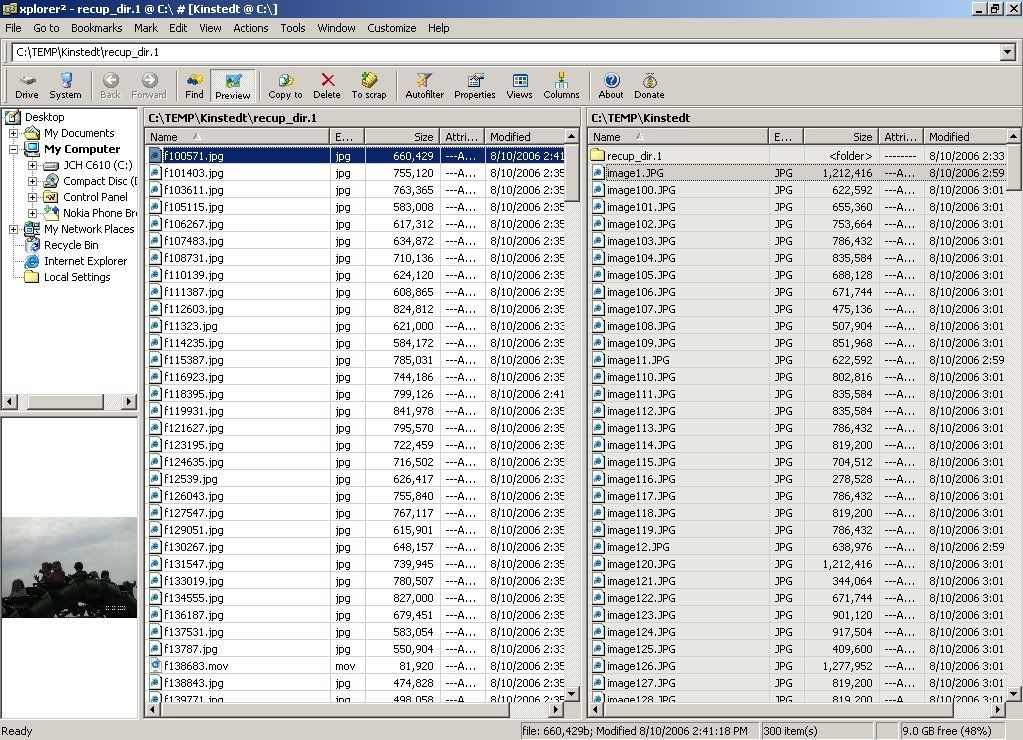
For reference, (given that some don't use a dual pane managers), here's a screen shot from Xplorer2 lite as I use it when doing manual/auto sync'ing:
Still spending WAY TOO much time here! But it's such a pleasure helping XY be a treasure!
(XP on laptop with touchpad and thus NO mouse!) Using latest beta vers when possible.
(XP on laptop with touchpad and thus NO mouse!) Using latest beta vers when possible.
-
lukescammell
- Posts: 744
- Joined: 28 Jul 2006 13:15
- Location: Kent, UK
- Contact:
-
jacky
- XYwiki Master
- Posts: 3106
- Joined: 23 Aug 2005 22:25
- Location: France
- Contact:
Well well... honestly I (obviously) don't use a dual pane, nor do I feel the need for one. I did used to work all day long with one, back on my OS/2 days (!) and I thought it was pretty cool.
But the way I feel is, basically, that is was great cause I was on text-mode, but now with Windows & its GUI mode and all, I just don't really feel a need for it at all.
I actually feel like a great single pane file manager with awesome usefull features (like rich operations, drop stack, etc) is more efficient, to me at least.
Now I hear the some may need to do some comparaison of folders and/or synch. I personally don't really have to, and what comes close to this for me is done through a search & rich copy
I'm not sure how much a dual pane would really help/improve XY, even though with its big "myth" it'll probably have an affect on some users.
On a more "technical" way, maybe what could be wished for could be something else, for new features like a synch one:
- You "start" it, choose a source (original) and a destination (clone, or w/e) and XY does the job, put the dest in synch with the source, with BEFORE doing anything showing you a list of what will be done: which files/folders will be copied/deleted, etc. (maybe with the ability for one to choose which of those operations will be done; so one can "cancel" some of them)
This to me would sound like a better thing, cause it really does something, I mean a dual pane look sexy to its fan , but it doesn't do nothing per-se. Here, the synch feature would do the actual work, and that sounds more efficient to me.....
And in the same way, one could think of a folder comparaison feature, that would list results of this comparaison: what items are on source but not dest, etc. You could even dream of this using criteria of your choice: dates, sizes, CRCs, etc so once again it does the work, faster (& better) than you could do it manually with your dual pane....
Allright, that was my 2cents
But the way I feel is, basically, that is was great cause I was on text-mode, but now with Windows & its GUI mode and all, I just don't really feel a need for it at all.
I actually feel like a great single pane file manager with awesome usefull features (like rich operations, drop stack, etc) is more efficient, to me at least.
Now I hear the some may need to do some comparaison of folders and/or synch. I personally don't really have to, and what comes close to this for me is done through a search & rich copy
I'm not sure how much a dual pane would really help/improve XY, even though with its big "myth" it'll probably have an affect on some users.
On a more "technical" way, maybe what could be wished for could be something else, for new features like a synch one:
- You "start" it, choose a source (original) and a destination (clone, or w/e) and XY does the job, put the dest in synch with the source, with BEFORE doing anything showing you a list of what will be done: which files/folders will be copied/deleted, etc. (maybe with the ability for one to choose which of those operations will be done; so one can "cancel" some of them)
This to me would sound like a better thing, cause it really does something, I mean a dual pane look sexy to its fan
, but it doesn't do nothing per-se. Here, the synch feature would do the actual work, and that sounds more efficient to me..... And in the same way, one could think of a folder comparaison feature, that would list results of this comparaison: what items are on source but not dest, etc. You could even dream of this using criteria of your choice: dates, sizes, CRCs, etc so once again it does the work, faster (& better) than you could do it manually with your dual pane....
Allright, that was my 2cents
Proud XYplorer Fanatic
-
j_c_hallgren
- XY Blog Master
- Posts: 5826
- Joined: 02 Jan 2006 19:34
- Location: So. Chatham MA/Clearwater FL
- Contact:
Xplorer2 calls this "mirror scrolling" mode and it's activated by a toggle on the "go to" menu...it moves the focus on the inactive pane to match the active one, and scrolls as needed...and when no match found, it keeps inactive focus on last matching item...lukescammell wrote:Sync-scroll:
1) When would this kick in?
2) Should it be manually toggleable?
X2 also has "mirror browsing" where the folders being browsed are kept in sync as one moves up/down the tree...I don't use this often so am not that familiar with it.
X2 has a sync feature that marks those items that differ, and then one can work with those files for whatever purpose...but there are many times when just by a glance, I can tell how the two folders differ...and in some cases, even when I have a match, I may want to delete both so dual helps in this case, as I can preview the item to see what is was..
Dual pane is, to me, a prerequisite to any automated sync feature...not the end result, but just a way to get there...
Still spending WAY TOO much time here! But it's such a pleasure helping XY be a treasure!
(XP on laptop with touchpad and thus NO mouse!) Using latest beta vers when possible.
(XP on laptop with touchpad and thus NO mouse!) Using latest beta vers when possible.
-
admin
- Site Admin
- Posts: 66514
- Joined: 22 May 2004 16:48
- Location: Win8.1, Win10, Win11, all @100%
- Contact:
Oh, it does something: take away screen space!jacky wrote:... I mean a dual pane look sexy to its fan
Synch is planned, as is Drop Stack... I'm aware that I lag behind my plans recently... but they are not forgotten! Default tab is already coded and works nicely!! You'll have it soon...

-
admin
- Site Admin
- Posts: 66514
- Joined: 22 May 2004 16:48
- Location: Win8.1, Win10, Win11, all @100%
- Contact:
I still do not see myself doing a comforting/reassuring/whatever visual comparison of 2 folders with 500 items each. Computers have been invented so we do not have to do this. (I know that's historically wrong, but mass comparison is something computers are just real good for.)RalphM wrote:1. Visual comparison of the content of two folders without switching back and forth between the two folders.
I can understand that a preview for Rename Special would be nice (and it's planned!): the templates, especially RegExp, can be very complex, so you like to check what will happen before you actually let it happen. But synch is such an easy concept... you want to synch, you click synch, you get synch. There are no surprises. Why visually counter-check?? Trust the machine!RalphM wrote:2. If some synch functions are in development, which would definitely need dual pane in order to see which files will be synched and how.
-
phatmankerr
- Posts: 186
- Joined: 26 Dec 2005 19:35
A no vote for dual pane
Apologies to all you 'Dual Paners' out there, but I am with Don on this one.
I can't see the point of having dual panes (I have used various dual pane managers) but I much prefer the XY tabbed interface. As Don points out all the file operations (which is what XY is all about) are achievable without dual panes.
Would be nice to see a side by side comparison for rename operations, but even there I trust XY to do the job (so not essential).
Just one opinion of many though.
Cheers
Andy
I can't see the point of having dual panes (I have used various dual pane managers) but I much prefer the XY tabbed interface. As Don points out all the file operations (which is what XY is all about) are achievable without dual panes.
Would be nice to see a side by side comparison for rename operations, but even there I trust XY to do the job (so not essential).
Just one opinion of many though.
Cheers
Andy
-
Orson
- Posts: 85
- Joined: 24 Oct 2006 20:31
A couple of thoughts on two panes:
Yes, I have gotten very accustomed to two panes through using Total Commander for years. I'm working on losing the habit, so to speak. But maybe I shouldn't have to "work" on it. I would bet there are a lot of potential purchasers of XY who love the catalog, love the great preview functions, and love a number of features..... but just wish the dang thing had (at least the option of) a second pane. Yeah, we can all go over to Total Commander, Xplorer2, Directory Opus, Servant Salamander, Frigate, etc., etc. But imagine wowing people by providing the exclusive & hot XY-only features plus, by golly, a second pane.
That's my expand-your-market argument. I'd also argue that there is genuine functional value in the ability to simultaneously view two folders' content. It's not merely a feel-good factor (although for software, I believe feel-good is a valid UI design factor). It's functional, it's convenient to be able to work with two different directories at a glance, not by clicking a tab--just by looking.
I think Donald has introduced some great innovations in the design of a file manager. I'm suggesting that one non-innovative feature would augment both the marketability and practical value of this very cool tool.
Yes, I have gotten very accustomed to two panes through using Total Commander for years. I'm working on losing the habit, so to speak. But maybe I shouldn't have to "work" on it. I would bet there are a lot of potential purchasers of XY who love the catalog, love the great preview functions, and love a number of features..... but just wish the dang thing had (at least the option of) a second pane. Yeah, we can all go over to Total Commander, Xplorer2, Directory Opus, Servant Salamander, Frigate, etc., etc. But imagine wowing people by providing the exclusive & hot XY-only features plus, by golly, a second pane.
That's my expand-your-market argument. I'd also argue that there is genuine functional value in the ability to simultaneously view two folders' content. It's not merely a feel-good factor (although for software, I believe feel-good is a valid UI design factor). It's functional, it's convenient to be able to work with two different directories at a glance, not by clicking a tab--just by looking.
I think Donald has introduced some great innovations in the design of a file manager. I'm suggesting that one non-innovative feature would augment both the marketability and practical value of this very cool tool.
-
j_c_hallgren
- XY Blog Master
- Posts: 5826
- Joined: 02 Jan 2006 19:34
- Location: So. Chatham MA/Clearwater FL
- Contact:
1) I've never done a manual compare of THAT many files! But for a typical folder with maybe 50 or less files, then visual can be done easily...and...admin wrote:I still do not see myself doing a comforting/reassuring/whatever visual comparison of 2 folders with 500 items each.RalphM wrote:1. Visual comparison of the content of two folders without switching back and forth.But synch is such an easy concept... you want to synch, you click synch, you get synch. There are no surprises. Why visually counter-check?? Trust the machine!RalphM wrote:2. If some synch functions are in development, which would definitely need dual pane in order to see which files will be synched and how.
in some rare cases, a visual compare appears to be the only way possible:
Example - I have two folders, one containing BMP files and the other JPG's...they have obviously different sizes but also the dates differ...and the names differ slightly even ignoring the extension...but, I can visually tell which pairs match up as the names when sorted are similar...maybe that's an extreme case, but there is no real way that can be sync'd programatically IMO.
2) Ok, so in X2 when I do a sync, it shows which ones match...fine...then I typically use the unmatched ones to manually process those, by either copying or renaming or deleting or moving, etc...and often my actions differ for each file, so there is no way to automate this task...I'm not counter-checking, but acting on the results...If I wanted to only make sure that folders were identical, than that's a different story...
Still spending WAY TOO much time here! But it's such a pleasure helping XY be a treasure!
(XP on laptop with touchpad and thus NO mouse!) Using latest beta vers when possible.
(XP on laptop with touchpad and thus NO mouse!) Using latest beta vers when possible.
-
lukescammell
- Posts: 744
- Joined: 28 Jul 2006 13:15
- Location: Kent, UK
- Contact:
Heh, that's made me think of another onej_c_hallgren wrote: 1) I've never done a manual compare of THAT many files! But for a typical folder with maybe 50 or less files, then visual can be done easily...and...
in some rare cases, a visual compare appears to be the only way possible:
Example - I have two folders, one containing BMP files and the other JPG's...they have obviously different sizes but also the dates differ...and the names differ slightly even ignoring the extension...but, I can visually tell which pairs match up as the names when sorted are similar...maybe that's an extreme case, but there is no real way that can be sync'd programatically IMO.
The ability to look at thumbnails from two different directories could come in useful from time to time. Especially if you think you've got some pictures mixed up, or just want to put pictures of the same visual type together. Yes you *could* do it with a single pane, but with two up at the same time it's quicker.
You can still just have the one tab bar with two vertical (or horizontal) panes. All you need is some kind of clour indicator which shows which tabs are being displayed in the panes (eg, one red, one green) with an indicator for whichever is active (there would obviously be two "showing" tabs and one "active").
In defence of the horizontal dual pane, I work with graphics, and would find it pretty useful to be able to have both my "source" and my "modified" directories visible at the same time. I drag and drop files int InDesign the whole time, and not having to click another tab to be able to just edit the original file in Photoshop would be a noticeable time saver for me. Vertical is useful for comparison and preview type tasks, but horizntal does have its uses.
Used to update to the latest beta every day. Now I have children instead…
Windows 10 Pro x64 (everywhere except phone…)
Windows 10 Pro x64 (everywhere except phone…)