11.5 new feature: incorrect color while sorting by file name

Things you’d like to miss in the future...
Forum rules
You might want to read this if you're looking for priority service

:info: Please Include The Following Information
1) Your XYplorer Version (e.g., v28.00.0801)
2) Your Windows Version (e.g., Win 11)
3) Your Screen Scaling Percentage (e.g., 125%).

:info: Use Your Profile Or Signature
We strongly recommend adding your Windows Version and Screen Scaling Percentage to the Location field in your Profile or to your Signature. That way, you only have to type them once, and we won't have to search for that vital information.

:info: How To Attach Images
When attaching an Image, please use the Attachment tab at the bottom of your post and click "Add files".
binocular222
Posts: 1424
Joined: 04 Nov 2008 05:35
Location: Win11, Win10, 100% Scaling

11.5 new feature: incorrect color while sorting by file name

Post by binocular222 »

Hi,

When I sort by extension it's just fine: Files with same extension have the same color.
However, when I sort by file name, the color is applied in weired ways. As all file names are different, why some files are hightlighted?
Image


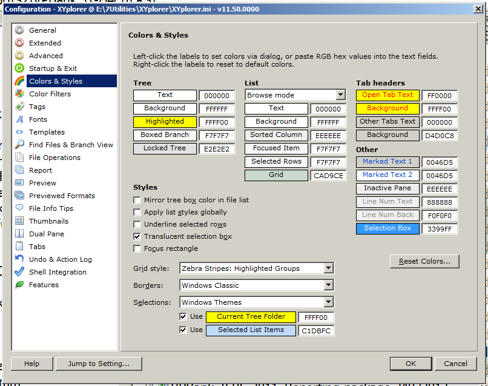
Here is my settings:
Image
I'm a casual coder using AHK language. All of my xys scripts:
http://www.xyplorer.com/xyfc/viewtopic. ... 243#p82488

Borut
Posts: 1472
Joined: 19 Oct 2010 19:29
Location: Win10 Pro 64b 22H2, @120DPI (125%)

Re: 11.5 new feature: incorrect color while sorting by file

Post by Borut »

Seems logical and in accord with http://xyplorer.com/release_11.50.htm#HighlightedGroups to me:
Also sorting by Name renders some groups which wouldn't be as obvious without the highlights. Note that grouping in the Name column resorts to some smart algorithm that detects similar filenames, else there would be no groups since all Names have to be different in a folder. (Click to zoom)
Actually, I would like to have the same smart logic in cases when sorting column is a time field (like last modified), which does not seem to me to work that way. Therefore my wish (is not quite the theme of this thread)...

Don, couldn't you apply the same smart logic (which you use with file names) on time fields by treating the time field content as if it would be a name made by date-time in the ISO-standard format? (It could be made even smarter by analysing the time span of all the listed files and dynamically adapting the categorisation.)
Win 10 Pro 64bit

admin
Site Admin
Posts: 67316
Joined: 22 May 2004 16:48
Location: Win8.1, Win10, Win11, all @100%
Contact:

Re: 11.5 new feature: incorrect color while sorting by file

Post by admin »

Borut wrote:Seems logical and in accord with http://xyplorer.com/release_11.50.htm#HighlightedGroups to me:
Also sorting by Name renders some groups which wouldn't be as obvious without the highlights. Note that grouping in the Name column resorts to some smart algorithm that detects similar filenames, else there would be no groups since all Names have to be different in a folder. (Click to zoom)
Actually, I would like to have the same smart logic in cases when sorting column is a time field (like last modified), which does not seem to me to work that way. Therefore my wish (is not quite the theme of this thread)...

Don, couldn't you apply the same smart logic (which you use with file names) on time fields by treating the time field content as if it would be a name made by date-time in the ISO-standard format? (It could be made even smarter by analysing the time span of all the listed files and dynamically adapting the categorisation.)
If I'm interested in exact dupes rather than time spans the logic is perfect as it is now. The current logic applied on ISO-standard date/time fields would group the items by year -- not very interesting IMO.

Borut
Posts: 1472
Joined: 19 Oct 2010 19:29
Location: Win10 Pro 64b 22H2, @120DPI (125%)

Re: 11.5 new feature: incorrect color while sorting by file

Post by Borut »

admin wrote:If I'm interested in exact dupes rather than time spans the logic is perfect as it is now. The current logic applied on ISO-standard date/time fields would group the items by year -- not very interesting IMO.
Oh, yes, I actually did not realise that your algorithm is not really smart at all. :wink: What you need, IMHO, is the following (somewhat simplified, but should be enough, I believe):

Code: Select all

Legend:
Z(i)    String under question, from line i
Le(a,b) The length of the equal left part of the strings a and b

The idea of an algorithm (quite simplified):
i:=2;
Lcurrent := Le( Z(i-1), Z(i) );
while EnoughLines do
begin
   Lnext := Le( Z(i), Z(i+1) );
   IsGroupBorder := Lcurrent <> Lnext;
   Lcurrent:=Lnext;
   i:=i+1;
end;
delete group borders between the groups containing only one item;
In the case of ISO-coded date-time, a static parameter could be the number of string positions to be checked by Le (i.e. resolution level: seconds, minutes, hours, days...). This could be even determined dynamically, based on the context (that was, what I had in mind).

I believe that this would generate more interesting results, both when comparing names and date-times.
Win 10 Pro 64bit

admin
Site Admin
Posts: 67316
Joined: 22 May 2004 16:48
Location: Win8.1, Win10, Win11, all @100%
Contact:

Re: 11.5 new feature: incorrect color while sorting by file

Post by admin »

Borut wrote:
admin wrote:If I'm interested in exact dupes rather than time spans the logic is perfect as it is now. The current logic applied on ISO-standard date/time fields would group the items by year -- not very interesting IMO.
Oh, yes, I actually did not realise that your algorithm is not really smart at all. :wink: What you need, IMHO, is the following (somewhat simplified, but should be enough, I believe):

Code: Select all

Legend:
Z(i)    String under question, from line i
Le(a,b) The length of the equal left part of the strings a and b

The idea of an algorithm (quite simplified):
i:=2;
Lcurrent := Le( Z(i-1), Z(i) );
while EnoughLines do
begin
   Lnext := Le( Z(i), Z(i+1) );
   IsGroupBorder := Lcurrent <> Lnext;
   Lcurrent:=Lnext;
   i:=i+1;
end;
delete group borders between the groups containing only one item;
In the case of ISO-coded date-time, a static parameter could be the number of string positions to be checked by Le (i.e. resolution level: seconds, minutes, hours, days...). This could be even determined dynamically, based on the context (that was, what I had in mind).

I believe that this would generate more interesting results, both when comparing names and date-times.
So you find your algorithm smarter? :) Did you test it? I did not, but looking at my test lists I don't think the results a better than mine. For example:

My way:

Code: Select all

XY-01
XY-02
---------------
Xylophone-01
Xylophone-02
Your way:

Code: Select all

XY-01
XY-02
Xylophone-01
---------------
Xylophone-02

TheQwerty
Posts: 4373
Joined: 03 Aug 2007 22:30

Re: 11.5 new feature: incorrect color while sorting by file

Post by TheQwerty »

This just goes to show that there needs to be a way to define matching patterns for grouping. :P

I dream of regex...

Code: Select all

^(.*?-)\[?\d+\]?(-.*?)\.[^\.]+$
If all the captured groups match consider them a group!

Abc-0-def.rar
Abc-1000-def.zip
Abc-[12]-def.awesome

Would then all be grouped together, or whatever, the user is in full control. ;)

admin
Site Admin
Posts: 67316
Joined: 22 May 2004 16:48
Location: Win8.1, Win10, Win11, all @100%
Contact:

Re: 11.5 new feature: incorrect color while sorting by file

Post by admin »

TheQwerty wrote:This just goes to show that there needs to be a way to define matching patterns for grouping. :P

I dream of regex...

Code: Select all

^(.*?-)\[?\d+\]?(-.*?)\.[^\.]+$
If all the captured groups match consider them a group!

Abc-0-def.rar
Abc-1000-def.zip
Abc-[12]-def.awesome

Would then all be grouped together, or whatever, the user is in full control. ;)
My current infinitely simpler way also sees your 3 files as group. Show me an example where my way fails in a way that convinces me to change it.

Borut
Posts: 1472
Joined: 19 Oct 2010 19:29
Location: Win10 Pro 64b 22H2, @120DPI (125%)

Re: 11.5 new feature: incorrect color while sorting by file

Post by Borut »

No, I have not tested my proposal and I can see that it should be refined and played with, for which I do not have time (and neither do you, I suppose).

For your particular test case I believe that my algorithm would in fact generate one group spanning all four items, but - what is worse - I seem to see that it would probably do even worse than that on some other test cases. However, this could perhaps be fine tuned through change in the definition of IsGroupBorder.

To me it seems that your algorithm is overly fixated on special separator characters in the file names, or on the file names of the same length, which is not always the case with file names that are nevertheless similar and also "logically connected". I encounter file names of the following type in real life, for example:

ABCDEFA.XYZ
ABCDEFB.XYZ
ABCDEFC.XYZ
ABCDEFD.XYZ
ABCDEFE.XYZ
ABCDEFF.XYZ
ARTjhgfjhgf.xyz
ARTjhwejgwej.XYZ
ARTtzrdzrd.XYZ
ARTtrestddtd.XYZ

I was looking for a solution for these cases.
Win 10 Pro 64bit

admin
Site Admin
Posts: 67316
Joined: 22 May 2004 16:48
Location: Win8.1, Win10, Win11, all @100%
Contact:

Re: 11.5 new feature: incorrect color while sorting by file

Post by admin »

OK,

ARTjhgfjhgf.xyz
ARTjhwejgwej.XYZ
ARTtzrdzrd.XYZ
ARTtrestddtd.XYZ

these look somewhat like a group. But they look rare to me, nothing I see often on my computer.

I tested many large real folders on my computer and I can say that the current simple algorithm does surprisingly well. Sure, one can always increase smartness, but at what cost? The simplicity of the current algorithm also has the advantage that it is easily predictable because it is so easy to see how it works. It's equally easy to see where it fails, and that's a strength.

TheQwerty
Posts: 4373
Joined: 03 Aug 2007 22:30

Re: 11.5 new feature: incorrect color while sorting by file

Post by TheQwerty »

admin wrote:My current infinitely simpler way also sees your 3 files as group. Show me an example where my way fails in a way that convinces me to change it.
XYplorer - Group Highlighting 2.png
A user definable regex would allow the user to do the following to achieve the same grouping via different means:

Code: Select all

^(\d+).*$
Grouping (in case you can't make out the group from XY's default coloring):
100 Cats.txt
-
101 Cats.txt
101 Dalmatians-01.txt
101 Dalmatians-02.txt
101 Doggies-01.txt
101 Doggies-02.txt
Example 1:

Code: Select all

Pattern: ^\d+ (.*?)[-\d]*\.[^\.]+$
Group by noun / Ignore number prefix:
100 Cats.txt
101 Cats.txt
-
101 Dalmatians-01.txt
101 Dalmatians-02.txt
-
101 Doggies-01.txt
101 Doggies-02.txt
Example 2:

Code: Select all

Pattern: ^(\d+ .*?)[-\d]*\.[^\.]+$
Group by number prefix and noun:
100 Cats.txt
-
101 Cats.txt
-
101 Dalmatians-01.txt
101 Dalmatians-02.txt
-
101 Doggies-01.txt
101 Doggies-02.txt
Example 3:

Code: Select all

Pattern: ^(\d)
Group by first character is a digit:
100 Cats.txt
101 Cats.txt
101 Dalmatians-01.txt
101 Dalmatians-02.txt
101 Doggies-01.txt
101 Doggies-02.txt
-
desktop.ini
Example 4:

Code: Select all

Pattern: ^(.)
Group by the first character
I think what you have is an okay start - can't say I agree with the grouping in that screenshot - and I agree that for the first iteration a non-customization algorithm keeps things nice and simple.

But there is no question in my mind that the next iteration of grouping would benefit from having user definable name patterns.
To see the attached files, you need to log into the forum.

admin
Site Admin
Posts: 67316
Joined: 22 May 2004 16:48
Location: Win8.1, Win10, Win11, all @100%
Contact:

Re: 11.5 new feature: incorrect color while sorting by file

Post by admin »

Yes, I prefer to start simple. Let's wait for the first wave of feedback on this revolutionary (? or have you ever seen something like that?) feature from the user cloud, uh crowd.

Filehero
Posts: 2734
Joined: 27 Feb 2012 18:50
Location: Windows 11@100%

Re: 11.5 new feature: incorrect color while sorting by file

Post by Filehero »

admin wrote:Yes, I prefer to start simple.
Yes, please leave the current (or a slightly - by whatever means - way) as a one-click option.

I love the glory mightyness of regexps - when it's their turn. But logical file grouping is based on explicit (visual) clues and should therefore remain straightforward to a certain extent.

Just my humble opinion ....


Cheers,
Filehero

binocular222
Posts: 1424
Joined: 04 Nov 2008 05:35
Location: Win11, Win10, 100% Scaling

Re: 11.5 new feature: incorrect color while sorting by file

Post by binocular222 »

Can I have an option to not using color when sort by name?
I'm a casual coder using AHK language. All of my xys scripts:
http://www.xyplorer.com/xyfc/viewtopic. ... 243#p82488

admin
Site Admin
Posts: 67316
Joined: 22 May 2004 16:48
Location: Win8.1, Win10, Win11, all @100%
Contact:

Re: 11.5 new feature: incorrect color while sorting by file

Post by admin »

binocular222 wrote:Can I have an option to not using color when sort by name?
Why?

binocular222
Posts: 1424
Joined: 04 Nov 2008 05:35
Location: Win11, Win10, 100% Scaling

Re: 11.5 new feature: incorrect color while sorting by file

Post by binocular222 »

- Everyone has his own logic of naming files. Your logic does not meet my logic most of the time.
- Beside, files can be related in multiple ways (i.e: files received from boss / files related to ABC client ....) thus file name not always reflect the relationship I'm looking for.
In these cases, having color is visually complex, I just feel that I don't need it. But color by extension / date created is great.
I'm a casual coder using AHK language. All of my xys scripts:
http://www.xyplorer.com/xyfc/viewtopic. ... 243#p82488

Post Reply