 XYplorer Beta Club
Can't add custom RGB values in the color dialog.
Can only add a maximum of 2 numbers (have tried this with various themes - including XP Classic as this sometimes affects text boxes and other fields).
A workaround or a fix would be appreciated.
Thanks
Andy
Configuration>Colors
Forum rules
 READ THIS AND DO IT!!!
 Please include the following information:
1) Your XYplorer Version (e.g., v28.00.0801)
2) Your Windows Version (e.g., Win 11)
3) Your Screen Scaling Percentage (e.g., 125%).
We strongly recommend adding your Windows Version and Screen Scaling Percentage to the Location field in your Profile or to your Signature. That way, you only have to type them once, and we won't have to search for that vital information.
When attaching an Image, please use the Attachment tab at the bottom of your post and click "Add files".
READ THIS AND DO IT!!!
READ THIS AND DO IT!!! Please include the following information:1) Your XYplorer Version (e.g., v28.00.0801)
2) Your Windows Version (e.g., Win 11)
3) Your Screen Scaling Percentage (e.g., 125%).
We strongly recommend adding your Windows Version and Screen Scaling Percentage to the Location field in your Profile or to your Signature. That way, you only have to type them once, and we won't have to search for that vital information. When attaching an Image, please use the Attachment tab at the bottom of your post and click "Add files". READ THIS AND DO IT!!!
-
phatmankerr
- Posts: 186
- Joined: 26 Dec 2005 19:35
Fixed
Not to worry - found the values in config file and edited there.
Andy
Andy
-
admin
- Site Admin
- Posts: 66431
- Joined: 22 May 2004 16:48
- Location: Win8.1, Win10, Win11, all @100%
- Contact:
Re: Configuration>Colors
? What do you mean, 2 digits?phatmankerr wrote:Can only add a maximum of 2 numbers...
-
phatmankerr
- Posts: 186
- Joined: 26 Dec 2005 19:35
Post Image
Sorry Don,
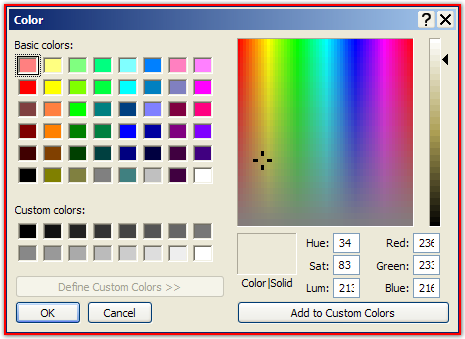
Have posted an image - the field is truncated and although you can just about see the 3 digits when you try and enter new values I can only enter a maximum of 2 digits.
I should point out that this now appears to be something that it NOT particular to XY (have a program called colorcop and it's color dialog suffers from the same problem) - I think this is something to do with the themes I use, but even the standard XP themes seem to introduce this problem.
Have posted an image - the field is truncated and although you can just about see the 3 digits when you try and enter new values I can only enter a maximum of 2 digits.
I should point out that this now appears to be something that it NOT particular to XY (have a program called colorcop and it's color dialog suffers from the same problem) - I think this is something to do with the themes I use, but even the standard XP themes seem to introduce this problem.
-
Gandolf