

Reset Filters (and saving filters)

Features wanted...
Post Reply
MrSpock
Posts: 37
Joined: 07 Mar 2008 00:24

Reset Filters (and saving filters)

Post by MrSpock »

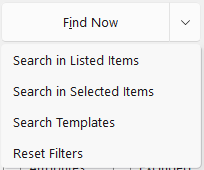
I reset my filters frequently, so I wasn't very happy about the option being moved to a submenu, but I'll probably get used to it.

Image

While we're on the subject, it would be great to be able to quickly save my current search filters (including all "Find Files" tabs) and reuse them later. In that case, this submenu would be very useful. Forgive me if this is already possible and I'm simply not aware of it.

Regards,
MrSpock
XYplorer v28.50 | Windows 11 Pro 26H2

admin
Site Admin
Posts: 67271
Joined: 22 May 2004 16:48
Location: Win8.1, Win10, Win11, all @100%
Contact:

Re: Reset Filters (and saving filters)

Post by admin »

Click "Search Templates...", then "Save to Template".

MrSpock
Posts: 37
Joined: 07 Mar 2008 00:24

Re: Reset Filters (and saving filters)

Post by MrSpock »

Great, I got it working! May I suggest adding "Save as template" and "Load template >" options to the new submenu? I think that would be both intuitive and time-saving.

Would it be possible to bring back the Reset button? Unfortunately, the change hasn't been an improvement.
MrSpock
XYplorer v28.50 | Windows 11 Pro 26H2

admin
Site Admin
Posts: 67271
Joined: 22 May 2004 16:48
Location: Win8.1, Win10, Win11, all @100%
Contact:

Re: Reset Filters (and saving filters)

Post by admin »

That's not so easy, and needs good thinking.

There's no space for the button.

MrSpock
Posts: 37
Joined: 07 Mar 2008 00:24

Re: Reset Filters (and saving filters)

Post by MrSpock »

Thank you. I understand and respect your decision.
MrSpock
XYplorer v28.50 | Windows 11 Pro 26H2

admin
Site Admin
Posts: 67271
Joined: 22 May 2004 16:48
Location: Win8.1, Win10, Win11, all @100%
Contact:

Re: Reset Filters (and saving filters)

Post by admin »

There's a scripting command searchtemplate(). You can use it to build the interface of your dreams.

admin
Site Admin
Posts: 67271
Joined: 22 May 2004 16:48
Location: Win8.1, Win10, Win11, all @100%
Contact:

Re: Reset Filters (and saving filters)

Post by admin »

I had a better idea: Next beta exposes Reset Filters to scripting via SC searchtemplate. This allows you to trigger it via keyboard shortcut or custom toolbar button.

Post Reply