
Window hidden on program startup

Things you’d like to miss in the future...
Forum rules
:warnred20: :warnred20: :warnred20: :warnred20: :warnred20: READ THIS AND DO IT!!! :warnred20: :warnred20: :warnred20: :warnred20: :warnred20:

:info: Please include the following information:
1) Your XYplorer Version (e.g., v28.00.0801)
2) Your Windows Version (e.g., Win 11)
3) Your Screen Scaling Percentage (e.g., 125%).

:info: We strongly recommend adding your Windows Version and Screen Scaling Percentage to the Location field in your Profile or to your Signature. That way, you only have to type them once, and we won't have to search for that vital information.

:info: When attaching an Image, please use the Attachment tab at the bottom of your post and click "Add files".

:warnred20: :warnred20: :warnred20: :warnred20: :warnred20: READ THIS AND DO IT!!! :warnred20: :warnred20: :warnred20: :warnred20: :warnred20:
Post Reply
msfox99
Posts: 3
Joined: 07 Sep 2025 16:42
Location: Windows 11, 4k monitor @ 150%

Window hidden on program startup

Post by msfox99 »

A few weeks ago XYPlorer got into a mode where, when I start it up, the window is somehow hidden off screen and/or also minimized. I have tried all of the usual things to bring it up from that state but they didn't work. I have a dual monitor setup. One monitor is HD 1920 with 100% scaling and the other is 4k with 150% scaling. I have been using XYPlorer this way for many years without issue.

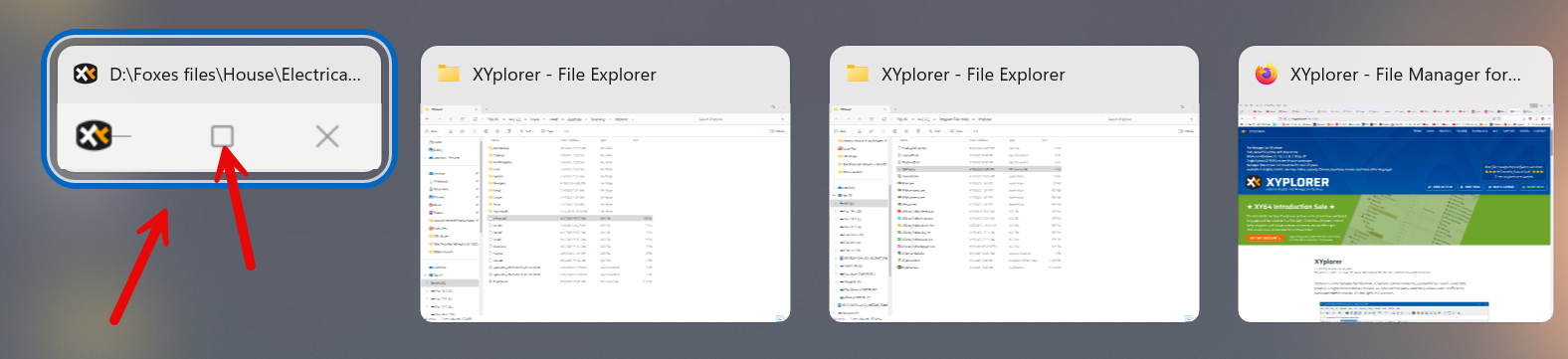
I was able to fix it after searching online, but it has happened again, so I thought I would post here in case anyone knows what might be causing this. (Also, I don't remember what It did, sorry.) In the screenshot below from hitting ALT-Tab, you can see how the instance is smaller than other running programs and also the close and maximize buttons are greyed out. When I select XYPlorer with ALT-Tab is stays hidden.
Image

Any suggestions?

Thanks.

Windows 11 Pro 24H2, 26100.4946

admin
Site Admin
Posts: 66538
Joined: 22 May 2004 16:48
Location: Win8.1, Win10, Win11, all @100%
Contact:

Re: Window hidden on program startup

Post by admin »

1) Which version of XY is that?

2) Check your settings here:
Configuration | General | Startup & Exit | Minimize to tray
Configuration | General | Startup & Exit | Minimize to tray on X close

msfox99
Posts: 3
Joined: 07 Sep 2025 16:42
Location: Windows 11, 4k monitor @ 150%

Re: Window hidden on program startup

Post by msfox99 »

XT version is 27.0.0.500. I found that by doing a Properties on XYplorer.exe. I can't see the program because it is hidden. I have a lifetime Pro license under a different email.

I therefore also can't check the settings you suggested. But to clarify, the program isn't minimized. When I click on it in the quick launch area of the task bar (once it is already running) to restore the window, I see a ghost of an animation of a very small window shoot over towards to top of monitor #2, but it will not show.

As I mentioned in my post I had the problem a couple of months ago and was able to fix it. Unfortunately I have searched for the solution that I found but can't find it now. My recollection is that it had me delete one of XYPlorer files. It is just strange that it has happened again. The program in this state is not usable.

Thanks, Mike

highend
Posts: 14991
Joined: 06 Feb 2011 00:33
Location: Win Server 2022 @100%

Re: Window hidden on program startup

Post by highend »

Terminate XY, open your XYplorer.ini, change these values:

Code: Select all

WinW=1000
WinH=768
WinX=20
WinY=20
Save it, start XY
One of my scripts helped you out? Please donate via Paypal

msfox99
Posts: 3
Joined: 07 Sep 2025 16:42
Location: Windows 11, 4k monitor @ 150%

Re: Window hidden on program startup

Post by msfox99 »

Excellent - that did it. Thanks very much.

Do you know what I might have done to get it into this state?

Post Reply
