 XYplorer Beta Club
XYplorer x64 does not copy, move, or backup.
Forum rules
 READ THIS AND DO IT!!!
 Please include the following information:
1) Your XYplorer Version (e.g., v28.00.0801)
2) Your Windows Version (e.g., Win 11)
3) Your Screen Scaling Percentage (e.g., 125%).
We strongly recommend adding your Windows Version and Screen Scaling Percentage to the Location field in your Profile or to your Signature. That way, you only have to type them once, and we won't have to search for that vital information.
When attaching an Image, please use the Attachment tab at the bottom of your post and click "Add files".
READ THIS AND DO IT!!!
READ THIS AND DO IT!!! Please include the following information:1) Your XYplorer Version (e.g., v28.00.0801)
2) Your Windows Version (e.g., Win 11)
3) Your Screen Scaling Percentage (e.g., 125%).
We strongly recommend adding your Windows Version and Screen Scaling Percentage to the Location field in your Profile or to your Signature. That way, you only have to type them once, and we won't have to search for that vital information. When attaching an Image, please use the Attachment tab at the bottom of your post and click "Add files". READ THIS AND DO IT!!!
-
KLASS
- Posts: 190
- Joined: 06 Dec 2014 12:28
Re: XYplorer x64 27.90.0002 beta
Yes, it is 27.90.0007
To see the attached files, you need to log into the forum.
Windows 10 Version 21H2
Screen Scaling Percentage 100%
Screen Scaling Percentage 100%
-
admin
- Site Admin
- Posts: 66535
- Joined: 22 May 2004 16:48
- Location: Win8.1, Win10, Win11, all @100%
- Contact:
Re: XYplorer x64 27.90.0002 beta
Do you use a fractional size in "Configuration | Colors and Styles | Fonts | Edit Text", and your decimal separator is not a dot?
FAQ | XY News RSS | XY X
-
KLASS
- Posts: 190
- Joined: 06 Dec 2014 12:28
Re: XYplorer x64 27.90.0002 beta
That's the point.
To see the attached files, you need to log into the forum.
Windows 10 Version 21H2
Screen Scaling Percentage 100%
Screen Scaling Percentage 100%
-
admin
- Site Admin
- Posts: 66535
- Joined: 22 May 2004 16:48
- Location: Win8.1, Win10, Win11, all @100%
- Contact:
Re: XYplorer x64 27.90.0002 beta
Try v27.90.0008. I couldn't reproduce it, so it's a blind fix, but I'm optimistic.
FAQ | XY News RSS | XY X
-
KLASS
- Posts: 190
- Joined: 06 Dec 2014 12:28
Re: XYplorer x64 27.90.0002 beta
There are no errors in version 27.90.0008!
To see the attached files, you need to log into the forum.
Windows 10 Version 21H2
Screen Scaling Percentage 100%
Screen Scaling Percentage 100%
-
Antieve
- Posts: 90
- Joined: 02 Apr 2016 20:52
Re: XYplorer x64 27.90.0002 beta
Context menu nexpected behavior
1. "Copy" and "Paste" menu types are not the same
2. "Paste" operation just don't work
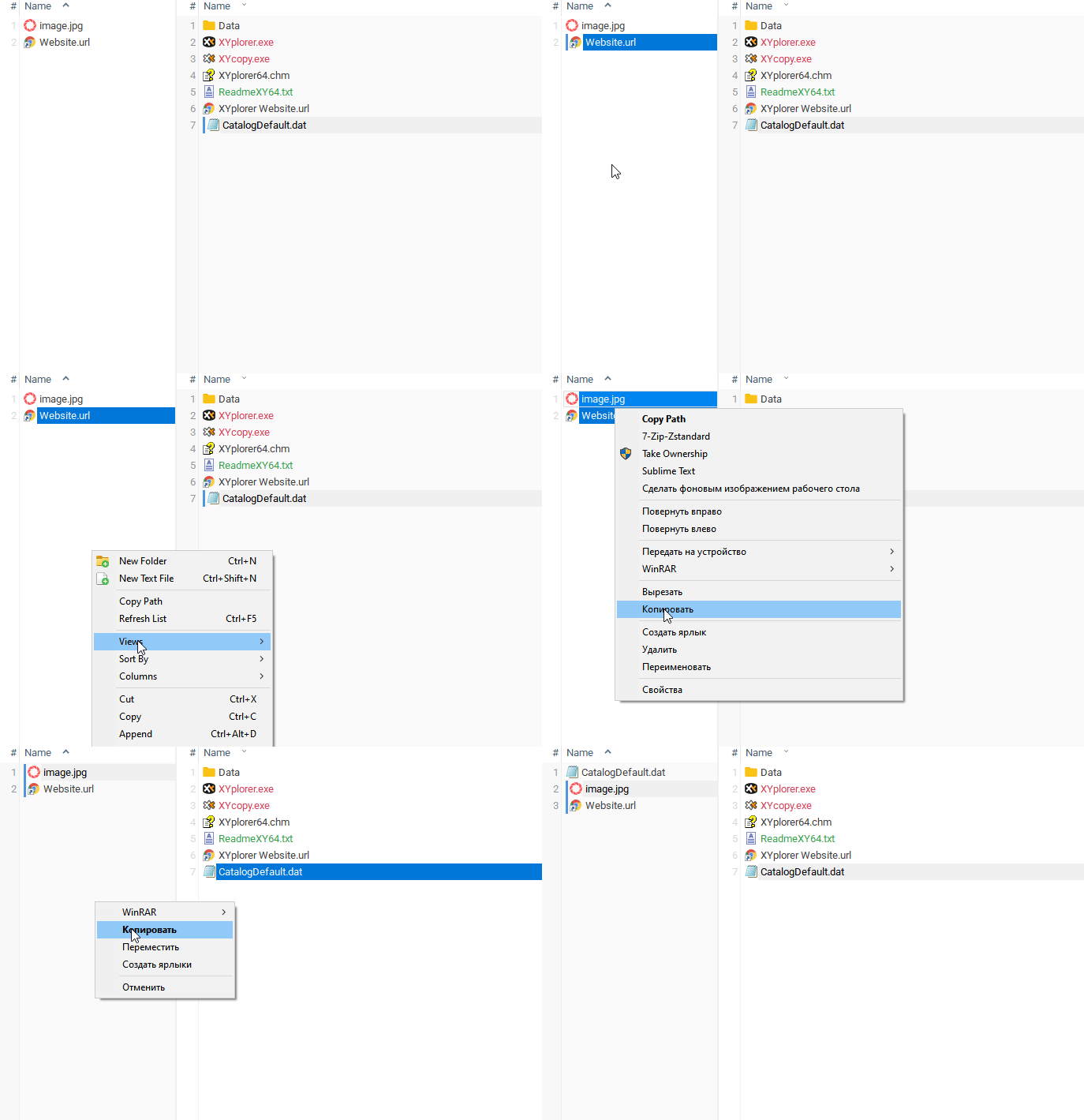
1. "Copy" and "Paste" menu types are not the same
2. "Paste" operation just don't work
-
admin
- Site Admin
- Posts: 66535
- Joined: 22 May 2004 16:48
- Location: Win8.1, Win10, Win11, all @100%
- Contact:

-
KLASS
- Posts: 190
- Joined: 06 Dec 2014 12:28
Re: XYplorer x64 27.90.0002 beta
Configuration => Mouse Down Blow Up => Mouse Down on Thumbnails and Icons => Check the checkboxes on the parameters:
1. On left mouse down
2. Enable blow ups on file icons as well
Further, if you left-click on the GIF icon, in XY 32 you will see a full-size pop-up window with a GIF image. In XY 64 we will see just a white window without a GIF image.
1. On left mouse down
2. Enable blow ups on file icons as well
Further, if you left-click on the GIF icon, in XY 32 you will see a full-size pop-up window with a GIF image. In XY 64 we will see just a white window without a GIF image.
To see the attached files, you need to log into the forum.
Windows 10 Version 21H2
Screen Scaling Percentage 100%
Screen Scaling Percentage 100%
-
jupe
- Posts: 3462
- Joined: 20 Oct 2017 21:14
- Location: Win10 22H2 120dpi
-
KLASS
- Posts: 190
- Joined: 06 Dec 2014 12:28
Re: XYplorer x64 27.90.0002 beta
Yes, it is animated. Then we wait too. )
Windows 10 Version 21H2
Screen Scaling Percentage 100%
Screen Scaling Percentage 100%
-
admin
- Site Admin
- Posts: 66535
- Joined: 22 May 2004 16:48
- Location: Win8.1, Win10, Win11, all @100%
- Contact:
Re: XYplorer x64 27.90.0002 beta
Next time, choose a more descriptive thread name. It should describe the issue rather than the XYplorer version.
FAQ | XY News RSS | XY X
-
KLASS
- Posts: 190
- Joined: 06 Dec 2014 12:28
Re: XYplorer x64 does not copy, move, or backup.
Corrected the theme name.
Windows 10 Version 21H2
Screen Scaling Percentage 100%
Screen Scaling Percentage 100%
-
admin
- Site Admin
- Posts: 66535
- Joined: 22 May 2004 16:48
- Location: Win8.1, Win10, Win11, all @100%
- Contact:
-
KLASS
- Posts: 190
- Joined: 06 Dec 2014 12:28
Re: XYplorer x64 does not copy, move, or backup.
Have you tried the XYplorer x64 version 27.90.0008?
Windows 10 Version 21H2
Screen Scaling Percentage 100%
Screen Scaling Percentage 100%