ShowDriveLettersFirst no longer works for network drives

Things you’d like to miss in the future...
Forum rules
:warnred20: :warnred20: :warnred20: :warnred20: :warnred20: READ THIS AND DO IT!!! :warnred20: :warnred20: :warnred20: :warnred20: :warnred20:

:info: Please include the following information:
1) Your XYplorer Version (e.g., v28.00.0801)
2) Your Windows Version (e.g., Win 11)
3) Your Screen Scaling Percentage (e.g., 125%).

:info: We recommend adding your Windows Version and Screen Scaling Percentage to the Location field in your Profile or to your Signature. That way, you only have to type them once.

:info: When attaching an Image, please use the Attachment tab at the bottom of your post and click "Add files".

:warnred20: :warnred20: :warnred20: :warnred20: :warnred20: READ THIS AND DO IT!!! :warnred20: :warnred20: :warnred20: :warnred20: :warnred20:
Post Reply
R2X
Posts: 3
Joined: 17 Feb 2025 13:03

ShowDriveLettersFirst no longer works for network drives

Post by R2X »

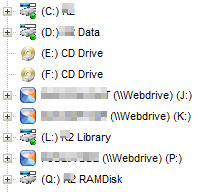
Since a few weeks the registry entry "ShowDriveLettersFirst" is ignored if the drive is a network drive:

Image

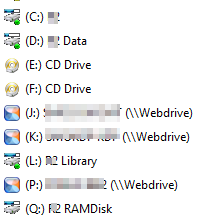
In Windows Explorer:

Image

There were also problems with the icons, but that seems to be working again now.

admin
Site Admin
Posts: 65246
Joined: 22 May 2004 16:48
Location: Win8.1, Win10, Win11, all @100%
Contact:

Re: ShowDriveLettersFirst no longer works for network drives

Post by admin »

Which version are you using?

AgentSmith007
Posts: 40
Joined: 06 Oct 2024 18:11
Location: Land of the free, home of the brave

Re: ShowDriveLettersFirst no longer works for network drives

Post by AgentSmith007 »

R2X wrote: 17 Feb 2025 13:20 Since a few weeks the registry entry "ShowDriveLettersFirst" is ignored if the drive is a network drive:
I was the first (I think) to scream about this when version number went from 26.70.XXXX to 26.80.XXXX. But our master fixed it in a few updates.
It works great with the latest version of 26.90.0000.

Kudos to master.
Rule #39: "There is no such thing as coincidences."

R2X
Posts: 3
Joined: 17 Feb 2025 13:03

Re: ShowDriveLettersFirst no longer works for network drives

Post by R2X »

admin wrote: 17 Feb 2025 16:38 Which version are you using?
26.90.0000
I use a software to map cloud accounts as network drives. Does this perhaps make a difference to normal network drives?
Until the previous version (26.80.0500) , the icon for this particular software did not work either. With all other icons I had no problems.

admin
Site Admin
Posts: 65246
Joined: 22 May 2004 16:48
Location: Win8.1, Win10, Win11, all @100%
Contact:

Re: ShowDriveLettersFirst no longer works for network drives

Post by admin »

I don't know how that software works, but unchecking Configuration | General | Safety Belts, Network | Network | Assume that mapped network drives are available should solve your issues.

R2X
Posts: 3
Joined: 17 Feb 2025 13:03

Re: ShowDriveLettersFirst no longer works for network drives

Post by R2X »

admin wrote: 18 Feb 2025 08:43 I don't know how that software works, but unchecking Configuration | General | Safety Belts, Network | Network | Assume that mapped network drives are available should solve your issues.
That worked immediately. Thank you very much!

Post Reply