 XYplorer Beta Club
XYploer 26.70.0400
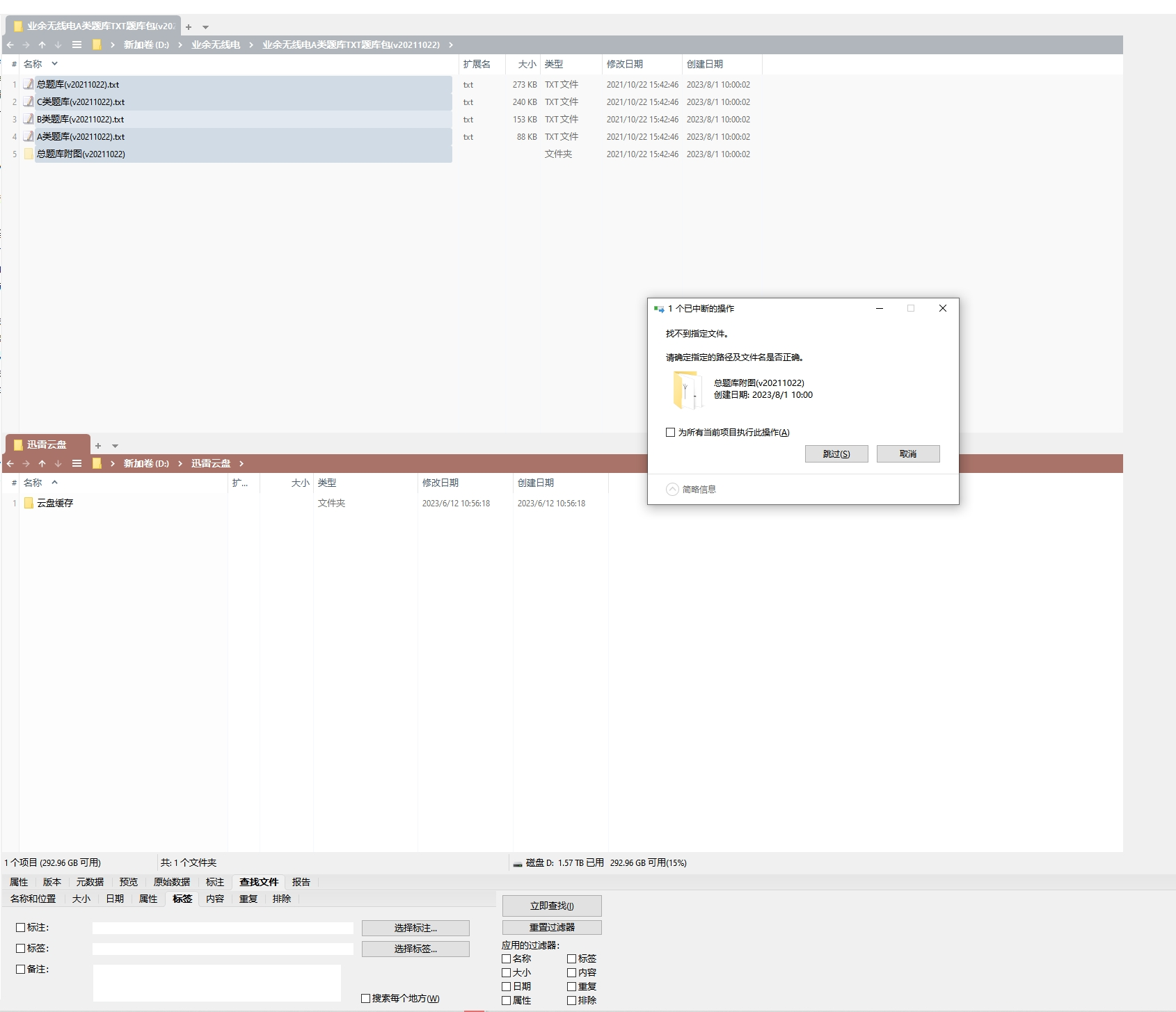
In XYplorer, it is not possible to cut and paste files and folders, with the message "The specified file could not be found," but "copy and paste" operations can be performed.
"The specified file could not be found"When cut&paste
Forum rules
 READ THIS AND DO IT!!!
 Please include the following information:
1) Your XYplorer Version (e.g., v28.00.0801)
2) Your Windows Version (e.g., Win 11)
3) Your Screen Scaling Percentage (e.g., 125%).
We strongly recommend adding your Windows Version and Screen Scaling Percentage to the Location field in your Profile or to your Signature. That way, you only have to type them once, and we won't have to search for that vital information.
When attaching an Image, please use the Attachment tab at the bottom of your post and click "Add files".
READ THIS AND DO IT!!!
READ THIS AND DO IT!!! Please include the following information:1) Your XYplorer Version (e.g., v28.00.0801)
2) Your Windows Version (e.g., Win 11)
3) Your Screen Scaling Percentage (e.g., 125%).
We strongly recommend adding your Windows Version and Screen Scaling Percentage to the Location field in your Profile or to your Signature. That way, you only have to type them once, and we won't have to search for that vital information. When attaching an Image, please use the Attachment tab at the bottom of your post and click "Add files". READ THIS AND DO IT!!!
-
passwordo2
- Posts: 8
- Joined: 20 Dec 2024 08:44
-
admin
- Site Admin
- Posts: 66543
- Joined: 22 May 2004 16:48
- Location: Win8.1, Win10, Win11, all @100%
- Contact:
Re: "The specified file could not be found"When cut&paste
Well, this claim is obviously false, otherwise this file manager would be dead.
So why not give some context with a screenshot of the situation when the error message is displayed?
Welcome to the club!
So why not give some context with a screenshot of the situation when the error message is displayed?
Welcome to the club!
FAQ | XY News RSS | XY X
-
passwordo2
- Posts: 8
- Joined: 20 Dec 2024 08:44
-
admin
- Site Admin
- Posts: 66543
- Joined: 22 May 2004 16:48
- Location: Win8.1, Win10, Win11, all @100%
- Contact:
Re: "The specified file could not be found"When cut&paste
Great. 
"The specified file could not be found" ... does this file exist?
"The specified file could not be found" ... does this file exist?
FAQ | XY News RSS | XY X
-
passwordo2
- Posts: 8
- Joined: 20 Dec 2024 08:44
Re: "The specified file could not be found"When cut&paste
Select the file from the folder window above and press Ctrl+X, then press Ctrl+V in the folder window below, and the error message will be as above, which means "File not found" in English. However, there is no problem when using Ctrl+C/Ctrl+V. Moreover, this operation can be performed normally using Ctrl+X in the Windows native explorer, and the file will also be synchronized and displayed as moved in the xyploer window.
However, after canceling the operation and returning to XYplorer to repeat Ctrl+X/Ctrl+V, it still prompts that the file cannot be found.
However, after canceling the operation and returning to XYplorer to repeat Ctrl+X/Ctrl+V, it still prompts that the file cannot be found.
-
passwordo2
- Posts: 8
- Joined: 20 Dec 2024 08:44
Re: "The specified file could not be found"When cut&paste
The file is clearly present in the directory; it can be operated normally in Explorer, and even in XYplorer, it can be copied and pasted normally using Ctrl+C/Ctrl+V. The issue is that the cut and paste operation using Ctrl+X/Ctrl+V cannot be performed in XYplorer.
And this is just a random set of files used as an example. In fact, if you select any other set of files and perform the same Ctrl+X/Ctrl+V operation in XYplorer, you will get the same prompt. It's not possible that all files do not exist, right?
And this is just a random set of files used as an example. In fact, if you select any other set of files and perform the same Ctrl+X/Ctrl+V operation in XYplorer, you will get the same prompt. It's not possible that all files do not exist, right?
-
admin
- Site Admin
- Posts: 66543
- Joined: 22 May 2004 16:48
- Location: Win8.1, Win10, Win11, all @100%
- Contact:
Re: "The specified file could not be found"When cut&paste
Please attach your screenshot like this:
To see the attached files, you need to log into the forum.
FAQ | XY News RSS | XY X
-
passwordo2
- Posts: 8
- Joined: 20 Dec 2024 08:44
Re: "The specified file could not be found"When cut&paste
Whenever the Ctrl+X/Ctrl+V operation is performed in XYplorer, this situation arises. I have tried reinstalling XYplorer and restoring the default settings.
Attachments STATUS:It was not possible to determine the dimensions of the image. Please verify that the URL you entered is correct.
Attachments STATUS:It was not possible to determine the dimensions of the image. Please verify that the URL you entered is correct.
-
admin
- Site Admin
- Posts: 66543
- Joined: 22 May 2004 16:48
- Location: Win8.1, Win10, Win11, all @100%
- Contact:
Re: "The specified file could not be found"When cut&paste
Try Custom Copy (Configuration | File Operations | File Operations | Custom Copy Operations | Use Custom Copy), maybe the error message there tells us a little more.passwordo2 wrote: ↑20 Dec 2024 10:00 Whenever the Ctrl+X/Ctrl+V operation is performed in XYplorer, this situation arises. I have tried reinstalling XYplorer and restoring the default settings.
Strange.passwordo2 wrote: ↑20 Dec 2024 10:00 Attachments STATUS:It was not possible to determine the dimensions of the image. Please verify that the URL you entered is correct.

FAQ | XY News RSS | XY X
-
passwordo2
- Posts: 8
- Joined: 20 Dec 2024 08:44
Re: "The specified file could not be found"When cut&paste
Use Custom Copy works, allowing normal Ctrl+X/Ctrl+V operations. Thank you.
However, there is still a strange issue: after successfully cutting and pasting, when I try to undo the move operation with Ctrl+Z, I get a prompt saying the file cannot be found again. But I can still use Ctrl+X/Ctrl+V to move the file back to the original folder.
However, there is still a strange issue: after successfully cutting and pasting, when I try to undo the move operation with Ctrl+Z, I get a prompt saying the file cannot be found again. But I can still use Ctrl+X/Ctrl+V to move the file back to the original folder.
-
admin
- Site Admin
- Posts: 66543
- Joined: 22 May 2004 16:48
- Location: Win8.1, Win10, Win11, all @100%
- Contact:
Re: "The specified file could not be found"When cut&paste
Is this problem occurring with only one specific file?
FAQ | XY News RSS | XY X
-
passwordo2
- Posts: 8
- Joined: 20 Dec 2024 08:44
Re: "The specified file could not be found"When cut&paste
It‘s occurring with all file
-
admin
- Site Admin
- Posts: 66543
- Joined: 22 May 2004 16:48
- Location: Win8.1, Win10, Win11, all @100%
- Contact:
Re: "The specified file could not be found"When cut&paste
The error message you see is coming from the Windows shell, not from XYplorer. There is something wrong with your Windows.
FAQ | XY News RSS | XY X
-
passwordo2
- Posts: 8
- Joined: 20 Dec 2024 08:44