
Hard link icon display problem

Things you’d like to miss in the future...
Forum rules
:warnred20: :warnred20: :warnred20: :warnred20: :warnred20: READ THIS AND DO IT!!! :warnred20: :warnred20: :warnred20: :warnred20: :warnred20:

:info: Please include the following information:
1) Your XYplorer Version (e.g., v28.00.0801)
2) Your Windows Version (e.g., Win 11)
3) Your Screen Scaling Percentage (e.g., 125%).

:info: We strongly recommend adding your Windows Version and Screen Scaling Percentage to the Location field in your Profile or to your Signature. That way, you only have to type them once, and we won't have to search for that vital information.

:info: When attaching an Image, please use the Attachment tab at the bottom of your post and click "Add files".

:warnred20: :warnred20: :warnred20: :warnred20: :warnred20: READ THIS AND DO IT!!! :warnred20: :warnred20: :warnred20: :warnred20: :warnred20:
Post Reply
Lucien
Posts: 2
Joined: 22 Oct 2024 03:47

Hard link icon display problem

Post by Lucien »

Version Windows 11 Professional
Version number 24H2
Installation date ‎2024/‎10/‎20
Operating system version 26100.2033
Serial number PF2BJTFV
Experience Windows Feature Experience Pack 1000.26100.23.0
Link Shell Extension
Official website: https://schinagl.priv.at/nt/hardlinkshe ... nsion.html
It is a tool that can display hard links, directory links, symbolic links and other file types in the lower left corner of the file icon. In 23H2, the icons of the created hard links, directory links and other files can be displayed normally, but after updating to 24H2, it cannot be seen in xplorer. It can only display the shortcut icon in the directory connection file category similar to the default shortcut icon of Windows Explorer. However, Windows Explorer can distinguish and display them normally.
windows
https://i.postimg.cc/CMmGFnGz/2024-10-22-100044.png
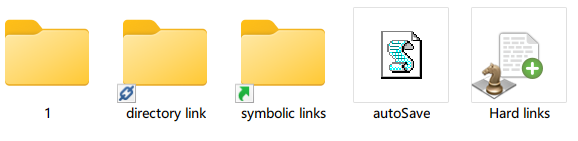
屏幕截图 2024-10-22 100044.png
Image
xyplorer
https://i.postimg.cc/wMfLFnqh/2024-10-22-100148.png

屏幕截图 2024-10-22 100148.png
Image

jupe
Posts: 3462
Joined: 20 Oct 2017 21:14
Location: Win10 22H2 120dpi

Re: Hard link icon display problem

Post by jupe »

I am only theorizing because I haven't used LSE, but most likely you will need to manually make sure that this reg key

Code: Select all

HKEY_LOCAL_MACHINE\SOFTWARE\WOW6432Node\Microsoft\Windows\CurrentVersion\Explorer\ShellIconOverlayIdentifiers
mostly matches this:

Code: Select all

HKEY_LOCAL_MACHINE\SOFTWARE\Microsoft\Windows\CurrentVersion\Explorer\ShellIconOverlayIdentifiers
at least in regards to LinkShellExt entries, their entries will need to be near the top of the list. If you find you need to make changes a Explorer restart will be required to see the effects in XY.

Lucien
Posts: 2
Joined: 22 Oct 2024 03:47

Re: Hard link icon display problem

Post by Lucien »

jupe wrote: 22 Oct 2024 04:20 I am only theorizing because I haven't used LSE, but most likely you will need to manually make sure that this reg key

Code: Select all

HKEY_LOCAL_MACHINE\SOFTWARE\WOW6432Node\Microsoft\Windows\CurrentVersion\Explorer\ShellIconOverlayIdentifiers
mostly matches this:

Code: Select all

HKEY_LOCAL_MACHINE\SOFTWARE\Microsoft\Windows\CurrentVersion\Explorer\ShellIconOverlayIdentifiers
at least in regards to LinkShellExt entries, their entries will need to be near the top of the list. If you find you need to make changes a Explorer restart will be required to see the effects in XY.
Thank you, the problem is solved.
HKEY_LOCAL_MACHINE\SOFTWARE\Microsoft\Windows\CurrentVersion\Explorer\ShellIconOverlayIdentifiers
I have edited this before, so Windows can display it.

HKEY_LOCAL_MACHINE\SOFTWARE\WOW6432Node\Microsoft\Windows\CurrentVersion\Explorer\ShellIconOverlayIdentifiers
I didn't know that I needed to edit this, and this solved my problem. But in the 23h2 version, I don't need to edit this location, I only edit the first path.

Post Reply
