 XYplorer Beta Club
right-click bug
Forum rules
 READ THIS AND DO IT!!!
 Please include the following information:
1) Your XYplorer Version (e.g., v28.00.0801)
2) Your Windows Version (e.g., Win 11)
3) Your Screen Scaling Percentage (e.g., 125%).
We strongly recommend adding your Windows Version and Screen Scaling Percentage to the Location field in your Profile or to your Signature. That way, you only have to type them once, and we won't have to search for that vital information.
When attaching an Image, please use the Attachment tab at the bottom of your post and click "Add files".
READ THIS AND DO IT!!!
READ THIS AND DO IT!!! Please include the following information:1) Your XYplorer Version (e.g., v28.00.0801)
2) Your Windows Version (e.g., Win 11)
3) Your Screen Scaling Percentage (e.g., 125%).
We strongly recommend adding your Windows Version and Screen Scaling Percentage to the Location field in your Profile or to your Signature. That way, you only have to type them once, and we won't have to search for that vital information. When attaching an Image, please use the Attachment tab at the bottom of your post and click "Add files". READ THIS AND DO IT!!!
-
alhagi
- Posts: 28
- Joined: 28 Oct 2020 14:32
right-click bug
Occasionally, when you right-click a directory, the program will lose its response and remain busy.
-
admin
- Site Admin
- Posts: 66542
- Joined: 22 May 2004 16:48
- Location: Win8.1, Win10, Win11, all @100%
- Contact:
-
terrytw
- Posts: 121
- Joined: 03 Mar 2023 03:37
Re: right-click bug
I am not sure if we are talking about the same thing, but I did encounter this from time to time.
It lasts 1 or 2 seconds before the context menu pops up.
Usually XYplorer is quite responsive, so it is pretty obvious when it hands.
It lasts 1 or 2 seconds before the context menu pops up.
Usually XYplorer is quite responsive, so it is pretty obvious when it hands.
-
admin
- Site Admin
- Posts: 66542
- Joined: 22 May 2004 16:48
- Location: Win8.1, Win10, Win11, all @100%
- Contact:
Re: right-click bug
It's normal. The shell menu can take a while depending on the number and nature of shell extensions. This slowness is the main reason for this option to use the lightning-fast native menu instead: Configuration | General | Menus, Mouse, Usability | Context Menus | Native context menu
FAQ | XY News RSS | XY X
-
terrytw
- Posts: 121
- Joined: 03 Mar 2023 03:37
Re: right-click bug
Yeah it makes sense. But the native context menu loses the ability to incorporate other options, unless I'm missing something (I read the help file this time...)admin wrote: ↑16 Mar 2023 15:18 It's normal. The shell menu can take a while depending on the number and nature of shell extensions. This slowness is the main reason for this option to use the lightning-fast native menu instead: Configuration | General | Menus, Mouse, Usability | Context Menus | Native context menu
For example I have bandizip installed, and I would like to have the bandizip context menu options like "create tar file" or "smart unzip". There does not seem to have anyway to do this with native context menu.
-
admin
- Site Admin
- Posts: 66542
- Joined: 22 May 2004 16:48
- Location: Win8.1, Win10, Win11, all @100%
- Contact:
Re: right-click bug
It can be done via Tools | Customize File Associations.... If you find a way to call bandizip from there, it will be featured under "Open With..." which can be part of the native context menu (via Configuration | General | Menus, Mouse, Usability | Context Menus | File List...).
FAQ | XY News RSS | XY X
-
xuejianxianzun
- Posts: 15
- Joined: 22 Aug 2022 14:26
Re: right-click bug
I had the same problem, and it's still the same with the current 24.50 version.
After I launch XY, if I first right-click on a folder, the program freezes for a few seconds, doesn't show the context menu, and shows a window with Context Menu helper that also doesn't respond. I can only force close XY.
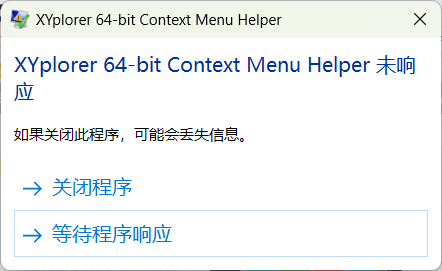
On my computer, this issue is reproducible with every test.
But if I first right-click a file (not a folder) after launching XY, the context menu works fine, and then when I right-click a folder, the context menu also works fine. This problem is solved.
On my computer, the folder's context menu is displayed very quickly (less than 1s), so I don't know why it becomes unresponsive when right-clicking a folder in XY.
After I launch XY, if I first right-click on a folder, the program freezes for a few seconds, doesn't show the context menu, and shows a window with Context Menu helper that also doesn't respond. I can only force close XY.
On my computer, this issue is reproducible with every test.
But if I first right-click a file (not a folder) after launching XY, the context menu works fine, and then when I right-click a folder, the context menu also works fine. This problem is solved.
On my computer, the folder's context menu is displayed very quickly (less than 1s), so I don't know why it becomes unresponsive when right-clicking a folder in XY.
-
Norn
- Posts: 508
- Joined: 24 Oct 2021 16:10
Re: right-click bug
It should be caused by a context menu item, disable one of the folder's right-click menu item.
https://github.com/BluePointLilac/Conte ... ag/3.3.3.1
But this doesn't appear in new instance.
https://github.com/BluePointLilac/Conte ... ag/3.3.3.1
But this doesn't appear in new instance.
Windows 11 24H2 @100% 2560x1440
-
xuejianxianzun
- Posts: 15
- Joined: 22 Aug 2022 14:26
Re: right-click bug
This method works. thanks.Norn wrote: ↑10 Jun 2023 17:55 It should be caused by a context menu item, disable one of the folder's right-click menu item.
https://github.com/BluePointLilac/Conte ... ag/3.3.3.1
But this doesn't appear in new instance.