 XYplorer Beta Club
Hi,
Since this version (maybe before also), I noticed that the "Name" column is no longer well autosized, I see "..." at the end of several lines. while autosize columns is still on. Not always though so this is strange... Anyone saw this too ?
Thanks.
.merle1.
Autosize columns broken with 24.20.0300
Forum rules
 READ THIS AND DO IT!!!
 Please include the following information:
1) Your XYplorer Version (e.g., v28.00.0801)
2) Your Windows Version (e.g., Win 11)
3) Your Screen Scaling Percentage (e.g., 125%).
We strongly recommend adding your Windows Version and Screen Scaling Percentage to the Location field in your Profile or to your Signature. That way, you only have to type them once, and we won't have to search for that vital information.
When attaching an Image, please use the Attachment tab at the bottom of your post and click "Add files".
READ THIS AND DO IT!!!
READ THIS AND DO IT!!! Please include the following information:1) Your XYplorer Version (e.g., v28.00.0801)
2) Your Windows Version (e.g., Win 11)
3) Your Screen Scaling Percentage (e.g., 125%).
We strongly recommend adding your Windows Version and Screen Scaling Percentage to the Location field in your Profile or to your Signature. That way, you only have to type them once, and we won't have to search for that vital information. When attaching an Image, please use the Attachment tab at the bottom of your post and click "Add files". READ THIS AND DO IT!!!
-
admin
- Site Admin
- Posts: 66583
- Joined: 22 May 2004 16:48
- Location: Win8.1, Win10, Win11, all @100%
- Contact:
Re: Autosize columns broken with 24.20.0300
If this is ticked then it is no wonder:
Configuration | Colors and Styles | Styles | Columns | Autofit the width of the Name column
Also check this setting:
Configuration | Colors and Styles | Styles | Columns | Autosize Name column right margin (0 = none)
Configuration | Colors and Styles | Styles | Columns | Autofit the width of the Name column
Also check this setting:
Configuration | Colors and Styles | Styles | Columns | Autosize Name column right margin (0 = none)
FAQ | XY News RSS | XY X
-
MerleOne
- Posts: 55
- Joined: 10 Dec 2008 15:00
Re: Autosize columns broken with 24.20.0300
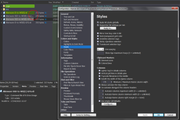
Thanks. Here is a picture that shows the issue. These settings doesn't seem to change or not the way it used to be.
Regards,
Merle1
Regards,
Merle1
To see the attached files, you need to log into the forum.
-
MerleOne
- Posts: 55
- Joined: 10 Dec 2008 15:00
Re: Autosize columns broken with 24.20.0300
Reposting the image for better quality (it now points to an image upload website when clicked on)
Regards,
Merle1
Regards,
Merle1
-
admin
- Site Admin
- Posts: 66583
- Joined: 22 May 2004 16:48
- Location: Win8.1, Win10, Win11, all @100%
- Contact:
Re: Autosize columns broken with 24.20.0300
Can you give me the full filename of that file, the font, and font size? Is that the only file with the problem?
FAQ | XY News RSS | XY X
-
MerleOne
- Posts: 55
- Joined: 10 Dec 2008 15:00
Re: Autosize columns broken with 24.20.0300
Hi,
The file name is
Alienware-SSD-to-WD[E]-new.rdi
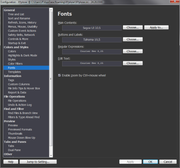
Regarding fonts here is what I have
Please note I had not this issue with versions say 1 month ago.
Regards,
.merle1.
The file name is
Alienware-SSD-to-WD[E]-new.rdi
Regarding fonts here is what I have
Please note I had not this issue with versions say 1 month ago.
Regards,
.merle1.
-
admin
- Site Admin
- Posts: 66583
- Joined: 22 May 2004 16:48
- Location: Win8.1, Win10, Win11, all @100%
- Contact:
Re: Autosize columns broken with 24.20.0300
Can't reproduce.
Screen resolution is 100%?
Screen resolution is 100%?
FAQ | XY News RSS | XY X
-
MerleOne
- Posts: 55
- Joined: 10 Dec 2008 15:00
Re: Autosize columns broken with 24.20.0300
Hi,
Will check and report...
Thanks.
.merle1.
Will check and report...
Thanks.
.merle1.
-
ChrisinCabarlah
- Posts: 10
- Joined: 16 Feb 2023 10:41
- Location: XY 64-bit, W11_25H2 64-bit, 2560x1440,60hz,150dpi
- Contact:
Re: Autosize columns broken with 24.20.0300
Confirmed, 2560x1440 with 120dpi
-
admin
- Site Admin
- Posts: 66583
- Joined: 22 May 2004 16:48
- Location: Win8.1, Win10, Win11, all @100%
- Contact:
Re: Autosize columns broken with 24.20.0300
Yes, confirmed. Fixed in next beta. 
FAQ | XY News RSS | XY X
-
MerleOne
- Posts: 55
- Joined: 10 Dec 2008 15:00
Re: Autosize columns broken with 24.20.0300
Great, thanks a lot !
Regards,
.merle1.
Regards,
.merle1.