 XYplorer Beta Club
Hello,
I am using version 24.00.0700. Since v 23.90.400 I am unable to open a .lnk file by double clicking on it IF it has a parameter. It works fine if it does not have a parameter. eg .lnk contents:
works: "C:\Program Files\VideoLAN\VLC\vlc.exe"
does not work: "C:\Program Files\VideoLAN\VLC\vlc.exe" "C:\Users\spiroc\Desktop\tmp_music"
Earlier versions, at least up to v23.50 worked fine. In the explorer pane I can successfully run the .lnk file by right clicking on it and pressing Open. It's just the double click that no longer works (and also not working if I drag the .lnk into a catalog). I have confirmed the problem still exists if I erase my profile first and launch a fresh XYplorer. I have also confirmed that the problem does not exist in Windows Explorer and still exists if I run XYplorer as Administrator. I notice too that I can't update the .lnk icon. When the double click fails, the popup says, for example,
"C:\Program Files (86)\VideoLAN\VLC\vlc.exe" The specified path does not exist
except the .lnk shortcut is NOT the (x86) path to vlc.exe!! I checked for updates on Win 10 and tried a reboot too, no luck.
thanks,
Spiro
I can no longer double click on a .lnk file to launch it
Forum rules
 READ THIS AND DO IT!!!
 Please include the following information:
1) Your XYplorer Version (e.g., v28.00.0801)
2) Your Windows Version (e.g., Win 11)
3) Your Screen Scaling Percentage (e.g., 125%).
We strongly recommend adding your Windows Version and Screen Scaling Percentage to the Location field in your Profile or to your Signature. That way, you only have to type them once, and we won't have to search for that vital information.
When attaching an Image, please use the Attachment tab at the bottom of your post and click "Add files".
READ THIS AND DO IT!!!
READ THIS AND DO IT!!! Please include the following information:1) Your XYplorer Version (e.g., v28.00.0801)
2) Your Windows Version (e.g., Win 11)
3) Your Screen Scaling Percentage (e.g., 125%).
We strongly recommend adding your Windows Version and Screen Scaling Percentage to the Location field in your Profile or to your Signature. That way, you only have to type them once, and we won't have to search for that vital information. When attaching an Image, please use the Attachment tab at the bottom of your post and click "Add files". READ THIS AND DO IT!!!
-
SpiroC
- Posts: 15
- Joined: 01 Dec 2017 23:20
-
highend
- Posts: 14991
- Joined: 06 Feb 2011 00:33
- Location: Win Server 2022 @100%
Re: I can no longer double click on a .lnk file to launch it
Replace
with
when that application lives in
C:\Program Files / C:\Program Files (86)with
%ProgramW6432%when that application lives in
C:\Program Files\One of my scripts helped you out? Please donate via Paypal
-
SpiroC
- Posts: 15
- Joined: 01 Dec 2017 23:20
Re: I can no longer double click on a .lnk file to launch it
Thank you for the reply.
I made that change and it appears to be doing the same thing (not fixed).
I made that change and it appears to be doing the same thing (not fixed).
-
highend
- Posts: 14991
- Joined: 06 Feb 2011 00:33
- Location: Win Server 2022 @100%
Re: I can no longer double click on a .lnk file to launch it
Show a screenshot of the properties of that .lnk
One of my scripts helped you out? Please donate via Paypal
-
SpiroC
- Posts: 15
- Joined: 01 Dec 2017 23:20
Re: I can no longer double click on a .lnk file to launch it
Here is a screenshot of the properties. The full Target: line is:
%ProgramW6432%\VideoLAN\VLC\vlc.exe "C:\Users\spiroc\Desktop\tmp_music"
In the lower part of the screenshot is the same folder in Windows Explorer. You can see the icon is correct in Explorer. I am able to click the .lnk in Explorer and successfully launch vlc!!
thanks again.
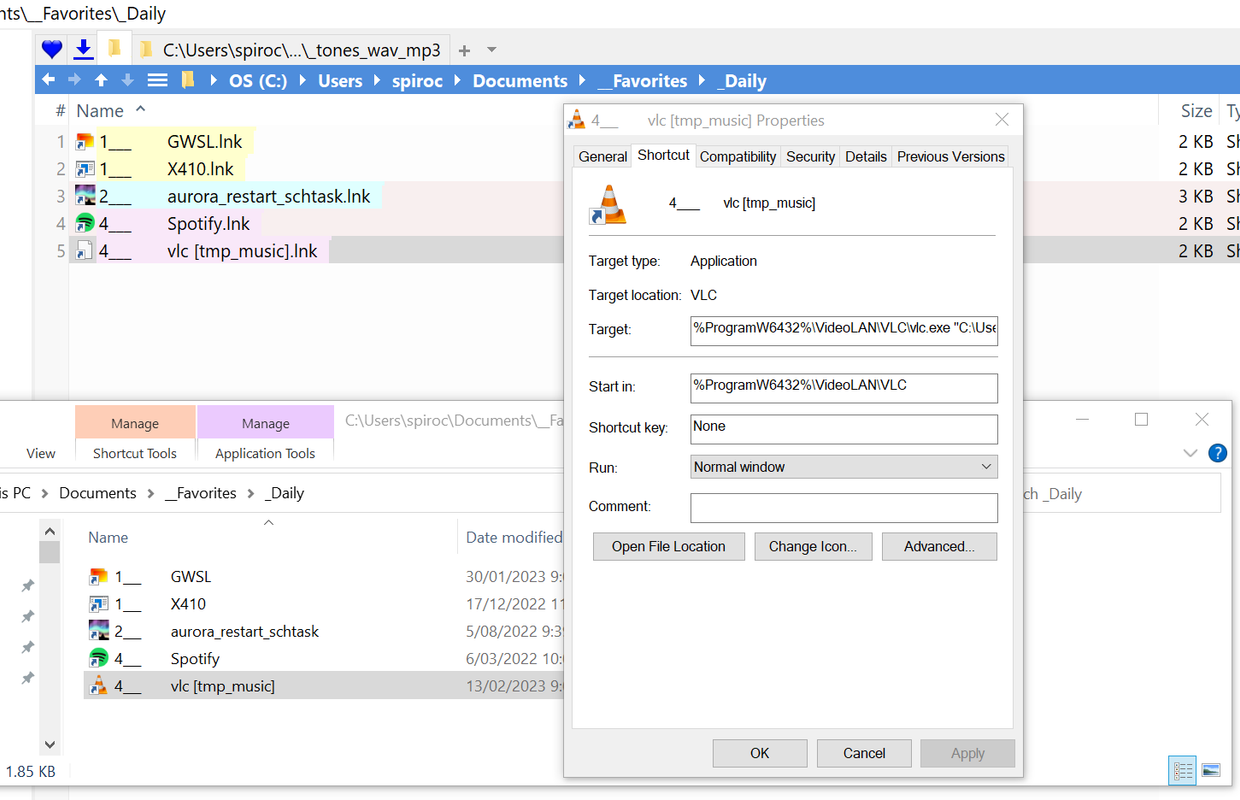
%ProgramW6432%\VideoLAN\VLC\vlc.exe "C:\Users\spiroc\Desktop\tmp_music"
In the lower part of the screenshot is the same folder in Windows Explorer. You can see the icon is correct in Explorer. I am able to click the .lnk in Explorer and successfully launch vlc!!
thanks again.
-
highend
- Posts: 14991
- Joined: 06 Feb 2011 00:33
- Location: Win Server 2022 @100%
Re: I can no longer double click on a .lnk file to launch it
Sorry but I'm unable to reproduce that here. Works fine even with a fresh instance...
One of my scripts helped you out? Please donate via Paypal
-
jupe
- Posts: 3462
- Joined: 20 Oct 2017 21:14
- Location: Win10 22H2 120dpi
Re: I can no longer double click on a .lnk file to launch it
Although in your original post you show that you quoted the vlc.exe path, your screenshot shows it unquoted.
-
Display
- Posts: 79
- Joined: 21 Apr 2015 11:20
- Location: Win10x64 21H2 LTSC @ 100% / XYx64 v.28.00.0500
Re: I can no longer double click on a .lnk file to launch it
I don't know if this is related but (since v24 betas I think) I too can't Double-Click .lnk shortcuts - but it only seems to affect mapped network drives. It's strange as the shortcuts are displaying the network mapped folder thumbnails correctly.
When I Double-Click the shortcut it gives this message:
 Location currently not available.
TOSHIBA (E:)_Blender\
The drive's label is TOSHIBA and it's mapped to E:\
If I Right-Click > Shortcut Target > Go to Shortcut Target the .lnk opens just fine!
If I use the UNC path for the shortcut instead e.g. \\HELPER\E\_Blender\ that opens correctly with Double-Clicks
Edit: Only seems to affect folders too, not files??
When I Double-Click the shortcut it gives this message:
Location currently not available.TOSHIBA (E:)_Blender\
The drive's label is TOSHIBA and it's mapped to E:\
If I Right-Click > Shortcut Target > Go to Shortcut Target the .lnk opens just fine!
If I use the UNC path for the shortcut instead e.g. \\HELPER\E\_Blender\ that opens correctly with Double-Clicks
Edit: Only seems to affect folders too, not files??