It took two minutes to start, which was too slow

Things you’d like to miss in the future...
Forum rules
:warnred20: :warnred20: :warnred20: :warnred20: :warnred20: READ THIS AND DO IT!!! :warnred20: :warnred20: :warnred20: :warnred20: :warnred20:

:info: Please include the following information:
1) Your XYplorer Version (e.g., v28.00.0801)
2) Your Windows Version (e.g., Win 11)
3) Your Screen Scaling Percentage (e.g., 125%).

:info: We strongly recommend adding your Windows Version and Screen Scaling Percentage to the Location field in your Profile or to your Signature. That way, you only have to type them once, and we won't have to search for that vital information.

:info: When attaching an Image, please use the Attachment tab at the bottom of your post and click "Add files".

:warnred20: :warnred20: :warnred20: :warnred20: :warnred20: READ THIS AND DO IT!!! :warnred20: :warnred20: :warnred20: :warnred20: :warnred20:
Post Reply
star
Posts: 46
Joined: 11 Mar 2022 08:18

It took two minutes to start, which was too slow

Post by star »

It took two minutes to start, which was too slow

Code: Select all

XYplorer: 22.90.0100 (Pro Edition - Lifetime License Pro)
Loaded in: 50,853 毫秒 at 2022/3/11 15:06:47
Uptime: 9 分, 10 秒   Runtime: 6.00.9848
Memory Usage: 46,048 KB, Virtual Memory Size: 20,436 KB

OS: Windows 10 (Unknown Product Type: 125), 64-bit, Release 2009, Build 19044.1526 (10.0), .NET v4.8.04084
OS Uptime: 46 分, 17 秒
Time Zone: 中国标准时dll,-572, 中国夏令时.dll,-571   UTC Offset: +08:00
User Role: Admin   UI Language: ChineseSimplified
Themes: Yes (Aero)   RealSystem32: Yes

System / Thread Locale ID: 2052 (zh-CN) / 2052 (zh-CN)
Default ANSI Code Page: 936   (ANSI/OEM - 简体中文 GBK)
Active ANSI Code Page: 936   (ANSI/OEM - 简体中文 GBK)
Default OEM code page: 936   (ANSI/OEM - 简体中文 GBK)
Active OEM Code Page: 936   (ANSI/OEM - 简体中文 GBK)
DBCS Code Page: Yes
Main Contents Font: Segoe UI 9
Buttons & Labels Font: Segoe UI 9

Monitor: 1/1 (Primary)
Screen: 3840x2160   Virtual: (0, 0) - (3840, 2160)   Work: (105, 0) - (3840, 2160)
Screen DPI: 144 (150%)   twX: 10 (10)   Stretch: 1.5   sLF: 1.5   Toolbar Zoom: 1.5 (1;1)
Screen Color Depth: 32   Line Spacing: 2 (3)
DPI awareness: Per monitor   Auto Scaling: Yes, Yes

UseDPIAwareIconSizes: Yes
Icon Size: Small=16, Large=32, Extra Large=48, Jumbo=256
Icon Size Controls: Small=24, Large=48, Extra Large=48, Jumbo=256
Icon Size Recommended: Small=24, Large=48, Extra Large=48, Jumbo=256
DblClick Time: 500 ms

App:              	C:\Program Files (x86)\XYplorer\XYplorer.exe
Ini File:         	C:\Users\li1gu\AppData\Roaming\XYplorer\XYplorer.ini
Catalog:          	C:\Users\li1gu\AppData\Roaming\XYplorer\Catalogs\catalog.dat
Tags Database:    	C:\Users\li1gu\AppData\Roaming\XYplorer\tag.dat

App Data:         	C:\Users\li1gu\AppData\Roaming\XYplorer\
Pane 1 Data:      	C:\Users\li1gu\AppData\Roaming\XYplorer\Panes\1\
Pane 2 Data:      	C:\Users\li1gu\AppData\Roaming\XYplorer\Panes\2\
Catalogs:         	C:\Users\li1gu\AppData\Roaming\XYplorer\Catalogs\
Icons:            	C:\Users\li1gu\AppData\Roaming\XYplorer\Icons\
New Items:        	C:\Users\li1gu\AppData\Roaming\XYplorer\NewItems\
Paper Folders:    	C:\Users\li1gu\AppData\Roaming\XYplorer\Paper\
Scripts:          	C:\Users\li1gu\AppData\Roaming\XYplorer\Scripts\
Thumbs Cache:     	C:\Users\li1gu\AppData\Roaming\XYplorer\Thumbnails\

Language Support:	8.143
Language:     	简体中文 (Simplified Chinese) - 8.143
Locale:       	0, 1, 936   (ANSI/OEM - 简体中文 GBK), 系统默认 (936)
Translator:   	You and me
Language File: 	C:\Users\li1gu\AppData\Roaming\XYplorer\ChineseSimplified.lng
I wish someone would tell me the solution😢
XYPlorer x32 Ver 27.10.0600, Win10 LSTC Enterprise 21H2, scaling percentage 200%(Display 4K)

highend
Posts: 14993
Joined: 06 Feb 2011 00:33
Location: Win Server 2022 @100%

Re: It took two minutes to start, which was too slow

Post by highend »

Execute this from the address bar: text get("loadtimes");
One of my scripts helped you out? Please donate via Paypal

star
Posts: 46
Joined: 11 Mar 2022 08:18

Re: It took two minutes to start, which was too slow

Post by star »

Starting too slow, what's the solution?

https://www.youtube.com/watch?v=wOqraT5JKpY
XYPlorer x32 Ver 27.10.0600, Win10 LSTC Enterprise 21H2, scaling percentage 200%(Display 4K)

star
Posts: 46
Joined: 11 Mar 2022 08:18

Re: It took two minutes to start, which was too slow

Post by star »

highend wrote: 11 Mar 2022 08:30 Execute this from the address bar: text get("loadtimes");
Hello

Code: Select all

XY ver: 	XYplorer 22.90.0100
OS:     	Windows 10 (Unknown Product Type: 125), 64-bit, Release 2009, Build 19044.1526
Loaded: 	2022-03-11 15:25:26 in 61,706 毫秒
Threshold: 	10 ms

     0 ms:     247 ms - Start Load
   256 ms:      89 ms - Load Language
   345 ms:      13 ms - Load Settings
   358 ms:      13 ms - Init Custom File Icons
   371 ms:      43 ms - Init Controls
   414 ms:     287 ms - Init Graphics
   701 ms:      30 ms - Init Tabs
   731 ms:      76 ms - Create Info Panel
   807 ms:     121 ms - Set Interface Font
   928 ms:      33 ms - Init Panes
   962 ms:      15 ms - Drives To Array
   977 ms:  52,257 ms - WNetAddConnection2W X: -> \\192.168.0.254\yunpan
53,239 ms:   7,956 ms - WNetAddConnection2W Z: -> \\DS416j\rili7T
61,223 ms:     127 ms - Load Maxi Tree
61,350 ms:      16 ms - Go Start Path: C:\Program Files\
61,366 ms:     140 ms - Init Custom Toolbar Buttons
61,516 ms:      14 ms - List 1 Browse: C:\Program Files\
61,532 ms:      19 ms - List 2 Browse: C:\
61,552 ms:      10 ms - Layout Bars
61,562 ms:      44 ms - Layout Tabs
61,611 ms:      83 ms - --- Show Window ---
61,706 ms:            - Load Done

MaxiTree: Rows=194, Nodes=195, Expanded=6, Mapped Drives=2
Tree Remember State: Yes (3 stored paths)
Tree Check Subfolders Exist: Yes
Icon Overlays (List, Tree, Network): Yes, No, No
Network on Startup: Browse=Yes, Reconnect=Yes, CacheServers=No
Pane 1: Items=11/72, Pane 2: Items=11/49, Catalog: Items=1
XYPlorer x32 Ver 27.10.0600, Win10 LSTC Enterprise 21H2, scaling percentage 200%(Display 4K)

highend
Posts: 14993
Joined: 06 Feb 2011 00:33
Location: Win Server 2022 @100%

Re: It took two minutes to start, which was too slow

Post by highend »

Configuration | General | Startup & Exit | [x] No network browsing on startup
is the first step
One of my scripts helped you out? Please donate via Paypal

star
Posts: 46
Joined: 11 Mar 2022 08:18

Re: It took two minutes to start, which was too slow

Post by star »

highend wrote: 11 Mar 2022 08:50 Configuration | General | Startup & Exit | [x] No network browsing on startup
is the first step
It worked.👍
XYPlorer x32 Ver 27.10.0600, Win10 LSTC Enterprise 21H2, scaling percentage 200%(Display 4K)

star
Posts: 46
Joined: 11 Mar 2022 08:18

Re: It took two minutes to start, which was too slow

Post by star »

highend wrote: 11 Mar 2022 08:30 Execute this from the address bar: text get("loadtimes");
Hello, I find the opening speed is slow, it takes at least 8 seconds to open:

Code: Select all

XY ver: 	XYplorer 22.90.0100
OS:     	Windows 10 (Unknown Product Type: 125), 64-bit, Release 2009, Build 19044.1526
Loaded: 	2022-03-11 22:01:18 in 8,528 毫秒
Threshold: 	10 ms

     0 ms:     345 ms - Start Load
   345 ms:      16 ms - Init Language
   361 ms:     107 ms - Load Language
   468 ms:      11 ms - Load Settings
   486 ms:      61 ms - Init Controls
   547 ms:     384 ms - Init Graphics
   931 ms:      47 ms - Init Tabs
   978 ms:     102 ms - Create Info Panel
 1,080 ms:     175 ms - Set Interface Font
 1,255 ms:      43 ms - Init Panes
 1,299 ms:      21 ms - Drives To Array
 1,339 ms:      10 ms - Tab Icons
 1,360 ms:   6,780 ms - Check Subfolders Exist: V:\
 8,142 ms:      28 ms - Load Mini Tree 3, Mode=0
 8,170 ms:     110 ms - Init Custom Toolbar Buttons
 8,292 ms:      16 ms - List 1 Browse: C:\Program Files (x86)\XYplorer\Scripts\
 8,311 ms:      11 ms - List 2 Browse: C:\Users\li1gu\Desktop\Project\Hardware_Information\配件清单\
 8,323 ms:      18 ms - Layout Bars
 8,341 ms:      53 ms - Layout Tabs
 8,402 ms:     114 ms - --- Show Window ---
 8,528 ms:            - Load Done

MiniTree: Rows=15, Nodes=20, Expanded=5, Mapped Drives=2
Tree Remember State: Yes (11 stored paths)
Tree Check Subfolders Exist: Yes
Icon Overlays (List, Tree, Network): Yes, No, No
Network on Startup: Browse=Yes, Reconnect=No, CacheServers=No
Pane 1: Items=3/3, Pane 2: Items=11/25, Catalog: Items=1
Image
Image
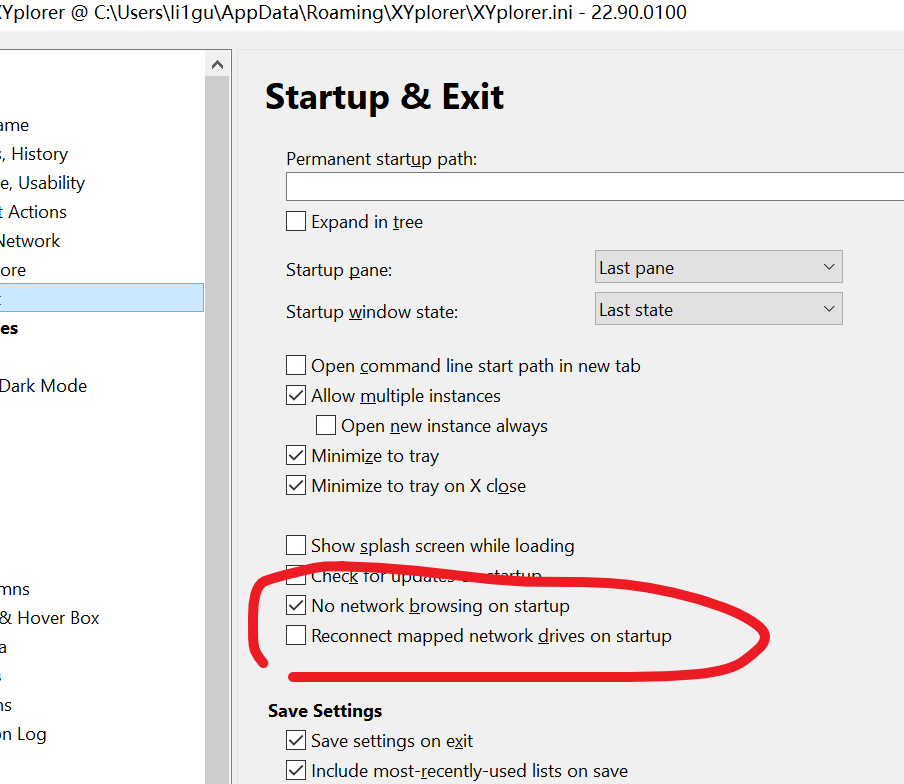
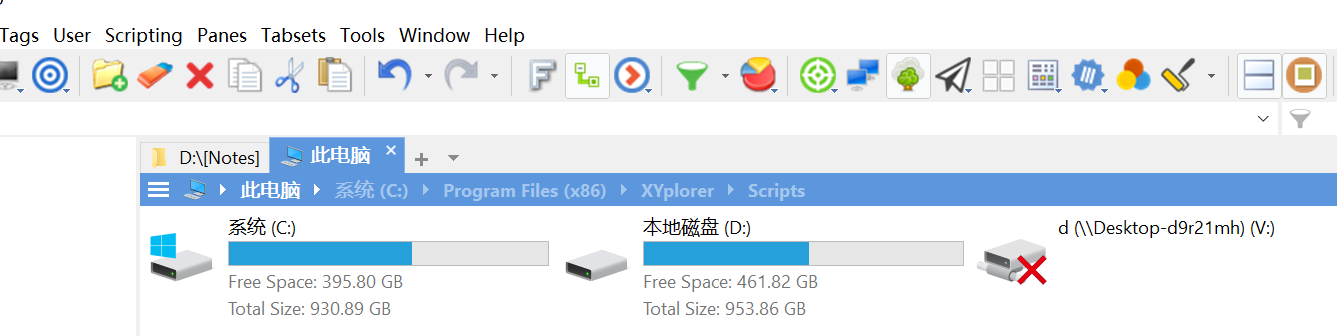
I can make sure network browsing on startup is off.

Why V: Disk scanning is time-consuming...This is a network Disk.

How to set up as smooth as native WIN10 Explorer? I found that jumping to this PC from other folders was not as smooth😢
XYPlorer x32 Ver 27.10.0600, Win10 LSTC Enterprise 21H2, scaling percentage 200%(Display 4K)

highend
Posts: 14993
Joined: 06 Feb 2011 00:33
Location: Win Server 2022 @100%

Re: It took two minutes to start, which was too slow

Post by highend »

Configuration | General | Tree and List | Tree | [ ] Check existence of subfolders in tree
One of my scripts helped you out? Please donate via Paypal

admin
Site Admin
Posts: 66631
Joined: 22 May 2004 16:48
Location: Win8.1, Win10, Win11, all @100%
Contact:

Re: It took two minutes to start, which was too slow

Post by admin »

View | Mini Tree | Mini Tree

star
Posts: 46
Joined: 11 Mar 2022 08:18

Re: It took two minutes to start, which was too slow

Post by star »

highend wrote: 11 Mar 2022 15:49 Configuration | General | Tree and List | Tree | [ ] Check existence of subfolders in tree
I really appreciate your help, it a good advice. But 2s is a little slow...

Code: Select all

XY ver: 	XYplorer 22.90.0100
OS:     	Windows 10 (Unknown Product Type: 125), 64-bit, Release 2009, Build 19044.1526
Loaded: 	2022-03-12 01:50:59 in 1,974 毫秒
Threshold: 	10 ms

     0 ms:     332 ms - Start Load
   332 ms:      11 ms - Init Language
   343 ms:     138 ms - Load Language
   481 ms:      10 ms - Load Settings
   500 ms:      68 ms - Init Controls
   568 ms:     477 ms - Init Graphics
 1,045 ms:      69 ms - Init Tabs
 1,114 ms:     135 ms - Create Info Panel
 1,249 ms:     215 ms - Set Interface Font
 1,464 ms:      53 ms - Init Panes
 1,517 ms:      22 ms - Drives To Array
 1,558 ms:      15 ms - Tab Icons
 1,576 ms:      21 ms - Load Mini Tree 3, Mode=0
 1,597 ms:     114 ms - Init Custom Toolbar Buttons
 1,726 ms:      10 ms - Set LookIn Text
 1,755 ms:      11 ms - List 2 Browse: C:\Users\li1gu\Desktop\Project\Hardware_Information\配件清单\
 1,768 ms:      17 ms - Layout Bars
 1,785 ms:      42 ms - Layout List
 1,827 ms:      15 ms - Layout Status Bar
 1,842 ms:     120 ms - --- Show Window ---
 1,974 ms:            - Load Done

MiniTree: Rows=11, Nodes=16, Expanded=2, Mapped Drives=2
Tree Remember State: Yes (11 stored paths)
Icon Overlays (List, Tree, Network): Yes, No, No
Network on Startup: Browse=No, Reconnect=No, CacheServers=No
Pane 1: Items=21/7, Pane 2: Items=5/25, Catalog: Items=1
XYPlorer x32 Ver 27.10.0600, Win10 LSTC Enterprise 21H2, scaling percentage 200%(Display 4K)

Post Reply