 XYplorer Beta Club

i have one folder with some files.
copy to clipboard - item names
on other folder i have same numbers of files but with other names.
i want rename all this files with previous names files captured on my clipboard.... is possible that??
example:
folder1
namo.adc
gerk.erd
alfo.skr
folder2
habx.edf
altr.edg
kal.sft
i want apply same filename of file on folder1 to all files content on folder2
final result:
folder2
namo.adc
gerk.erd
alfo.skr
rename file from clipboard
-
highend
- Posts: 15016
- Joined: 06 Feb 2011 00:33
- Location: Win Server 2022 @100%
Re: rename file from clipboard
Code: Select all
    $clp      = regexreplace(<clp>, "^(.*\\)?");
    $files    = listpane(, , 1, <crlf>);
    $cntClp   = gettoken(trim($clp, <crlf>, "R"), "count", <crlf>)
    $cntFiles = gettoken($files, "count", <crlf>);
    end ($cntClp != $cntFiles), "Number of file(s) in the current pane is<br>NOT EQUAL<br>to the number of file(s) in the clipboard<br><br>Aborted!";
    rename "l", $clp, , $files;
One of my scripts helped you out? Please donate via Paypal
-
swan_x
- Posts: 335
- Joined: 08 Oct 2009 12:27
Re: rename file from clipboard
i have 70 files on folder 1
same 70 files on folder 2
dual pane. copy files name on clipboard
run script but have this error: Number of file(s) in the current pane is NOT EQUAL to the number of file(s) in the clipboard Aborted!"
but i have same number of files on folder 1 and on folder 2...
same 70 files on folder 2
dual pane. copy files name on clipboard
run script but have this error: Number of file(s) in the current pane is NOT EQUAL to the number of file(s) in the clipboard Aborted!"
but i have same number of files on folder 1 and on folder 2...
-
kunkel321
- Posts: 665
- Joined: 10 Jun 2012 03:45
- Location: Near Seattle
Re: rename file from clipboard
This can be done manually without too many steps....
Go to Edit > New > New Files..., then paste your list info the window. (Unless I'm mistaken) each line becomes a new file or folder.
EDIT: I've used this feature in the past, but I've never tried it with 70 lines....
EDIT2: Note the slash for folders
Forward or backward slash works. Because Don is awesome like that.
EDIT3: For the heck of it I tried with 200 'dummy' files and folders. Worked fine... (img) I forgot to put extensions on the "textfiles" but I don't suppose that makes a difference.

Go to Edit > New > New Files..., then paste your list info the window. (Unless I'm mistaken) each line becomes a new file or folder.
EDIT: I've used this feature in the past, but I've never tried it with 70 lines....
EDIT2: Note the slash for folders
Code: Select all
folder1/
namo.adc
gerk.erd
alfo.skrEDIT3: For the heck of it I tried with 200 'dummy' files and folders. Worked fine... (img) I forgot to put extensions on the "textfiles" but I don't suppose that makes a difference.
Last edited by kunkel321 on 26 Jan 2021 18:07, edited 1 time in total.
ste(phen|ve) kunkel
Scaling: Main monitor 125%, Secondary monitor on the right 100%
OS: Win 10. XYplorer version: Latest beta, unless specified.
Scaling: Main monitor 125%, Secondary monitor on the right 100%
OS: Win 10. XYplorer version: Latest beta, unless specified.
-
swan_x
- Posts: 335
- Joined: 08 Oct 2009 12:27
Re: rename file from clipboard
yes work. but have all new file empty.
my intent (and highend script) is to copy file name from 1 folder to other file on folder 2...
i wait highend reply.
my intent (and highend script) is to copy file name from 1 folder to other file on folder 2...
i wait highend reply.
-
highend
- Posts: 15016
- Joined: 06 Feb 2011 00:33
- Location: Win Server 2022 @100%
Re: rename file from clipboard
Code: Select all
    $cntClp   = gettoken(<clp>, "count", <crlf>);
    $cntFiles = gettoken(listpane(, , 1, <crlf>), "count", <crlf>);
    text "Clp: $cntClp, files: $cntFiles";
One of my scripts helped you out? Please donate via Paypal
-
kunkel321
- Posts: 665
- Joined: 10 Jun 2012 03:45
- Location: Near Seattle
Re: rename file from clipboard
LOL I was so busy tinkering that I didn't even see your replies...
Note also, I think that you can do something like
folder1/file1
folder1/file2
folder1/file2
And all three 'files' will be put into the same 'folder1.'
To get your clipboard contents parsed like that though, yea I guess you'd need some kind of automation.
Also, I can't comment on Highend's code because I'm pretty sure it's written in Greek. LOL.
Note also, I think that you can do something like
folder1/file1
folder1/file2
folder1/file2
And all three 'files' will be put into the same 'folder1.'
To get your clipboard contents parsed like that though, yea I guess you'd need some kind of automation.
Also, I can't comment on Highend's code because I'm pretty sure it's written in Greek. LOL.
ste(phen|ve) kunkel
Scaling: Main monitor 125%, Secondary monitor on the right 100%
OS: Win 10. XYplorer version: Latest beta, unless specified.
Scaling: Main monitor 125%, Secondary monitor on the right 100%
OS: Win 10. XYplorer version: Latest beta, unless specified.
-
highend
- Posts: 15016
- Joined: 06 Feb 2011 00:33
- Location: Win Server 2022 @100%
Re: rename file from clipboard
Steve, the thing is, he wants to rename existing files, not create new ones 
One of my scripts helped you out? Please donate via Paypal
-
kunkel321
- Posts: 665
- Joined: 10 Jun 2012 03:45
- Location: Near Seattle
Re: rename file from clipboard
Ah yes... Upon rereading the top post I see that you are correct. Oh well... At least I had fun doing the screenshots.

ste(phen|ve) kunkel
Scaling: Main monitor 125%, Secondary monitor on the right 100%
OS: Win 10. XYplorer version: Latest beta, unless specified.
Scaling: Main monitor 125%, Secondary monitor on the right 100%
OS: Win 10. XYplorer version: Latest beta, unless specified.
-
swan_x
- Posts: 335
- Joined: 08 Oct 2009 12:27
Re: rename file from clipboard
highend i have run your script but have only this window
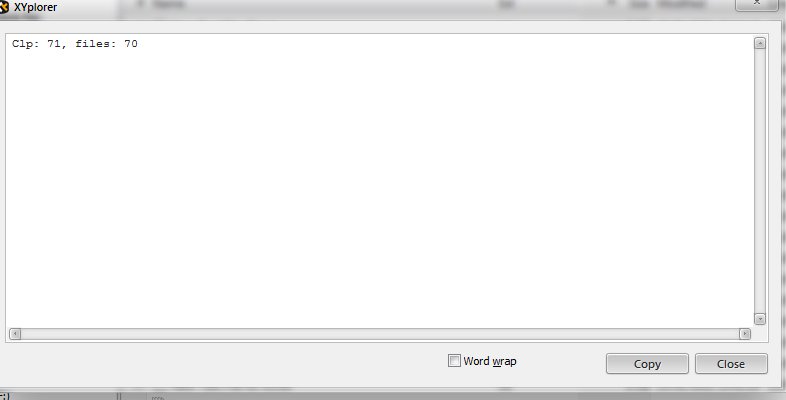
????
????
-
highend
- Posts: 15016
- Joined: 06 Feb 2011 00:33
- Location: Win Server 2022 @100%
Re: rename file from clipboard
As I said, different number of files, hence the error message...
One of my scripts helped you out? Please donate via Paypal
-
swan_x
- Posts: 335
- Joined: 08 Oct 2009 12:27
Re: rename file from clipboard
don't understand.
have 70 files on folder 1 and 70 files on folder 2... no other hide file... what file differences between the 2 folders??
and also: what does that Clp:71 mean in the window?? files is 70 correct, but Clp?
EDIT
have 70 files on folder 1 and 70 files on folder 2... no other hide file... what file differences between the 2 folders??
and also: what does that Clp:71 mean in the window?? files is 70 correct, but Clp?
EDIT
Last edited by swan_x on 27 Jan 2021 09:15, edited 1 time in total.
-
highend
- Posts: 15016
- Joined: 06 Feb 2011 00:33
- Location: Win Server 2022 @100%
Re: rename file from clipboard
Files in the first folder and folders in the second folder?have 70 files on folder 1 and 70 folder on folder 2
In your initial post you were only talking about files to rename, not folders...
71 items (whatever that are, files or folders) in the clipboardwhat does that Clp:71 mean in the window
One of my scripts helped you out? Please donate via Paypal
-
swan_x
- Posts: 335
- Joined: 08 Oct 2009 12:27
Re: rename file from clipboard
I was wrong to write. 70 files on folder 1, 70 files on folder 2. now i tried again and the same Clp71 files 70 window always appears to me....

my script used:
same window error:

my script used:
Code: Select all
$cntClp   = gettoken(<clp>, "count", <crlf>);
    $cntFiles = gettoken(listpane(, , 1, <crlf>), "count", <crlf>);
text "Clp: $cntClp, files: $cntFiles";-
highend
- Posts: 15016
- Joined: 06 Feb 2011 00:33
- Location: Win Server 2022 @100%
Re: rename file from clipboard
The reason is:
To clipboard: Item ... contain a trailing <crlf>
The status bar shows the correct amount but the check in the script will fail on this
Fix:
To clipboard: Item ... contain a trailing <crlf>
The status bar shows the correct amount but the check in the script will fail on this
Fix:
Code: Select all
    $clp      = regexreplace(<clp>, "^(.*\\)?");
    $files    = listpane(, , 1, <crlf>);
    $cntClp   = gettoken(trim($clp, <crlf>, "R"), "count", <crlf>)
    $cntFiles = gettoken($files, "count", <crlf>);
    end ($cntClp != $cntFiles), "Number of file(s) in the current pane is<br>NOT EQUAL<br>to the number of file(s) in the clipboard<br><br>Aborted!";
    rename "l", $clp, , $files;
One of my scripts helped you out? Please donate via Paypal