 XYplorer Beta Club

strange behavior: i have saved this script to filename.xys and run it through keyboards (L key)
all work correctly but at the end my script is self-eliminated and it's not in the trash... why?
i have other script.xys and run with L key without this problem...
error on script moveto
-
highend
- Posts: 15016
- Joined: 06 Feb 2011 00:33
- Location: Win Server 2022 @100%
Re: error on script moveto
Obviously one of your delete commands removed it?
One of my scripts helped you out? Please donate via Paypal
-
swan_x
- Posts: 335
- Joined: 08 Oct 2009 12:27
Re: error on script moveto
this is my final script:
my script.xys it's not named in my script....
Code: Select all
setting "BackgroundFileOps", 0; delete 0,0, "D:\folder\*.*"; moveto "D:\.......folder", "C:\folder......\*"; delete 0, 0, "D:\folder\file.wav|D:\folder\file.dat|D:\folder\file.msg|D:\folder\file.exe"; delete 0, 0, formatlist(listfolder("D:\folder....\qm\", , 1), "F", , "!qt_en.qm|file.en.qm", "f"); delete 0,0, "C:\folder\"; moveto "D:\folder", "D:\folder\file.exe", , , 2, 2;-
highend
- Posts: 15016
- Joined: 06 Feb 2011 00:33
- Location: Win Server 2022 @100%
Re: error on script moveto
Yeah, and? You are moving files, you are deleting files (by wildcard and all with some exclusions) and you don't come to the conclusion that you should check which of your single statements is responsible for either moving or deleting your script?my script.xys it's not named in my script....
One of my scripts helped you out? Please donate via Paypal
-
swan_x
- Posts: 335
- Joined: 08 Oct 2009 12:27
-
swan_x
- Posts: 335
- Joined: 08 Oct 2009 12:27
Re: error on script moveto
yes, my script have multiple commands. anyway i don't understand why if run script from keyboard this is deleted after all commands...
is there a way for this not to happen?
is there a way for this not to happen?
-
highend
- Posts: 15016
- Joined: 06 Feb 2011 00:33
- Location: Win Server 2022 @100%
Re: error on script moveto
Store it in
<xyscripts>?One of my scripts helped you out? Please donate via Paypal
-
swan_x
- Posts: 335
- Joined: 08 Oct 2009 12:27
Re: error on script moveto
thank you for your suggestion.
or (other way) burn a rule to run from user - manage commands - run script ...
or (other way) burn a rule to run from user - manage commands - run script ...
Last edited by swan_x on 09 Nov 2020 09:52, edited 1 time in total.
-
swan_x
- Posts: 335
- Joined: 08 Oct 2009 12:27
Re: error on script moveto
store on
work if run script trough
<xyscripts> same behavior: file .xys is deleted after use.work if run script trough
manage commands - run script (only valid way)-
swan_x
- Posts: 335
- Joined: 08 Oct 2009 12:27
Re: error on script moveto
I don't understand the correlation between the various commands inserted into the script and the fact that the script self-deletes itself at the end of the commands ... (with run .xys file trough L key)
-
highend
- Posts: 15016
- Joined: 06 Feb 2011 00:33
- Location: Win Server 2022 @100%
Re: error on script moveto
Post the full content of the final script with REAL folders + file names
Post the full path + file name of your .xys file
Post whatever you're invoking with the ominous "L" key (+ screenshot!)
If you are not able to do all of the above: Solve your problem yourself...
Post the full path + file name of your .xys file
Post whatever you're invoking with the ominous "L" key (+ screenshot!)
If you are not able to do all of the above: Solve your problem yourself...
One of my scripts helped you out? Please donate via Paypal
-
swan_x
- Posts: 335
- Joined: 08 Oct 2009 12:27
Re: error on script moveto
this is my final script:
filename: script_xy_YouPP3.xys
file path: D:\000\tmp\spofy_downloader or other folder, no change. also on
from XY on Scripting menu - Load Selected Script File i have assigned L key
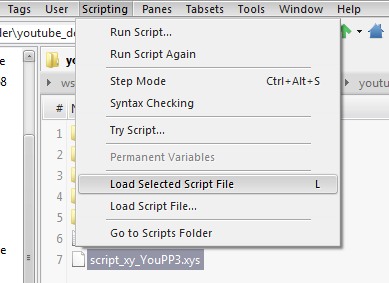
Code: Select all
setting "BackgroundFileOps", 0; delete 0,0, "D:\000\tmp\spify_downloader\yosbu_down\App\YouMP3\*.*"; moveto "D:\000\tmp\spify_downloader\yosbu_down\App\YouMP3", "C:\Sandbox\KGD56GE\KGD56GE\drive\C\Program Files\Mediaman\YouConvert\*"; delete 0, 0, "D:\000\tmp\spify_downloader\yosbu_down\App\YouMP3\ring.wav|D:\000\tmp\spify_downloader\yosbu_down\App\YouMP3\unins000.dat|D:\000\tmp\spify_downloader\yosbu_down\App\YouMP3\unins000.msg|D:\000\tmp\spify_downloader\yosbu_down\App\YouMP3\unins000.exe"; delete 0, 0, formatlist(listfolder("D:\000\tmp\spify_downloader\yosbu_down\App\YouMP3\qm\", , 1), "F", , "!qt_en.qm|YouTubeToMP3.en.qm", "f"); delete 0,0, "C:\Sandbox\KGD56GE\KGD56GE\"; moveto "D:\000\tmp\spify_downloader\yosbu_down\App\YouMP3", "D:\000\YouPP3.exe", , , 2, 2;file path: D:\000\tmp\spofy_downloader or other folder, no change. also on
<xyscripts> same behavior... script self-deletes itself at the end... from XY on Scripting menu - Load Selected Script File i have assigned L key
-
highend
- Posts: 15016
- Joined: 06 Feb 2011 00:33
- Location: Win Server 2022 @100%
Re: error on script moveto
I doubt that one of the commands in the script file leads to self-deletion but test it.
Open a second XY instance.
Switch back to the first.
Add a
Select the script in the first instance and run it from there.
Let it execute one command after another and after one was executed, switch to the second instance and check if the script file still exists.
Do that until you've executed all commands in the script...
Open a second XY instance.
Switch back to the first.
Add a
step; as the second command in your script.Select the script in the first instance and run it from there.
Let it execute one command after another and after one was executed, switch to the second instance and check if the script file still exists.
Do that until you've executed all commands in the script...
One of my scripts helped you out? Please donate via Paypal
-
swan_x
- Posts: 335
- Joined: 08 Oct 2009 12:27
Re: error on script moveto
clear. I just didn't understand where to add
like this ??
step;like this ??
Code: Select all
setting "BackgroundFileOps", 0; delete 0,0, "D:\.........\*.*"; step; moveto "D:\.......", "C:\.........\*";-
highend
- Posts: 15016
- Joined: 06 Feb 2011 00:33
- Location: Win Server 2022 @100%
Re: error on script moveto
Before the first delete command, not after.
One of my scripts helped you out? Please donate via Paypal