

Color filters don't work anymore for FOLDER name extensions...

Things you’d like to miss in the future...
Forum rules
You might want to read this if you're looking for priority service

:info: Please Include The Following Information
1) Your XYplorer Version (e.g., v28.00.0801)
2) Your Windows Version (e.g., Win 11)
3) Your Screen Scaling Percentage (e.g., 125%).

:info: Use Your Profile Or Signature
We strongly recommend adding your Windows Version and Screen Scaling Percentage to the Location field in your Profile or to your Signature. That way, you only have to type them once, and we won't have to search for that vital information.

:info: How To Attach Images
When attaching an Image, please use the Attachment tab at the bottom of your post and click "Add files".
Post Reply
ghost zero
Posts: 842
Joined: 26 Apr 2010 17:48

Color filters don't work anymore for FOLDER name extensions...

Post by ghost zero »

Image

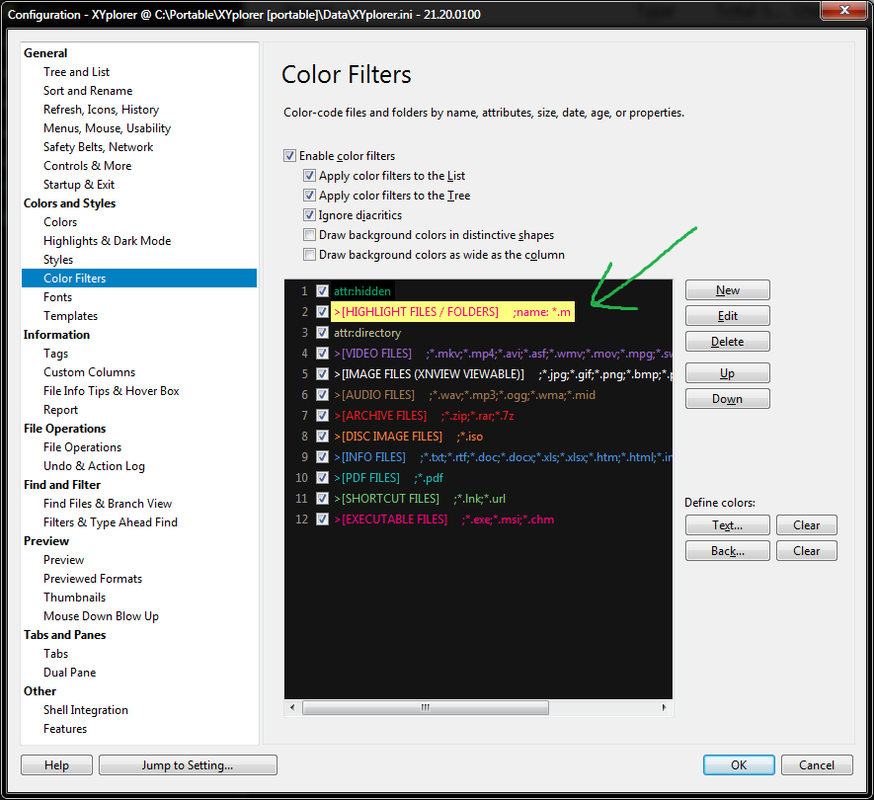
I recently noticed a new bug in which the color filters don't work anymore for folder name extensions, although file name extensions still work fine. Example, I have been using a custom color filter to highlight items that end with .m but now it doesn't work anymore for folders. Please fix.

XYplorer 21.20.0100

admin
Site Admin
Posts: 67271
Joined: 22 May 2004 16:48
Location: Win8.1, Win10, Win11, all @100%
Contact:

Re: Color filters don't work anymore for FOLDER name extensions...

Post by admin »

Where did you get the idea to prefix >[HIGHLIGHT FILES / FOLDERS] ; to the filter?

ghost zero
Posts: 842
Joined: 26 Apr 2010 17:48

Re: Color filters don't work anymore for FOLDER name extensions...

Post by ghost zero »

it is my own idea. i use it as a descriptive label in front of the color filter. the idea behind its text formatting is to make it easy to visually distinguish as a label, and to not conflict with anything.

admin
Site Admin
Posts: 67271
Joined: 22 May 2004 16:48
Location: Win8.1, Win10, Win11, all @100%
Contact:

Re: Color filters don't work anymore for FOLDER name extensions...

Post by admin »

If you remove it the filter works. So it wasn't a good idea. :)

ghost zero
Posts: 842
Joined: 26 Apr 2010 17:48

Re: Color filters don't work anymore for FOLDER name extensions...

Post by ghost zero »

it used to work fine for many years until one of the recent versions. what did you change to break it? can you fix it so we can continue to use such custom labeling schemes?

admin
Site Admin
Posts: 67271
Joined: 22 May 2004 16:48
Location: Win8.1, Win10, Win11, all @100%
Contact:

Re: Color filters don't work anymore for FOLDER name extensions...

Post by admin »

No, the change was necessary.

Color Filters support comments at the right end, after //. Why don't you simply follow the rules? :mrgreen:

ghost zero
Posts: 842
Joined: 26 Apr 2010 17:48

Re: Color filters don't work anymore for FOLDER name extensions...

Post by ghost zero »

but we need the labels to be in front of the extensions, so they are seen first, in a straight line along the left, and so they don't get cropped off from view.

admin
Site Admin
Posts: 67271
Joined: 22 May 2004 16:48
Location: Win8.1, Win10, Win11, all @100%
Contact:

Re: Color filters don't work anymore for FOLDER name extensions...

Post by admin »

It's your lucky day, you can prefix a caption in quotes:
"HIGHLIGHT FILES / FOLDERS" name:*.txt

And yes, it's also in the Help file:
Captions
Color Filters support captions prefixed in quotes to the filter definition.

ghost zero
Posts: 842
Joined: 26 Apr 2010 17:48

Re: Color filters don't work anymore for FOLDER name extensions...

Post by ghost zero »

thanks for the workaround. but it seems illogical that my original formatting works for files but not folders.

Post Reply