 XYplorer Beta Club

Typing file name which include Unicode characters FAIL
Forum rules
 READ THIS AND DO IT!!!
 Please include the following information:
1) Your XYplorer Version (e.g., v28.00.0801)
2) Your Windows Version (e.g., Win 11)
3) Your Screen Scaling Percentage (e.g., 125%).
We strongly recommend adding your Windows Version and Screen Scaling Percentage to the Location field in your Profile or to your Signature. That way, you only have to type them once, and we won't have to search for that vital information.
When attaching an Image, please use the Attachment tab at the bottom of your post and click "Add files".
READ THIS AND DO IT!!!
READ THIS AND DO IT!!! Please include the following information:1) Your XYplorer Version (e.g., v28.00.0801)
2) Your Windows Version (e.g., Win 11)
3) Your Screen Scaling Percentage (e.g., 125%).
We strongly recommend adding your Windows Version and Screen Scaling Percentage to the Location field in your Profile or to your Signature. That way, you only have to type them once, and we won't have to search for that vital information. When attaching an Image, please use the Attachment tab at the bottom of your post and click "Add files". READ THIS AND DO IT!!!
-
admin
- Site Admin
- Posts: 66361
- Joined: 22 May 2004 16:48
- Location: Win8.1, Win10, Win11, all @100%
- Contact:
Re: Typing file name which include Unicode characters FAIL
Doesn't the icon alarm you sufficiently? Should I better use a skull icon?
FAQ | XY News RSS | XY X
-
PeterH
- Posts: 2829
- Joined: 21 Nov 2005 20:39
- Location: DE W11Pro 24H2, 1920*1200*100% 3840*2160*150%
Re: Typing file name which include Unicode characters FAIL
Hm, getting a bit OT here, but:
it's about info "getting your attention" if you don't look there - and that's about color and size. And the text adds quite a bit to the size of the icon
(Miss a smily with eyeglasses, so take these: )
)
it's about info "getting your attention" if you don't look there - and that's about color and size. And the text adds quite a bit to the size of the icon
(Miss a smily with eyeglasses, so take these:
)-
admin
- Site Admin
- Posts: 66361
- Joined: 22 May 2004 16:48
- Location: Win8.1, Win10, Win11, all @100%
- Contact:
Re: Typing file name which include Unicode characters FAIL
Sure, but if there is text it should be readable. IMO the current color (next beta) is a good choice.
FAQ | XY News RSS | XY X
-
Luigi
- Posts: 57
- Joined: 01 Sep 2011 00:41
Re: Typing file name which include Unicode characters FAIL
1) Thank you admin, it looks much better now (sorry for off-topic)admin wrote:1) Thanks, I will change that red color. Is this one at the bottom better?
statusred.png
2018-01-10_104304.png
2) When you rename a file, is typing those characters possible then? In other words, can you type those characters into an edit box?
2) Yes I can rename them however I want, just can not typeahead them.
Typeahead normalizes(?) some characters to ASCII versions (something like this: â → a, ö → o)
To see the attached files, you need to log into the forum.
-
admin
- Site Admin
- Posts: 66361
- Joined: 22 May 2004 16:48
- Location: Win8.1, Win10, Win11, all @100%
- Contact:
Re: Typing file name which include Unicode characters FAIL
OK, thanks, I thought so. I will try to fix that, but my hopes are low...
UPDATE: No chance. This cannot be fixed.
UPDATE: No chance. This cannot be fixed.
FAQ | XY News RSS | XY X
-
Luigi
- Posts: 57
- Joined: 01 Sep 2011 00:41
Re: Typing file name which include Unicode characters FAIL
Can you tell me the technical details why this cannot be fixed? I want to understandadmin wrote:OK, thanks, I thought so. I will try to fix that, but my hopes are low...
UPDATE: No chance. This cannot be fixed.
Did you try a Turkish keyboard layout?
-
admin
- Site Admin
- Posts: 66361
- Joined: 22 May 2004 16:48
- Location: Win8.1, Win10, Win11, all @100%
- Contact:
Re: Typing file name which include Unicode characters FAIL
The Edit Box control has the necessary skills to handle this type of input, but the List in XYplorer is a different control, it does not have that skill.
There might be a possibility to redirect the keyboard input to an invisible edit box. That would need further research, I'll make a note...
There might be a possibility to redirect the keyboard input to an invisible edit box. That would need further research, I'll make a note...
FAQ | XY News RSS | XY X
-
Luigi
- Posts: 57
- Joined: 01 Sep 2011 00:41
Re: Typing file name which include Unicode characters FAIL
This issue happens on Notepad2-mod too (A C++ Notepad project):
In ANSI encoding mode:
If you can enable Unicode for List control, or like you said invisible input box that supports Unicode, it would work.
In ANSI encoding mode:
- "ğ" turns "g"
- "ş" turns "s"
If you can enable Unicode for List control, or like you said invisible input box that supports Unicode, it would work.
-
admin
- Site Admin
- Posts: 66361
- Joined: 22 May 2004 16:48
- Location: Win8.1, Win10, Win11, all @100%
- Contact:
Re: Typing file name which include Unicode characters FAIL
Are you pressing a single key for "ğ", or is it a combination or sequence of keys?
FAQ | XY News RSS | XY X
-
Luigi
- Posts: 57
- Joined: 01 Sep 2011 00:41
Re: Typing file name which include Unicode characters FAIL
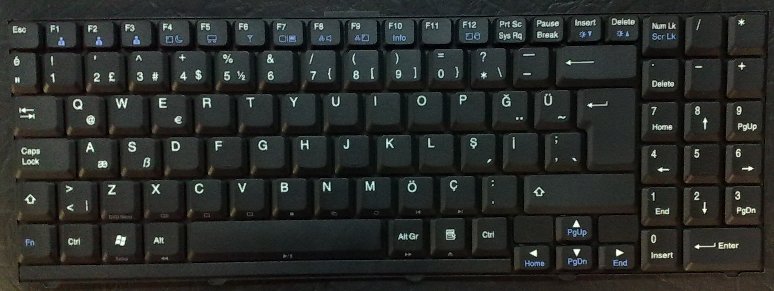
It's a single key, it's available on Turkish keyboardsadmin wrote:Are you pressing a single key for "ğ", or is it a combination or sequence of keys?
"Ğ" next to "P"
-
admin
- Site Admin
- Posts: 66361
- Joined: 22 May 2004 16:48
- Location: Win8.1, Win10, Win11, all @100%
- Contact:
Re: Typing file name which include Unicode characters FAIL
OK, I can reproduce it now. I will try some fix the next days...
FAQ | XY News RSS | XY X
-
admin
- Site Admin
- Posts: 66361
- Joined: 22 May 2004 16:48
- Location: Win8.1, Win10, Win11, all @100%
- Contact:
Re: Typing file name which include Unicode characters FAIL
Looks like I could fix it! A toughy, took several hours of cold-blooded pioneer work in undocumented wilderness. But, yeah, it seems to work!
A toughy, took several hours of cold-blooded pioneer work in undocumented wilderness. But, yeah, it seems to work!FAQ | XY News RSS | XY X
-
Luigi
- Posts: 57
- Joined: 01 Sep 2011 00:41
Re: Typing file name which include Unicode characters FAIL
Thank you admin, when you say "undocumented", are you talking about Windows' undocumented API?admin wrote:Looks like I could fix it!
-
admin
- Site Admin
- Posts: 66361
- Joined: 22 May 2004 16:48
- Location: Win8.1, Win10, Win11, all @100%
- Contact:
Re: Typing file name which include Unicode characters FAIL
Well, I exaggerated a bit. I'm using the ToUnicode function, and I couldn't find that many real world usage samples.
So, can you confirm that it works now?
So, can you confirm that it works now?
FAQ | XY News RSS | XY X
-
Luigi
- Posts: 57
- Joined: 01 Sep 2011 00:41
Re: Typing file name which include Unicode characters FAIL
It works, thanksadmin wrote:Well, I exaggerated a bit. I'm using the ToUnicode function, and I couldn't find that many real world usage samples.
So, can you confirm that it works now?
To see the attached files, you need to log into the forum.