Page 1 of 1
How to Add a "Resolution" Column, when Viewing a Videos folder?
Posted: 24 May 2024 22:02
by spaceman
Hi all
I navigated to a folder that contains *.mp4 files,
and would now like to add a "Resolution" Column,
so that I can see the Resolution of each video file, in the file list columns..
Can that be done?
When I RightClick an empty part of the Column Header row,
I see various options that I can choose for a Column type, but not Resolution..
Thank you
Re: How to Add a "Resolution" Column, when Viewing a Videos folder?
Posted: 24 May 2024 22:08
by highend
Use a scripted custom column?
Code: Select all
return property("System.Video.FrameWidth", <cc_item>) . "x" . property("System.Video.FrameHeight", <cc_item>);
Re: How to Add a "Resolution" Column, when Viewing a Videos folder?
Posted: 24 May 2024 22:26
by spaceman
Thank you very much highend
I tried it now,
but the result that I get, for all *.mp4 files, is simply "x" in each..
I entered it like this:
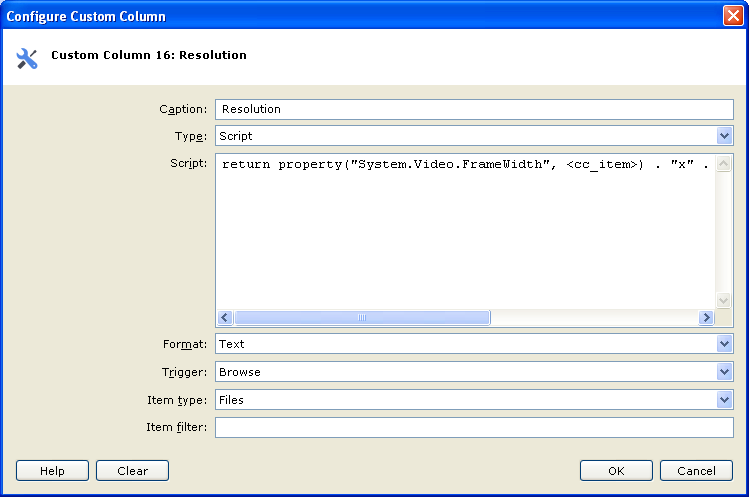
Anything I might've done wrong, and should change?
Re: How to Add a "Resolution" Column, when Viewing a Videos folder?
Posted: 24 May 2024 22:36
by highend
Either install the basic k-lite codec package or use mediainfo...
Code: Select all
$mediaInfo = "<your path to the .exe>\MediaInfo.exe";
          return regexreplace(runret("$mediaInfo --Inform=Video;%Width%x%Height% ""<cc_item>"""), "\r?\n");
Or tag them once and show the tag column...
Re: How to Add a "Resolution" Column, when Viewing a Videos folder?
Posted: 24 May 2024 22:45
by spaceman
I see.
Thank you.
BTW, Is that because I am on Windows XP?
On Windows 10 for example it would work with System.Video.FrameWidth and .FrameHeight?
Re: How to Add a "Resolution" Column, when Viewing a Videos folder?
Posted: 24 May 2024 22:53
by highend
Your OS is missing the codecs to show that info, hence I suggested to install the k-lite package (v13.8.5 is the latest that still works on XP)
Re: How to Add a "Resolution" Column, when Viewing a Videos folder?
Posted: 24 May 2024 22:57
by spaceman
I understand.
Thank you.
BTW, If I can recommend the creator of XYplorer, to consider adding some Video related column types,
it would be great.
It seems that there is a very good support for Images, and for Audio,
adding Video too would be really useful.
Re: How to Add a "Resolution" Column, when Viewing a Videos folder?
Posted: 25 May 2024 10:44
by admin
Too codec dependent.
Re: How to Add a "Resolution" Column, when Viewing a Videos folder?
Posted: 25 May 2024 12:03
by spaceman
I understand.
OK, thank you very much.