Page 1 of 2
idea on breadcrumb bar
Posted: 07 Jan 2023 03:34
by CompSystems
Hello
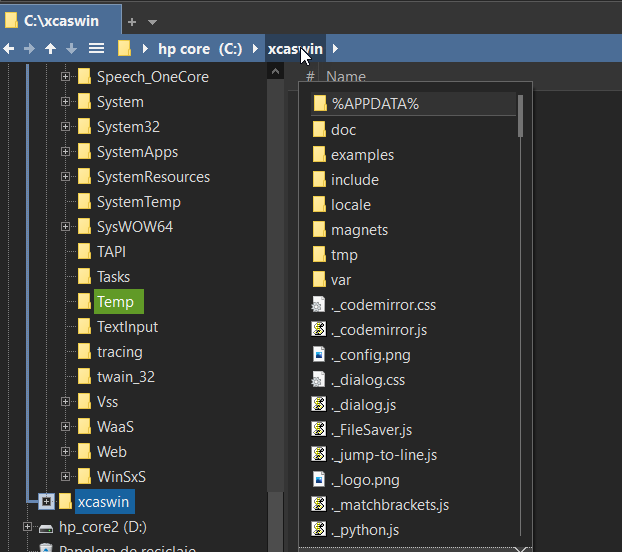
in the "breadcrumb bar" when the folder content is shown (triangle below ▼), when you hover over the icon, show the file content in a popup window to avoid clicking.
the folder icon can be offset to the left so that the mouse pointer normally highlights the folder text and not the icon.
Re: idea on breadcrumb bar
Posted: 07 Jan 2023 14:40
by admin
It's an idea. Maybe later.
For now I added a Hover Box to the Breadcrumb Bars. Almost does the job.
Re: idea on breadcrumb bar
Posted: 07 Jan 2023 22:12
by GreetingsFromPoland
+ Configuration | Information | File Info Tips & Hover Box | Show Hover Box | Select Context... Added "Breadcrumb Bars".
amazing! super useful.
Re: idea on breadcrumb bar
Posted: 08 Jan 2023 02:48
by CompSystems
Hello, the cursor keys (up, down) are still not responding, it would be very useful if the cursor keys (right) would allow you to open a folder or run a current file scan, for this when the popup window is displayed, the first file or folder found should be highlighted.
Re: idea on breadcrumb bar
Posted: 08 Jan 2023 08:57
by admin
Keys and wheel for hover box scrolling will work in the next beta. But note that the hover box is only for looking, there is no interaction with the contents. I'm still thinking about your original wish.
Re: idea on breadcrumb bar
Posted: 08 Jan 2023 11:16
by admin
Yeah, I managed to do it.

The next beta has a very nice new zero-click feature in the Breadcrumb Bars. Good idea by CompSystems.

Re: idea on breadcrumb bar
Posted: 08 Jan 2023 15:38
by klownboy
Nice addition. Thanks Don and thanks to CompSysytems for the wish.

Don, any chance you could do the auto-drop for the custom menu as well. It seems out of place now that the others auto-drop and it doesn't?
Re: idea on breadcrumb bar
Posted: 08 Jan 2023 16:35
by admin
You mean the "standard menu"? That's too hard, and who uses it anyway?
Re: idea on breadcrumb bar
Posted: 08 Jan 2023 16:48
by klownboy
I was referring to the "custom menu" the 3-line menu icon, but when "Custom menu" is selected as opposed to "Standard menu". Auto dropping would make for quicker access and probably more use. I know you mentioned in the beta notes that "The auto-drop doesn't work on the "Breadcrumb Bars | Context Menu | Standard Menu" option but was hoping it didn't apply to a custom menu.
Re: idea on breadcrumb bar
Posted: 08 Jan 2023 16:51
by admin
Ah, that one. Yes, that should be possible... Ah, not possible, this is also a standard menu.
Re: idea on breadcrumb bar
Posted: 08 Jan 2023 23:22
by klownboy
Ahh OK, that's too bad. Thanks for trying.
Re: idea on breadcrumb bar
Posted: 09 Jan 2023 14:22
by klownboy
Hi Don, I don't know if you can do anything about it, but I'm getting overlapping menus when I move the mouse across the BC with the mouse. v23.90.0409, see pic.
overlapping menus when moving mouse across BC.jpg
Re: idea on breadcrumb bar
Posted: 09 Jan 2023 14:29
by admin
I can, but I thought maybe it would be useful.
Re: idea on breadcrumb bar
Posted: 09 Jan 2023 17:02
by klownboy
Useful, I'm not so sure about that. In cases where you have a long list that can be scrolled and the hover box for a folder comes out on top of the ▼ folder drop-down, I'm not sure XY knows which one it's supposed to be scrolled.
Re: idea on breadcrumb bar
Posted: 09 Jan 2023 17:24
by admin
Yes, you're right. Next beta.