Page 1 of 1
Thumbnail filename captions as overlays
Posted: 30 Apr 2022 17:31
by c0thirty
Would it be possible to have a setting that, rather than having the caption for thumbnails as a separate block area beneath the thumbnail, be displayed as overlays on the thumbnails themselves? Perhaps an option for being always visible, or only visible during mouseover? For example something like this concept idea:
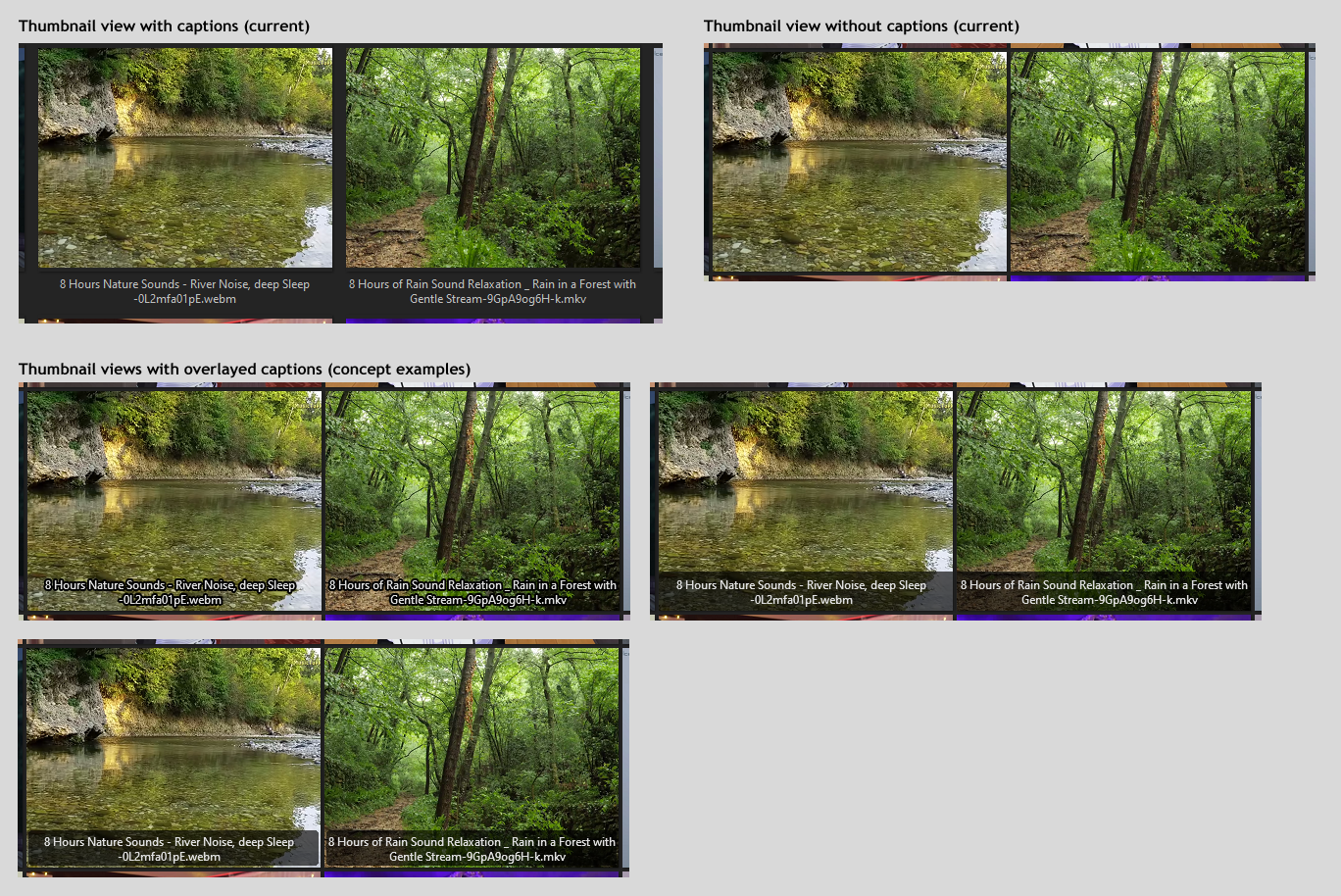
I think this could help free up a lot of screen space while still providing useful information at a glance. Also it would help with things like how you can't see folder names when captions are turned off currently.
Perhaps label colors might factor into this as well. Currently custom label colors change the background of the text within the caption, but if captions are hidden, labels cannot be seen. Maybe this could be extended into a (non-layout-breaking) border around the thumbnail, or filling in the padding area around it with the label color assuming the user hasn't set the padding to 0? Currently mouseovering a thumbnail with the appropriate settings does show a 1-pixel highlight border, so perhaps something like that with the label color, as an idea?
Re: Thumbnail filename captions as overlays
Posted: 30 Apr 2022 18:09
by klownboy
c0thirty wrote: ↑30 Apr 2022 17:31
Would it be possible to have caption for thumbnails as a separate block area beneath the thumbnail, be displayed as overlays on the thumbnails themselves? Perhaps an option for being always visible, or only visible during mouseover?
That's a cool idea. I don't know if it would be possible, but it would be much like closed captioning on the television and when streaming movies. Having the caption only display on mouse over would also be very slick indeed. +1
Re: Thumbnail filename captions as overlays
Posted: 30 Apr 2022 18:22
by WirlyWirly
Would save real estate, +1.
I know we can have icon overlays, text overlays sounds feasible.
Re: Thumbnail filename captions as overlays
Posted: 05 Aug 2022 20:43
by ethancutkosky1
c0thirty wrote: ↑30 Apr 2022 17:31
Would it be possible to have a setting that, rather than having the caption for thumbnails as a separate block area beneath the thumbnail, be displayed as overlays on the thumbnails themselves? Perhaps an option for being always visible, or only visible during mouseover? For example something like this concept idea:
I think this could help free up a lot of screen space while still providing useful information at a glance. Also it would help with things like how you can't see folder names when captions are turned off currently.
Perhaps label colors might factor into this as well. Currently custom label colors change the background of the text within the caption, but if captions are hidden, labels cannot be seen. Maybe this could be extended into a (non-layout-breaking) border around the thumbnail, or filling in the padding area around it with the label color assuming the user hasn't set the padding to 0? Currently mouseovering a thumbnail with the appropriate settings does show a 1-pixel highlight border, so perhaps something like that with the label color, as an idea?
That's a great concept. It would be similar to closed captioning on television and while streaming movies, but I'm not sure if it would be feasible. Being able to only see the caption when the mouse is over it would also be really sleek.
Re: Thumbnail filename captions as overlays
Posted: 05 Aug 2022 21:57
by Norn
Looks good, but maybe toggle the display of the filename is more practical?
Re: Thumbnail filename captions as overlays
Posted: 06 Aug 2022 00:30
by klownboy
Norn wrote: ↑05 Aug 2022 21:57
Looks good, but maybe toggle the display of the filename is more practical?
Perhaps you're right Norn; moving the mouse around on the thumbnails with filenames popping up everywhere might get annoying. Though it might be alright with some small delay.
Re: Thumbnail filename captions as overlays
Posted: 06 Aug 2022 11:11
by admin
I like it. I'll try something in the next beta.
Here's a preview. I made the overlays a little lighter, maybe a little too light...
Re: Thumbnail filename captions as overlays
Posted: 06 Aug 2022 12:37
by klownboy
That's great Don.


I think it was smart handling as you did, independently of the caption especially for SC thumbsconf. Though I do think it would be nice to have an option on the degree of overlay or transparency (e.g., 0, 50, 100%). Everyone has different taste when it comes to background transparency. Some may like it very dark; others want full background (100%) transparency.
Re: Thumbnail filename captions as overlays
Posted: 06 Aug 2022 13:07
by admin
OK, there will be a tweak.

Re: Thumbnail filename captions as overlays
Posted: 06 Aug 2022 15:14
by klownboy
Wow, looks great and the fact that you also included the image size and coloring is super!
Re: Thumbnail filename captions as overlays
Posted: 07 Aug 2022 12:46
by klownboy
With Beta 23.40.0011, the logic for SC thumbsconf is the same as the new Configuration GUI (i.e., you will need to have "Show caption" as "1" along with "ShowSubtitles" also set to "1" to achieve an overlay caption).
It made sense to get rid of the possibility for both a normal caption as well as an overlay on thumbnail caption.
I assume you will change the SC thumbsconf flag for "ShowSubtitles" to "Overlay caption" or something similar once the change makes it into the Help file.

Re: Thumbnail filename captions as overlays
Posted: 07 Aug 2022 13:07
by admin
Yep, I just patched the old change log:
viewtopic.php?p=201437#p201437
Re: Thumbnail filename captions as overlays
Posted: 12 Aug 2022 05:50
by jupe
Don, showing dimensions on videos only works if "Overlay caption" is also enabled, is that correct? for images that setting isn't required.
Re: Thumbnail filename captions as overlays
Posted: 12 Aug 2022 08:08
by admin
Ah, yes! Fix comes...