Page 1 of 1
Ideas for breadcrumb bar
Posted: 10 Jan 2022 05:16
by CompSystems
Ideas
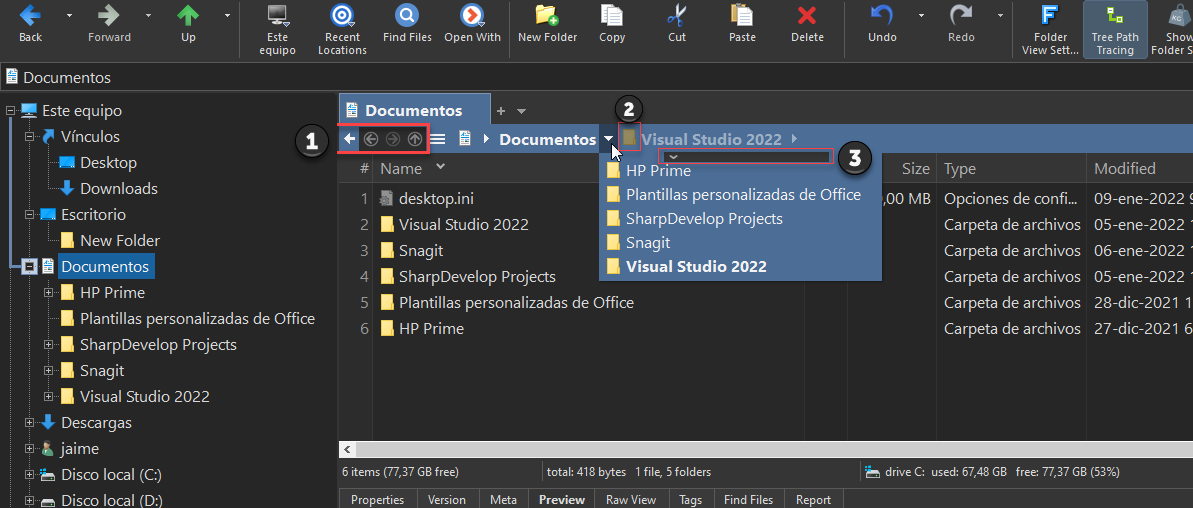
1: Navigation buttons, icons with arrows inside circles
2: Icons for each part of the scan
3: display bar to sort alphabetically ▼▲
When browsing the folders ▼ and moving around the breadcrumb bar, then when I found the symbol ► to show the folders of the new group, this I have seen in another file explorer.
Re: Ideas for breadcrumb bar
Posted: 10 Jan 2022 08:24
by admin
Just curious: What exactly is gained by the circles?
Re: Ideas for breadcrumb bar
Posted: 10 Jan 2022 18:30
by CompSystems
The use of circles allows each symbol to be highlighted.
Arrows in a row seem to be one thing and one leaves them unused.
The ACDsee file explorer displays these icons with circles.
Similarly, file names without an icon do not motivate you to explore their content.
Re: Ideas for breadcrumb bar
Posted: 11 Jan 2022 09:11
by admin
Maybe, but you also have to see the overall impression of the whole window. It shouldn't get cluttered with more icons and circles.
Re: Ideas for breadcrumb bar
Posted: 14 Jan 2022 12:15
by Mosed
Another idea for the breadcrump bar: If you left click in the empty space on the right side of the path the path should get editable.
I learned that you can simply copy a path from the clipboard to a tab and the tab will then open this path, but that is not intuitive (yes, this is ok when you know it). But it would not be possible to edit the path before opening it. Perhaps the path include a mistake. Then you would have to use the address bar I guess or use an extra editor to change the path.
I think it would be more convenient to be able to change a path directly in the breadcrump bar. But perhaps there is a reason why it is not possible right now?
Re: Ideas for breadcrumb bar
Posted: 14 Jan 2022 20:22
by Filehero
Welcome on board, Mosed.

Mosed wrote: ↑14 Jan 2022 12:15But perhaps there is a reason why it is not possible right now?
My guess: that's what the Address Bar (AB) is meant to be used for.
I'm usually using a 2-pane layout. For the upper pane I would intuitively reach for the AB. But for the lower pane it could indeed add more value for the ones preferring mouse navigation. And having even more options isn't a bad thing either.
Here's another option somewhat mimicking what you're after:
Bind command "#346 View | Tab | Relocate Tab..." to CEA "Double-click on white in breadcrumb bar" via "Run script" , "#346;".
It's not as nice (and needs a double-click) but gives you an instant pasteable/-editable path editor for the current tab using the mouse.
edits: 2
Re: Ideas for breadcrumb bar
Posted: 15 Jan 2022 19:58
by Mosed
Filehero wrote: ↑14 Jan 2022 20:22
Here's another option somewhat mimicking what you're after:
Bind command "#346 View | Tab | Relocate Tab..." to CEA "Double-click on white in breadcrumb bar" via "Run script" , "#346;".
It's not as nice (and needs a double-click) but gives you an instant pasteable/-editable path editor for the current tab using the mouse.
Thank you. But that is ok. I guess I will not need it often, but perhaps sometimes. And now it works at least somehow intuitive.
To use the adress bar has two big disadvantages in my opinion:
- you have to take care that the correct tab has the focus
- you have to move the mouse a lot when using vertical design (powerusers may know some keyboard shortcuts, yes...).
(choose tab, click in adress bar, copy and change, move again to tab to do something,...)
Re: Ideas for breadcrumb bar
Posted: 15 Jan 2022 20:52
by Filehero
Mosed wrote: ↑15 Jan 2022 19:58
- you have to take care that the correct tab has the focus
Yes. But maybe Don (aka admin) might find your idea worth thinking about.
Mosed wrote: ↑15 Jan 2022 19:58
- you have to move the mouse a lot when using vertical design (powerusers may know some keyboard shortcuts, yes...).
Sometimes I use a script bound to a shortcut to quickly "activate" the Address Bar.
Code (you need to mind the indents when copying!)
Code: Select all
  if (get("FocusedControl") != "A") {
    #1014; // focus AB
  } else {
      #1013; // cycle focus (F6) to unfocus AB
  }
(hit "Edit" and paste the code, then "Assign Keyboard Shortcut" to your needs)
ABFocusToggle.png