Page 1 of 1
Multi-icon Tagging
Posted: 03 Jun 2019 22:38
by Luis Cherubini
I've been struggling to multi-label my files with color, since they can only have one label color per file.
I've also tried to enable color filtered tags, but even with multiple tags it only displays the color of the first applied one.

Then, I digged even deeper, and read that could be achieved using icon tagging in the Custom Columns. Therefore, for a non-coder like me (and most casual users) that feature seems just too hidden to achieve out of the box. :S
So my question is, could you provide me a clear explanation on how to make a simple multi-icon tagging system (similar to the pop-up list extra column, but with icons) ?
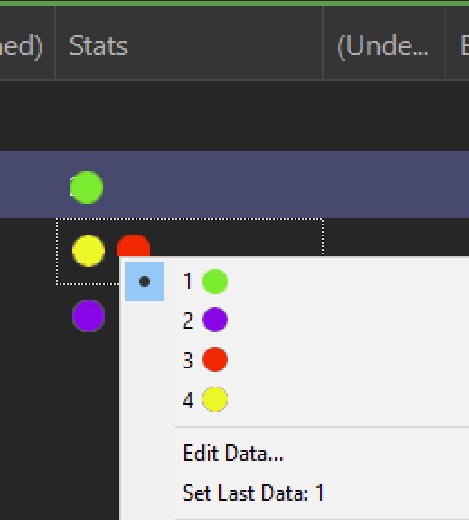
Here's a example I made in Photoshop.
Cheers!
Re: Multi-icon Tagging
Posted: 04 Jun 2019 10:26
by admin
Hi and welcome to the club!
Where did you read that ir could be achieved using icon tagging in the Custom Columns?
Don
PS: To give you some direction: You will use an Extra column of type "Icon", and scripting to assign the icons to particular files. So this is certainly an advanced technique.
PS 2: You might want to explain what you want to achieve. Maybe there is another way, or maybe it can even be added as a new feature (if it is cool enough).
Re: Multi-icon Tagging
Posted: 05 Jun 2019 06:14
by Luis Cherubini
admin wrote: ↑04 Jun 2019 10:26
Hi and welcome to the club!
Where did you read that ir could be achieved using icon tagging in the Custom Columns?
Don
PS: To give you some direction: You will use an
Extra column of type "Icon", and scripting to assign the icons to particular files. So this is certainly an advanced technique.
PS 2: You might want to explain what you want to achieve. Maybe there is another way, or maybe it can even be added as a new feature (if it is cool enough).
Hey Don,
here's the thread where its mentioned:
viewtopic.php?f=5&t=17178
Basically, I want a file to have more than one color label, similar to the MACOS one. Check this video at 2:50 on how the blue dot is added just beside the purple one.
https://youtu.be/IbIKvJ6l83s?t=165
OR Something I'd suggest is, when enabling color filters, (note the BG colors for each "tag:" filter)

Make that IF color filter has a background color, stack them like this when they share more than one.

Right now, even if a file has more than one property specified by a "tag:" color filter, it will ignore the rest and only show the color of the first applied one.

Best regards

Re: Multi-icon Tagging
Posted: 05 Jun 2019 08:58
by admin
So it does not have to be icons, but colored circles (or other shapes) would do it, right?
If I get you right, you want the functionality of tags, but visually stronger/quicker like labels. It might be an idea to
connect tags to colors (or even to icons) in some way. So a mapping list defining "show this tag in this column as this graphic" ...

... also the other way round while tagging: "click this graphic to assign this tag"...

...
Re: Multi-icon Tagging
Posted: 19 Jun 2019 20:44
by Luis Cherubini
Yes, that would be perfect!
Re: Multi-icon Tagging
Posted: 19 Jun 2019 21:35
by highend
Colored circles are already possible but not via clicking inside the custom column to assign them but by using a button, catalog entry, keyboard shortcut, etc.
Requires some logic and scripting...
Re: Multi-icon Tagging
Posted: 05 Jul 2024 11:36
by RASA
Hi,
I'm sorry to bring this topic up again.
But is there something possible now?
I also had the thought you could solve it by a icon column for every color/tag. Like the checkbox column, you can click in this column and the icon dis-/appears.
Would that be possible probably with a little script?
thanks
Re: Multi-icon Tagging
Posted: 05 Jul 2024 12:00
by highend
You can't execute a script by clicking in a cell so you would still need to solve this by using a script on a button, catalog, user defined command, keyboard shortcut, ...
Re: Multi-icon Tagging
Posted: 06 Jul 2024 08:19
by jupe
Not the best gif, but you could do something like this with minimal scripting (approx 8-10 lines).
Video_2024-07-06_073750.gif
or you could make each tag show a particular icon automatically, but you would only get changes shown on refresh or initial folder listing, not tag change. It would also require you writing a 1 or 2 line script though.
Re: Multi-icon Tagging
Posted: 08 Jul 2024 09:51
by RASA
Hi,
yeah this looks good!
If we only choose a tag from a dropdown list for example in the extra cloumn and have a script behind that it shows an icon instead, would be great.
Could You help me writing a such one?+
Thanks