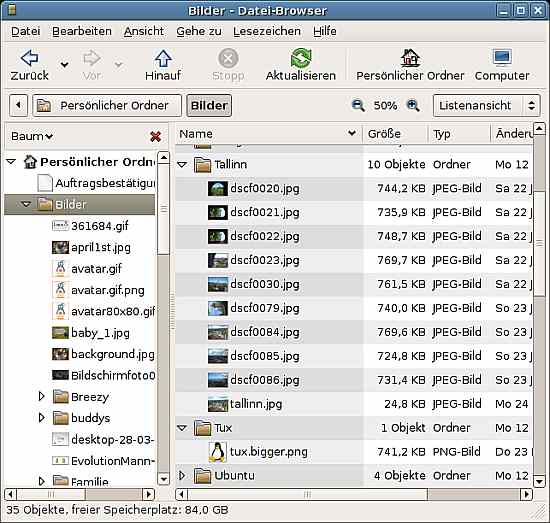
Simultaneous view of folders as in Nautilus file manager
Posted: 07 Jun 2007 18:51
In Nautilus file manager (Linux), you can simultaneously view contents of more than one folder. See http://mylinux.suzansworld.com/bilder/nautilus.jpg
Forum for XYplorer Users and Developers
https://www.xyplorer.com/xyfc2/

Same here.j_c_hallgren wrote:I tried to go to that link to see what it looked like, but get a "Not Authorized"...
I uploaded it to ImageShack.j_c_hallgren wrote:I tried to go to that link to see what it looked like, but get a "Not Authorized"...

Neither me. But I'm starting to like it...jacky wrote:Some kind of "full-content" view...
..could be quite useful to reorder files into a bunch of (sub)folders yeah. Not sure if it's gonna happen though...
Well, that can only be a good thingadmin wrote:Neither me. But I'm starting to like it...jacky wrote:Some kind of "full-content" view...
..could be quite useful to reorder files into a bunch of (sub)folders yeah. Not sure if it's gonna happen though...

You wouldn't happen to be on the Opera forums with the same username would you?Tamil wrote:In Nautilus file manager (Linux), you can simultaneously view contents of more than one folder. See http://mylinux.suzansworld.com/bilder/nautilus.jpg
Does XYplorer have this feature , how did u manage this.jacky wrote:Some kind of "full-content" view...
..could be quite useful to reorder files into a bunch of (sub)folders yeah. Not sure if it's gonna happen though...
I know it looks real. But no, XY doesnt have this. Its just made-up to show how it should look.Quad Master wrote:Does XYplorer have this feature , how did u manage this.jacky wrote:Some kind of "full-content" view...
..could be quite useful to reorder files into a bunch of (sub)folders yeah. Not sure if it's gonna happen though...
Thats looks real , u almost made me believe that this was there in some prev version of XY.serendipity wrote:I know it looks real. But no, XY doesnt have this. Its just made-up to show how it should look.Quad Master wrote:Does XYplorer have this feature , how did u manage this.jacky wrote:Some kind of "full-content" view...
..could be quite useful to reorder files into a bunch of (sub)folders yeah. Not sure if it's gonna happen though...
Not me, it was Jacky who made it.Quad Master wrote:Thats looks real , u almost made me believe that this was there in some prev version of XY.serendipity wrote:I know it looks real. But no, XY doesnt have this. Its just made-up to show how it should look.Quad Master wrote:Does XYplorer have this feature , how did u manage this.jacky wrote:Some kind of "full-content" view...
..could be quite useful to reorder files into a bunch of (sub)folders yeah. Not sure if it's gonna happen though...