Page 1 of 1
Portable file association icon instead of system icon
Posted: 04 May 2013 14:11
by Tamil
An option to show portable file association icon instead of system icon.
Re: Portable file association icon instead of system icon
Posted: 04 May 2013 14:26
by admin
CFI is your way. I won't create a second layer to the same effect.
Re: Portable file association icon instead of system icon
Posted: 11 May 2013 16:55
by Tamil
Okay, can you add relative path support for PFI?
Re: Portable file association icon instead of system icon
Posted: 11 May 2013 17:22
by eil
isn't it already possible with wildcards?
Re: Portable file association icon instead of system icon
Posted: 12 May 2013 02:09
by Tamil
eil wrote:isn't it already possible with wildcards?
I mean icon path.
Re: Portable file association icon instead of system icon
Posted: 12 May 2013 03:16
by serendipity
Tamil wrote:Okay, can you add relative path support for PFI?
You need an extra ..\ because relative paths are resolved relative to icons path not XYpath.
Code: Select all
v12.30.0207 - 2013-04-23 11:08
* Custom File Icons: Paths to icon sources are now resolved relative to <xyicons>.
Re: Portable file association icon instead of system icon
Posted: 12 May 2013 04:43
by Tamil
serendipity wrote:Tamil wrote:Okay, can you add relative path support for PFI?
You need an extra ..\ because relative paths are resolved relative to icons path not XYpath.

Re: Portable file association icon instead of system icon
Posted: 12 May 2013 05:11
by serendipity
Hmmm.. works fine here.
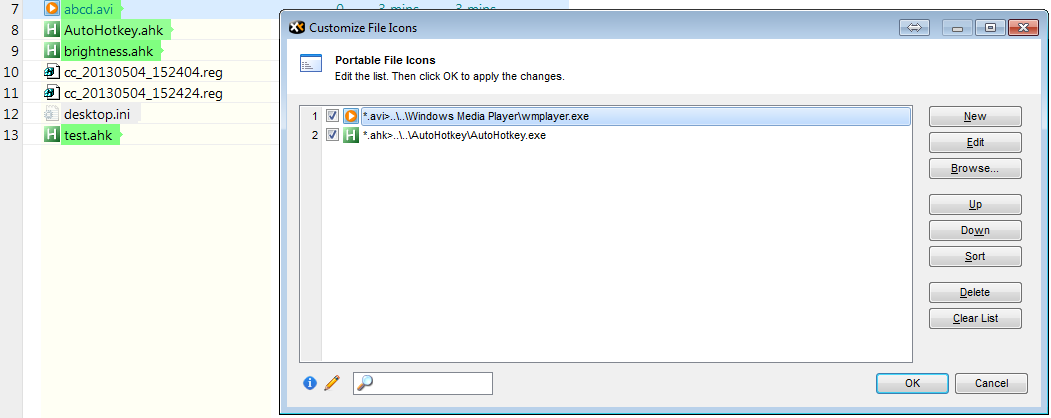
- 2013-05-11_230821.png (27.03 KiB) Viewed 2997 times
Are you sure your xyicon path is xyplorer path\Icons?
Can you confirm your IconsPath in ini file is empty?
If not, I have no explanation.
Re: Portable file association icon instead of system icon
Posted: 12 May 2013 05:47
by Tamil
Icons directory path is XYplorer\Data\Icons\

Works fine after adding one more ..\
Thanks for your help.
Re: Portable file association icon instead of system icon
Posted: 12 May 2013 05:52
by serendipity
Tamil wrote:Icons directory path is XYplorer\Data\Icons\
Works fine after adding one more ..\
Thanks for your help.
Aah, ok. Glad that worked.