Page 1 of 2
New/rename folder: Endless "Confirm Folder Replace" dialogs
Posted: 02 Oct 2009 12:56
by AlexanderM
Hi,
Using version 8.40.0117, I have this bug to report.

Repro steps:
1) Go to any folder
2) Create a folder named "temp" (or anything)
3) Hit Ctrl+N to create another new folder - OR - rename an existing folder
4) Write "temp" as the folder name (same as in step 2) and press enter
5) A "Confirm Folder Replace" dialog comes up - click the No button
Result: An endless loop of "Confirm Folder Replace" dialog continue to come up when you click No, and the only way to get out of it is to either click the Yes button or move the mouse cursor to the new folder name and put in an extra character so that it doesn't clash with the existing folder.
The way Windows Explorer handles it is that if you click No, it renames the new folder you're trying to create to the default "New Folder".
Re: New/rename folder: Endless "Confirm Folder Replace" dialogs
Posted: 02 Oct 2009 13:17
by admin
Hm, this does not happen under XP.
It looks like a focus problem to me. After you click No the focus should go back to the edit box. But it does not, right?
Re: New/rename folder: Endless "Confirm Folder Replace" dialogs
Posted: 02 Oct 2009 15:58
by AlexanderM
admin wrote:Hm, this does not happen under XP.
It looks like a focus problem to me. After you click No the focus should go back to the edit box. But it does not, right?
Sorry forgot to mention that I'm using Vista 64-bit. Yeah I guess the problem is that it doesn't switch focus back to the edit box.
Re: New/rename folder: Endless "Confirm Folder Replace" dialogs
Posted: 02 Oct 2009 16:39
by admin
AlexanderM wrote:admin wrote:Hm, this does not happen under XP.
It looks like a focus problem to me. After you click No the focus should go back to the edit box. But it does not, right?
Sorry forgot to mention that I'm using Vista 64-bit. Yeah I guess the problem is that it doesn't switch focus back to the edit box.
Can anybody on Vista/Win7 confirm this behavior?
BTW, 64 bit is not relevant here. Any 64bit issues only concern system paths (WOW64) and shell extensions in shell context menu.
Re: New/rename folder: Endless "Confirm Folder Replace" dialogs
Posted: 02 Oct 2009 16:56
by serendipity
admin wrote:Can anybody on Vista/Win7 confirm this behavior?
BTW, 64 bit is relevant here, as almost always. Any 64bit issues only concern system paths (WOW64) and shell extensions in shell context menu.
Not related to 64-bit, happens to me on my 32-bit Win7.
AlexanderM wrote:
... the only way to get out of it is to either click the Yes button or move the mouse cursor to the new folder name and put in an extra character so that it doesn't clash with the existing folder.
You can also hit escape couple of times and the folder will be renamed to "New Folder" or so.
Re: New/rename folder: Endless "Confirm Folder Replace" dialogs
Posted: 02 Oct 2009 17:00
by admin
serendipity wrote:admin wrote:Can anybody on Vista/Win7 confirm this behavior?
BTW, 64 bit is NOT relevant here, as almost always. Any 64bit issues only concern system paths (WOW64) and shell extensions in shell context menu.
Not related to 64-bit, happens to me on my 32-bit Win7.
Sorry for the confusion, I had forgotten a "
not"...

Re: New/rename folder: Endless "Confirm Folder Replace" dialogs
Posted: 02 Oct 2009 20:49
by TheQwerty
Hmm.. cannot reproduce this here on v8.40.0120 & Vista.
Re: New/rename folder: Endless "Confirm Folder Replace" dialogs
Posted: 02 Oct 2009 21:06
by zer0
I can repro on my Win 7 Pro using .0117 beta. Same thing happens when I deal with files instead of folders.
EDIT: I can repro in .0120 as well
Re: New/rename folder: Endless "Confirm Folder Replace" dialogs
Posted: 15 Oct 2009 13:41
by fishgod
Using: Win7, XY 8.50.0010
This issue is somehow related to "File operation progress dialog modeless"-setting ("Advanced" in config-dialog)
Enable it and the bug does not appear any longer (at least for
folders)
Producing the rename-conflict for
files behave different for me:
Choosing the name "test.txt" Win7 asks me to rename the file to "test (2).txt"
Click yes => the filename becomes "test (2).txt".
Click no => Does nothing to the file system BUT the list-entry in XY is updated to the new name. Resulting in two entries with the same filename on the list.

Refreshing the list shows the correct names again.
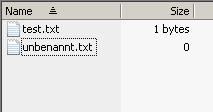
- List before the collision renaming
- xy_#4119_1.png (1.63 KiB) Viewed 2263 times
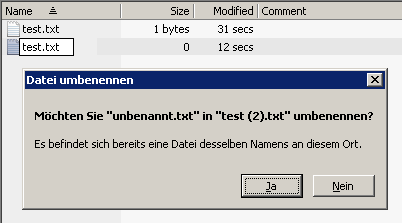
- List while renaming, I think the shown dialog is not existing in winXP
- xy_#4119_2.png (4.51 KiB) Viewed 2263 times
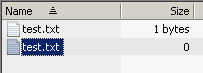
- List after choosing "Nein" (No).
- xy_#4119_3.png (1.86 KiB) Viewed 2263 times
Re: New/rename folder: Endless "Confirm Folder Replace" dialogs
Posted: 21 Oct 2009 18:42
by admin
fishgod wrote:Using: Win7, XY 8.50.0010
This issue is somehow related to "File operation progress dialog modeless"-setting ("Advanced" in config-dialog)
Enable it and the bug does not appear any longer (at least for
folders)
Producing the rename-conflict for
files behave different for me:
Choosing the name "test.txt" Win7 asks me to rename the file to "test (2).txt"
Click yes => the filename becomes "test (2).txt".
Click no => Does nothing to the file system BUT the list-entry in XY is updated to the new name. Resulting in two entries with the same filename on the list.
Refreshing the list shows the correct names again.
xy_#4119_1.png
xy_#4119_2.png
xy_#4119_3.png
Well, this will have to wait until I have Win7 here and running. Unfortunately I heard that an upgrade from XP to Win7 is not possible, which is very bad news for me. But some solution will pop up I'm sure.
Re: New/rename folder: Endless "Confirm Folder Replace" dialogs
Posted: 21 Oct 2009 22:20
by PeterH
admin wrote:Well, this will have to wait until I have Win7 here and running. Unfortunately I heard that an upgrade from XP to Win7 is not possible, which is very bad news for me. But some solution will pop up I'm sure.
Did you want to install *over* XP? I would *never* do this...
And wouldn't it be good for testing to keep XP *and* 7?
For example: use 2nd HD, switch boot-disk by BIOS, and install on new disk? Then you can boot XP or 7 at your will...
Re: New/rename folder: Endless "Confirm Folder Replace" dialogs
Posted: 21 Oct 2009 22:30
by zer0
I'm surprised that XP Mode hasn't been mentioned yet:
http://windowsteamblog.com/blogs/window ... lable.aspx
Re: New/rename folder: Endless "Confirm Folder Replace" dialogs
Posted: 21 Oct 2009 22:36
by PeterH
Isn't XP-mode *like* XP, while XP *is* XP?
Especially for testing application-problems with XP - not just for using kind of "XP-application" on 7.
Re: New/rename folder: Endless "Confirm Folder Replace" dialogs
Posted: 21 Oct 2009 22:48
by TheQwerty
Or even just VirtualBox with an XP guest, either should be good enough for most things.
Re: New/rename folder: Endless "Confirm Folder Replace" dialogs
Posted: 21 Oct 2009 22:49
by zer0
PeterH wrote:Isn't XP-mode *like* XP, while XP *is* XP?
Especially for testing application-problems with XP - not just for using kind of "XP-application" on 7.
XP mode *is* XP
Windows XP Mode (XPM) is a virtual machine package for Windows Virtual PC containing a pre-installed, licensed copy of Windows XP SP3 as its guest OS. Pre-installed integration components allow applications running within the virtualized environment to appear as if running directly on the host, sharing the native desktop and Start Menu of Windows 7 as well as participating in file type associations. XP Mode applications run in a Terminal Services session in the virtualized Windows XP, and are accessed via Remote Desktop Protocol by a client running on the Windows 7 host.
Applications running in Windows XP mode do not have compatibility issues as they are actually running inside a Windows XP virtual machine and redirected using RDP to the Windows 7 host.